---
title: "HubSpot Marketing Automation: Complete Guide & Setup Tips 2026"
description: Learn how HubSpot marketing automation streamlines workflows, lead nurturing, email sequences, and everyday tasks with HuboExperts, a HubSpot Gold Partner
image: https://www.huboexperts.com/hubfs/best%20(1).png
---
[](https://www.huboexperts.com)
- [Home](https://www.huboexperts.com)
- Solutions
#### Revenue Operations
##### [ Revenue Assessment](https://www.huboexperts.com/solutions/revenue-assessment)
##### [ CRM Strategy](https://www.huboexperts.com/solutions/crm-strategy)
##### [ Revenue Intelligence](https://www.huboexperts.com/solutions/revenue-intelligence)
##### [ Executive Dashboards](https://www.huboexperts.com/solutions/executive-dashboards)
##### [ HubSpot Cost Calculator](https://www.huboexperts.com/hubspot-cost-calculator)
#### HubSpot
##### [ CRM Implementation](https://www.huboexperts.com/solutions/crm-implementation)
##### [ Marketing Hub](https://www.huboexperts.com/solutions/marketing-hub)
##### [ Sales Hub](https://www.huboexperts.com/solutions/sales-hub)
##### [ Service Hub](https://www.huboexperts.com/solutions/service-hub)
##### [ Operations Hub](https://www.huboexperts.com/solutions/operations-hub)
##### [ Content Hub](https://www.huboexperts.com/solutions/content-hub)
##### [ HubSpot Audit App](https://www.huboexperts.com/hubspot-audit-app-huboexperts)
#### Solutions
##### [ Become A Partner](https://partner.hellohuboexperts.com/)
##### [ Hubspot Migration](https://www.huboexperts.com/salesforce-to-hubspot)
- [Case Studies](https://www.huboexperts.com/huboexperts-case-studies)
- [About Us](https://www.huboexperts.com/about-us)
- [Resources](https://www.huboexperts.com/blog)
- [Book a Consultation](https://meetings-na2.hubspot.com/div6)
[Book a Consultation](https://meetings-na2.hubspot.com/div6)
### Table of contents
Show Table of Contents
# HubSpot Marketing Automation: Complete Guide & Setup Tips 2026

By [Div](https://www.huboexperts.com/blog/author/div) • October 25, 2024
Introduction
Let me introduce you to[**HubSpot Marketing Automation**](https://www.huboexperts.com/blog/hubspot-partner-agency), an efficient solution that can improve customer interaction, automate marketing processes, and eventually increase sales. In this article, we'll look at how HubSpot marketing automation features may help businesses of all sizes operate more efficiently. In today's fast-paced digital market, businesses must not only reach their target audience, but also properly engage and nurture those leads.
## How HubSpot Marketing Automation Works: The Basics
HubSpot marketing automation is built around one core concept- workflows. A workflow is a series of automated actions triggered by a specific condition. When a contact meets a trigger (fills a form, visits a page, opens an email, reaches a lifecycle stage), HubSpot executes a pre-defined sequence of actions automatically- without anyone on your team needing to do anything.
Here's a simple example of how it works in practice:
Example Workflow: New Lead from Website
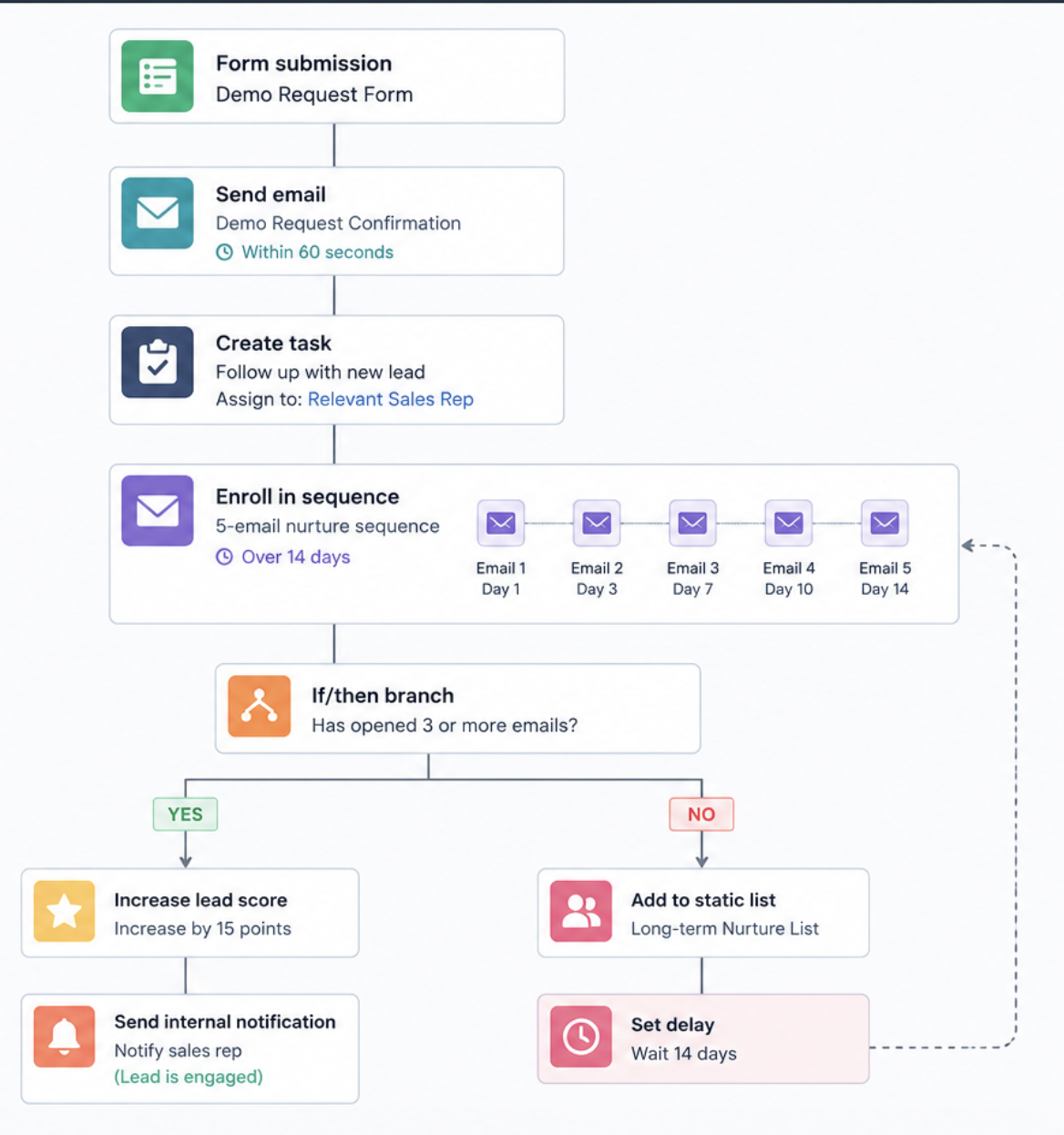1. Contact fills out a demo request form on your website:
2\. HubSpot automatically sends a confirmation email within 60 seconds
3\. A task is created and assigned to the relevant sales rep
4\. Contact is enrolled in a 5-email nurture sequence over 14 days
5\. If the contact opens 3+ emails, their lead score increases and the sales rep is notified
6\. If no response after 14 days, contact is moved to a long-term nurture list
This entire sequence runs automatically — 24/7, for every lead, without any manual work.
## What Our Clients Say About Working With HuboExperts
Successful HubSpot automation starts with understanding how a business actually works before building workflows around it. That means listening to requirements, adapting the implementation where needed, and ensuring the HubSpot setup aligns with the client's expectations.
One of our HubSpot onboarding clients highlighted this approach in their **5/5 review**:
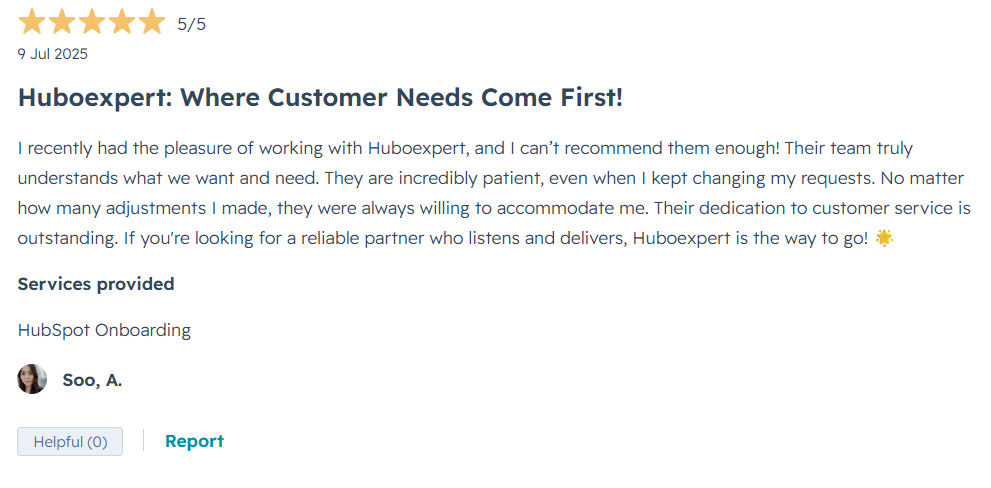
**Service provided:** HubSpot Onboarding
**Rating:** ⭐⭐⭐⭐⭐ 5/5
For us, this is an important part of HubSpot implementation: technology and automation need to be built around the business—not the other way around.
**Need help with your HubSpot setup or automation?**
**[Talk to a HubSpot Expert →](https://meetings-na2.hubspot.com/div6)**
## **How Automated Workflows Power Loop Marketing Strategies**
So, what happens when you start applying automated workflows to a marketing strategy like Loop Marketing? Let’s break it down. Loop Marketing typically follows a recurring process with four primary stages, and automation can streamline each one seamlessly:
- **Brand Expression:**
Want every new subscriber to be greeted with a consistent brand message? With automation, welcome emails deploy instantly, keeping messaging on-brand without you lifting a finger.
- **Personalization at Scale:** Instead of blasting generic content, automated workflows can sort your audience into different lists and trigger specific emails or offers based on their behavior—clicks, page views, or previous engagement.
- **Omnichannel Amplification:** Need to sync up your email sends, ad campaigns, and landing page updates? Automation coordinates these actions, pushing your content live across channels at just the right time.
- **Continuous Improvement:**
Automated tools track engagement, run A/B tests, and highlight what’s working best. This means your campaigns evolve based on real-world results, not just gut instinct.
By automating these marketing motions, businesses can keep their messaging consistent, respond to leads faster, and scale up successful strategies—without stretching their teams thin.
## What is HubSpot Marketing Automation?
HubSpot Marketing Automation" refers to the set of features and resources inside the HubSpot platform that let marketers automate repetitive tasks, personalize customer experiences, and manage campaigns more effectively. A variety of functions, including lead nurturing, social media posting, email marketing, and performance analytics, are included in this automation with the goal of increasing the efficacy of marketing campaigns.
### **The Advantages of Marketing Automation with Hubspot**
1. **Time Efficiency:** One of the most obvious benefits of using HubSpot Marketing Automation is that it can save a significant amount of time on repetitive tasks. Marketers sometimes get bogged down in routine duties like putting connections in groups, distributing information on social media, and sorting communications. Customers may use HubSpot to automate these tasks, saving up time for more important initiatives like campaign
**Improved Lead Management:** HubSpot's automation technologies enable businesses to manage leads more effectively. Through the use of tools like lead scoring and nurturing processes, marketers can score prospects based on the level of interaction and modify their messaging accordingly. One way to increase the efficiency of the sales process is to target specific leads, as this increases the likelihood that they will become customers.
2. **Customization at Scale**: Tailored content is essential for successful marketing, but producing it one lead at a time can be time-consuming. Marketers can utilize HubSpot to create dynamic content that adapts to the interests, behavior, and demographics of users. This degree of customization improves the user experience and increases conversion rates since the prospect feels more connected to the brand.
**3. Data-Driven Decisions**: HubSpot users have access to an abundance of data and analytics tools that shed light on campaign performance and consumer behavior. With the use of this data, marketers may choose strategies and allocate resources intelligently. Through consistent strategy adjustments based on the study of critical data such as open rates, click-through rates, and conversion rates, businesses may enhance their hubspot marketing efforts over time.
3. **Improved Collaboration**: HubSpot marketing automations integrated platform makes it easier for team members to collaborate. Because customer service, sales, and marketing teams have access to the same data and insights, they might work together more successfully. When everyone works together, goals and strategies are communicated clearly, which enhances
**.png?width=1200&height=628&name=best%20(1).png)**
### **Essential Elements of HubSpot's Marketing Automation**
1. **Email Marketing Automation:** Customers may create automated email campaigns that engage leads at various stages of the buyer's journey by using HubSpot's email marketing capabilities. Using tools like behavioral triggers, A/B testing, and customized subject lines, marketers can target the right audience with relevant material at the right moment.
2. **Lead Nurturing Workflows**: HubSpot's lead nurturing procedures simplify the process of guiding prospective clients through the sales funnel. Marketers have access to workflows that can initiate follow-up actions in response to specific user interactions, assign tasks to sales representatives, or send targeted emails. By guaranteeing that leads receive relevant information promptly, this increases the possibility of conversion.
3. **Social Media Management**: HubSpot's social media features enable marketers to schedule content, monitor conversations, and assess outcomes across a variety of platforms. Automation technologies enable bulk scheduling of posts, which simplifies the process of maintaining a consistent social media presence without requiring hours of manual update work.
4. **Landing Pages and Forms**: Creating forms and landing pages that turn visitors into leads is crucial. You don't need to be very technical to develop and share landing pages with the aid of HubSpot. In order to automatically collect crucial lead data, forms can also be customized and integrated into landing pages.
5. **Analytics and Reporting:** HubSpot offers robust analytics and reporting options that enable marketers to track campaign outcomes in real time. Notable metrics like cost of acquisition, conversion rates, and traffic sources can be incorporated into customized dashboards that users can create. Marketers are able to promptly modify their plans by utilizing this data-driven approach.
1. Additionally, marketing automation software captures comprehensive campaign metrics that help businesses measure ROI, attribute revenue, and optimize their marketing efforts. By leveraging these insights, teams can easily identify what’s working (and what isn’t), ensuring resources are allocated efficiently and future campaigns deliver stronger results.
### **How AI Elevates Marketing Automation**
Artificial intelligence has fundamentally transformed what's possible with marketing automation software. AI-driven features take routine marketing tasks and add a layer of intelligence that sharpens targeting, boosts personalization, and frees up valuable time for your team.
**1. Smarter Workflows and Personalization:** Instead of relying solely on static rules, AI algorithms analyze behaviors, preferences, and interactions across channels. This enables marketers to set up workflows that can adapt in real time—think of content recommendations powered by solutions like Adobe Sensei or IBM Watson, which adjust messages based on what an individual has clicked, downloaded, or shared. The result? Prospects receive communications that feel tailored to their interests and stage in the buyer’s journey.
**2. Improved Lead Scoring and Segmentation:** Gone are the days of manual lead qualifying. AI-enhanced systems score leads automatically by evaluating their digital body language—website visits, email engagement, and social interactions—and flagging those most likely to convert. Platforms such as Salesforce Einstein use machine learning to identify high-value prospects and segment lists dynamically, increasing both conversion rates and marketing efficiency.
1. **3. Automated Customer Journeys:** By leveraging predictive analytics, marketing automation tools can guide leads through custom journeys. For example, AI-based chatbots can interact with visitors on your site, answer common questions, and even book meetings, all while learning to improve their responses over time. As engagement changes, the system can branch workflows and adjust messaging in response.
**4. Data-Driven Optimization:** Marketing automation platforms gather a wealth of data from every campaign. With AI-powered analytics, this information isn’t just stored—it’s analyzed for patterns that reveal what’s working (or not). Marketers can instantly see which subject lines drive more opens or which content leads to conversions, allowing strategy tweaks that maximize ROI.
Ultimately, by combining automation with AI, businesses can streamline complex marketing activities, deliver hyper-relevant messages, and concentrate on strategy and creativity—the kind of high-value work that software just can't replicate on its own.
#### **HubSpot Marketing Automation Features: What Each Plan Includes**
One of the most common questions we get is: "Which HubSpot plan do I need for marketing automation?" Here's the honest breakdown:
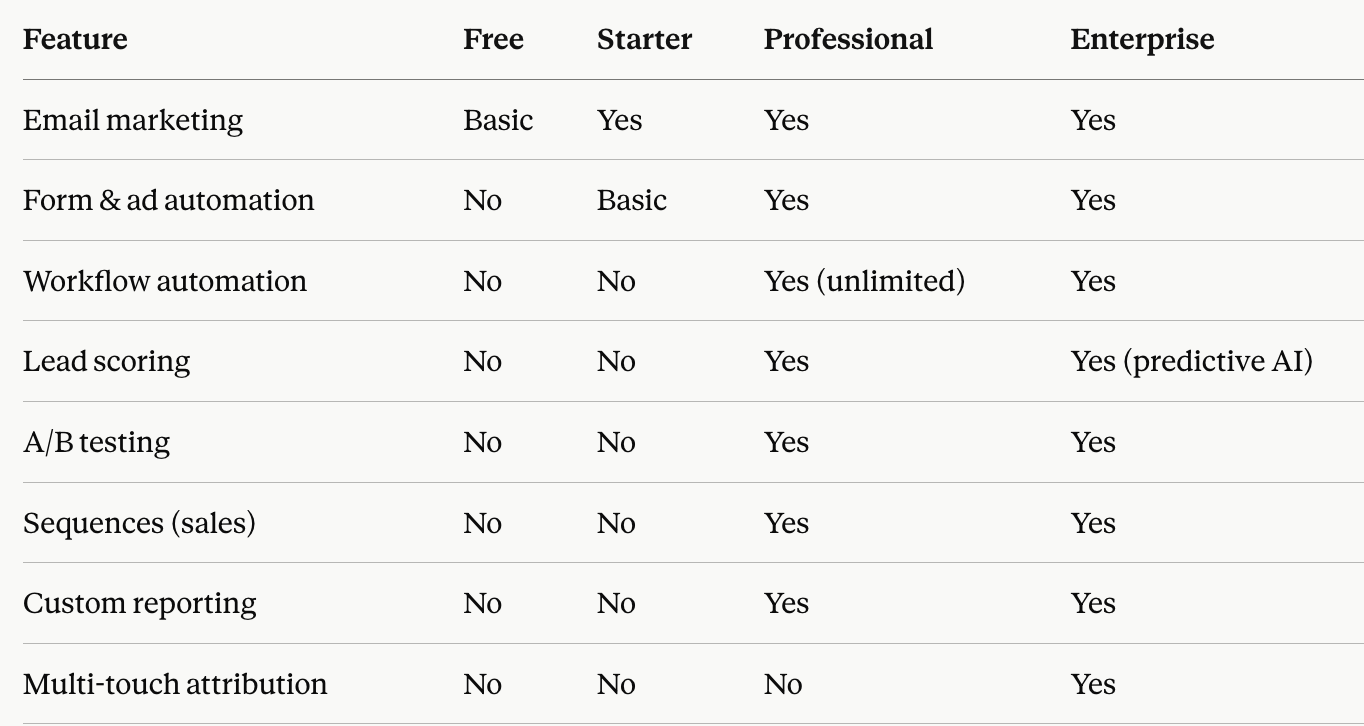
The key takeaway: **You need HubSpot Professional** (from $800/month) to unlock the full power of marketing automation including workflows, [lead scoring](https://www.huboexperts.com/blog/mastering-lead-scoring-with-automation), and A/B testing.
For businesses not ready for Professional, HubSpot Starter still offers basic email automation and list segmentation- which is a solid starting point.
### Applying Marketing Automation with HubSpot
- **Set Your Objectives**: Prior to introducing automation, it's imperative that you determine your marketing goals. Which goals are you attempting to achieve—more leads, higher revenue, or better customer retention? Establishing clear objectives might assist you in determining the success of your automation plan.
- **Divide the Viewer Base**: Marketing automation cannot function effectively until your audience is understood. HubSpot includes segmentation features that let you arrange your contacts based on characteristics like demographics, behavior, and past purchases. This division facilitates more targeted and relevant communication.
- **Develop Captivating Content**: Content is the foundation of all marketing strategies. Excellent, perceptive material that addresses the issues and passions of your readers should be produced. The content management system (CMS) from HubSpot can help you organize and distribute this content efficiently.
- **Create Automated Workflows:** After your audience segmentation and content are ready, it's time to create automated workflows. Create unique lead nurturing campaigns by utilizing HubSpot's workflow builder. Consider including action-based triggers depending on user activity, like downloading a document or attending a webinar.
- **Keep an eye on and improve**: Once your plan for marketing automation has been implemented, closely monitor key performance metrics. Analyze HubSpot data to identify areas in need of development. Which emails are generating more revenue than the rest? Are leads exiting the funnel at a specific moment? Make informed decisions and use this knowledge to improve your marketing.
#### **HubSpot Marketing Automation Workflows You Should Set Up First"**
Most businesses set up HubSpot and don't know where to start with automation. Here are the 5 most impactful workflows to build first:
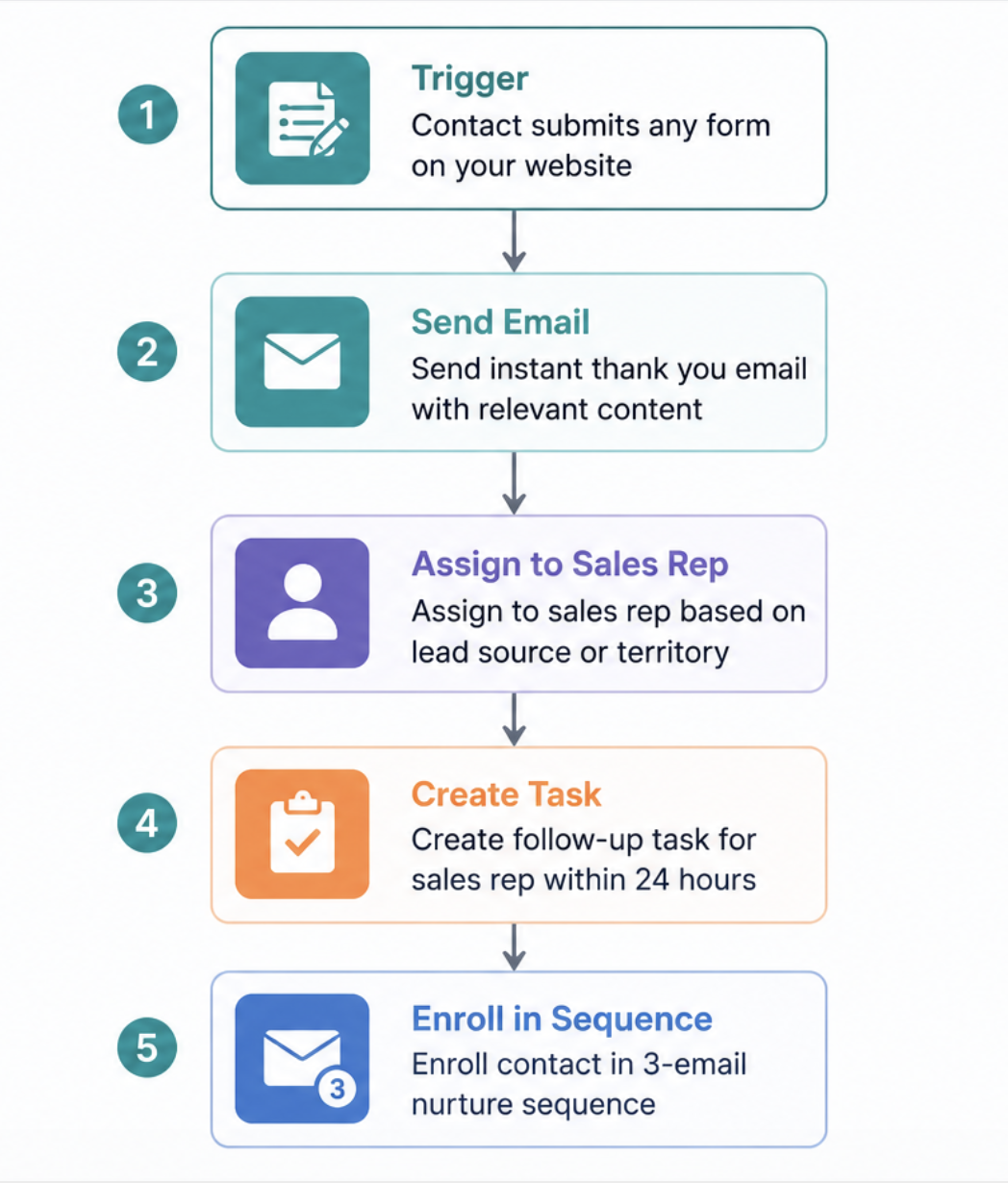
**Workflow 1 — New Lead Welcome Sequence** Trigger: Contact submits any form on your website Actions:
- Send instant thank you email with relevant content
- Assign to sales rep based on lead source or territory
- Create follow-up task for sales rep within 24 hours
- Enrol contact in 3-email nurture sequence
#### 
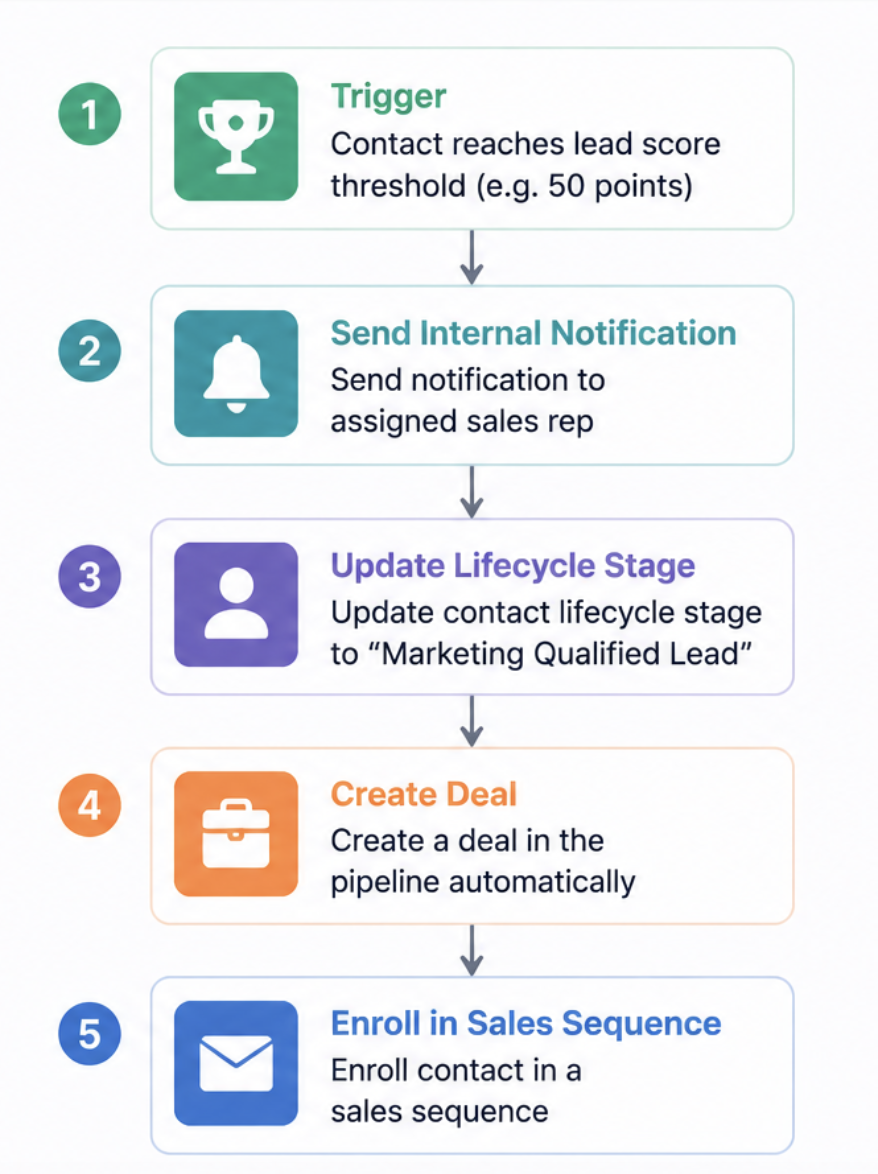
**Workflow 2 — Lead Scoring & Sales Handoff** Trigger: Contact reaches lead score threshold (e.g. 50 points) Actions:
- Send internal notification to sales rep
- Update contact lifecycle stage to "Marketing Qualified Lead"
- Create a deal in the pipeline automatically
- Enrol contact in a sales sequence
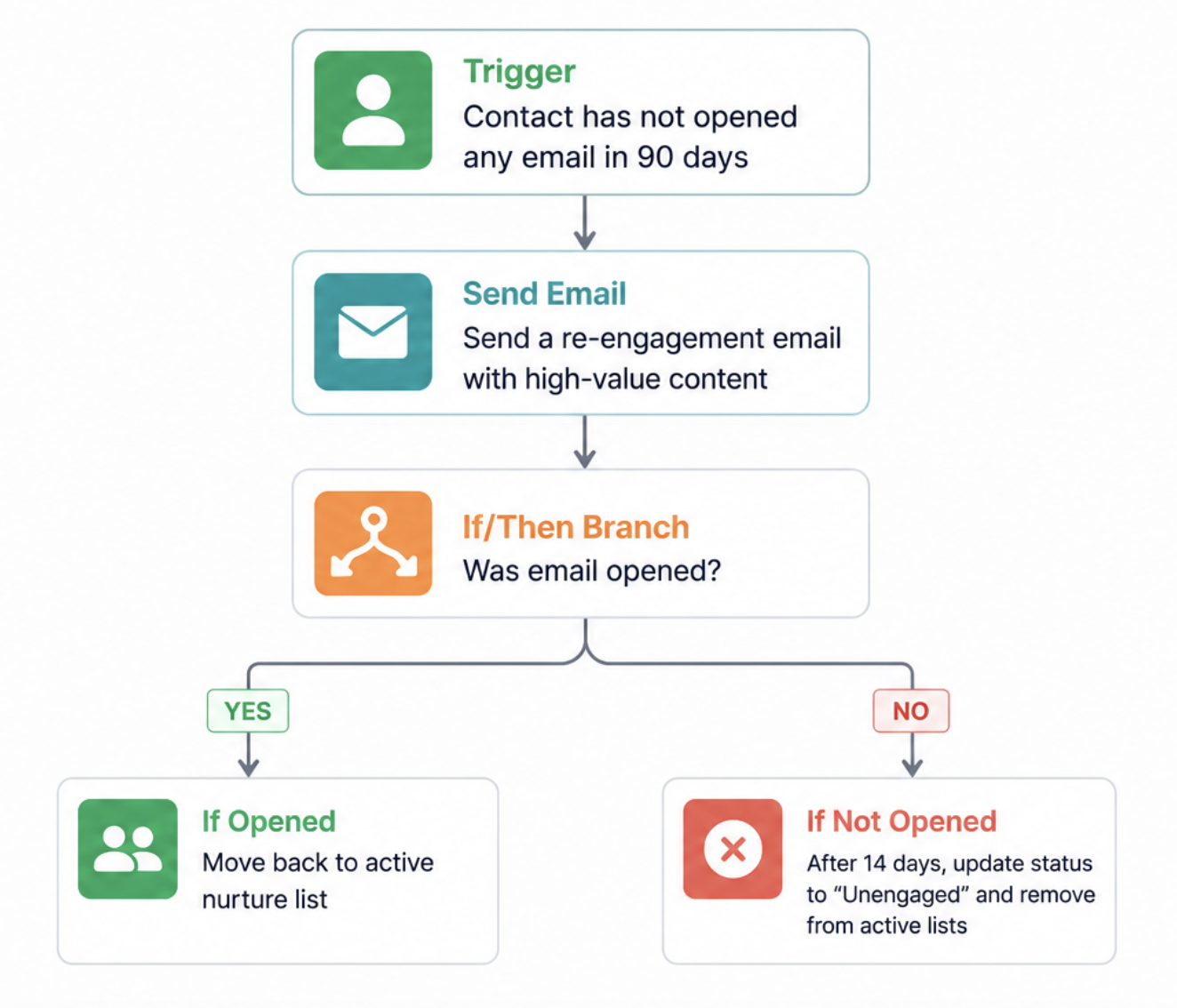
**Workflow 3 — Re-engagement Campaign** Trigger: Contact has not opened any email in 90 days Actions:
- Send a re-engagement email with high-value content
- If opened — move back to active nurture list
- If not opened after 14 days — update contact status to "Unengaged" and remove from active lists
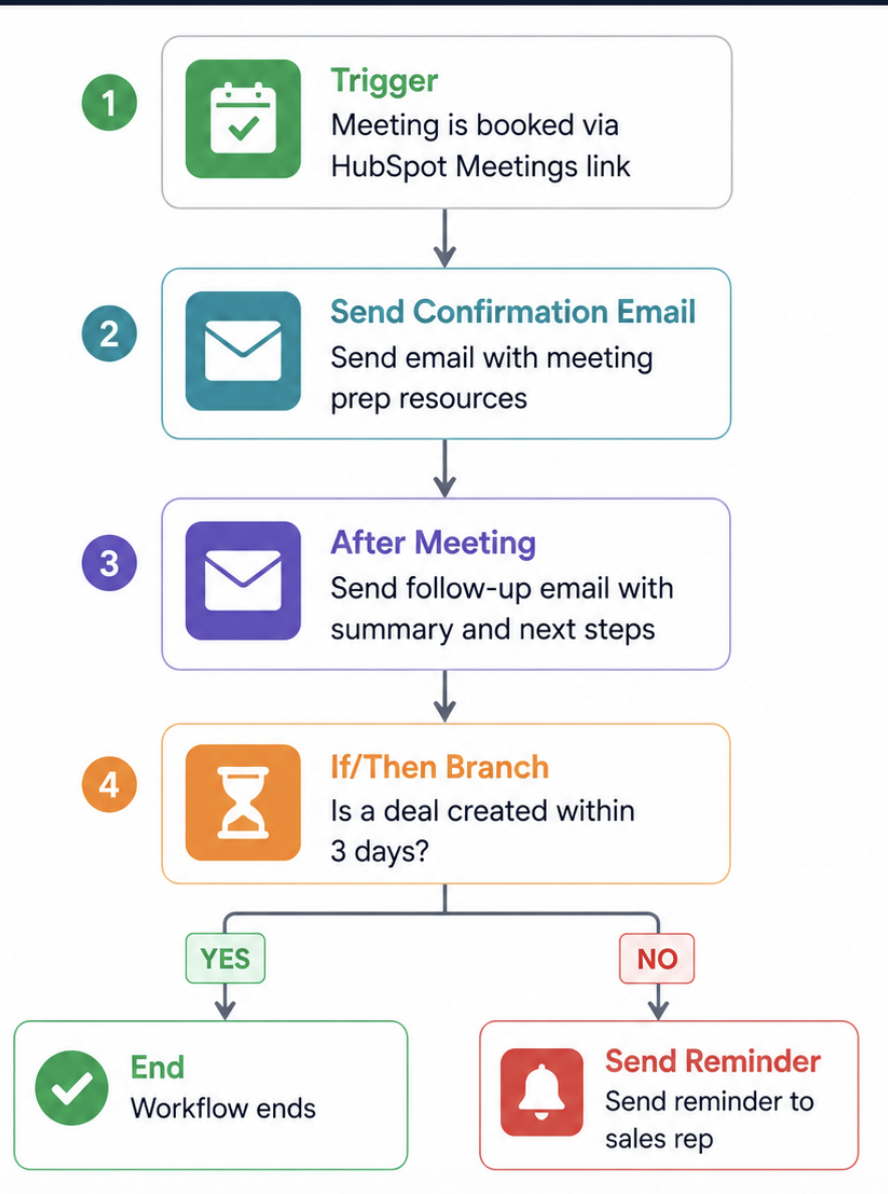
**Post-Demo Follow-Up** Trigger: Meeting is booked via HubSpot Meetings link Actions:
- Send confirmation email with meeting prep resources
- After meeting — send follow-up email with summary and next steps
- If deal not created within 3 days — send reminder to sales rep
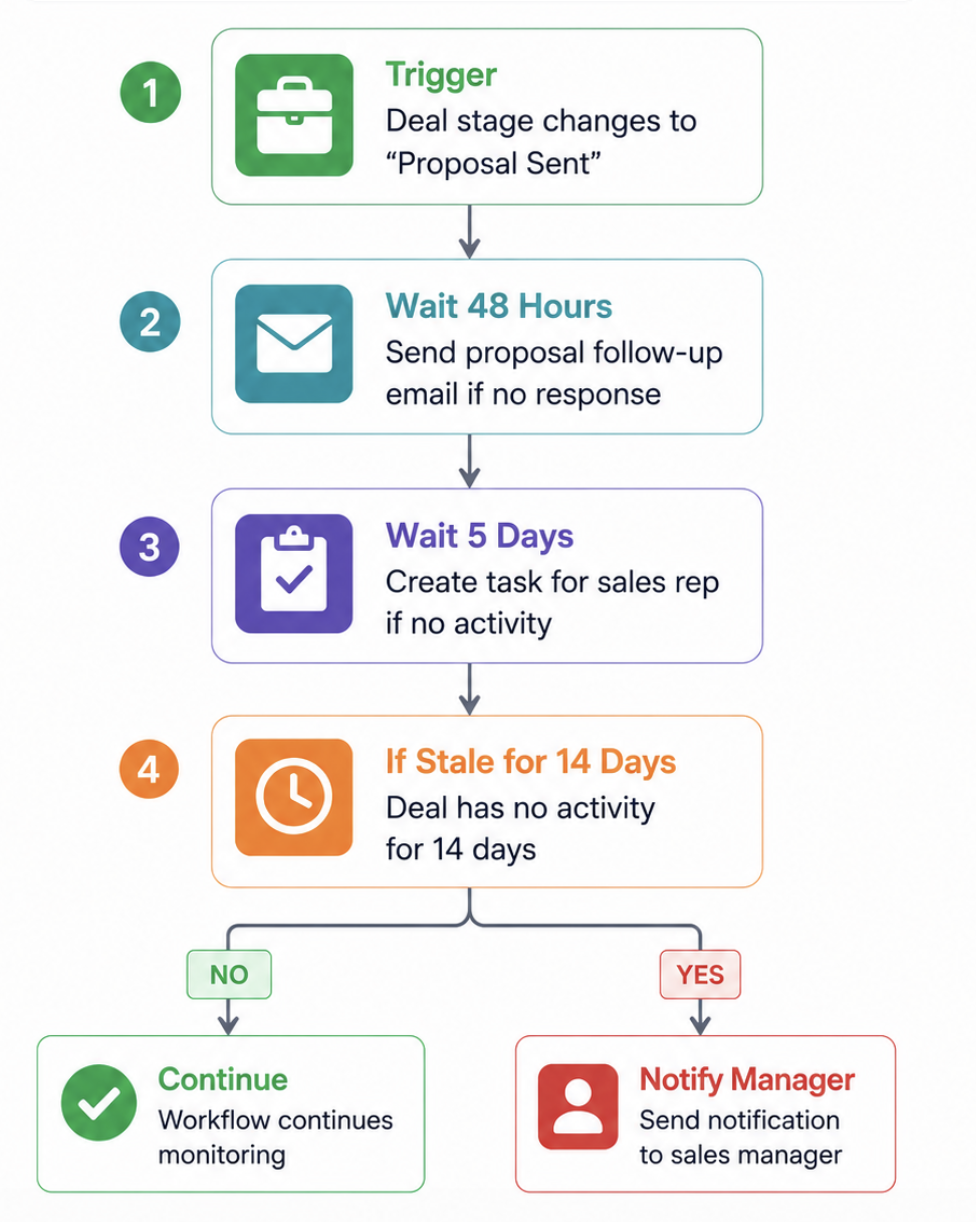
**Deal Stage Automation** Trigger: Deal stage changes to "Proposal Sent" Actions:
- Send proposal follow-up email after 48 hours if no response
- Create task for sales rep after 5 days with no activity
- If deal goes stale for 14 days — notify sales manager
#### 
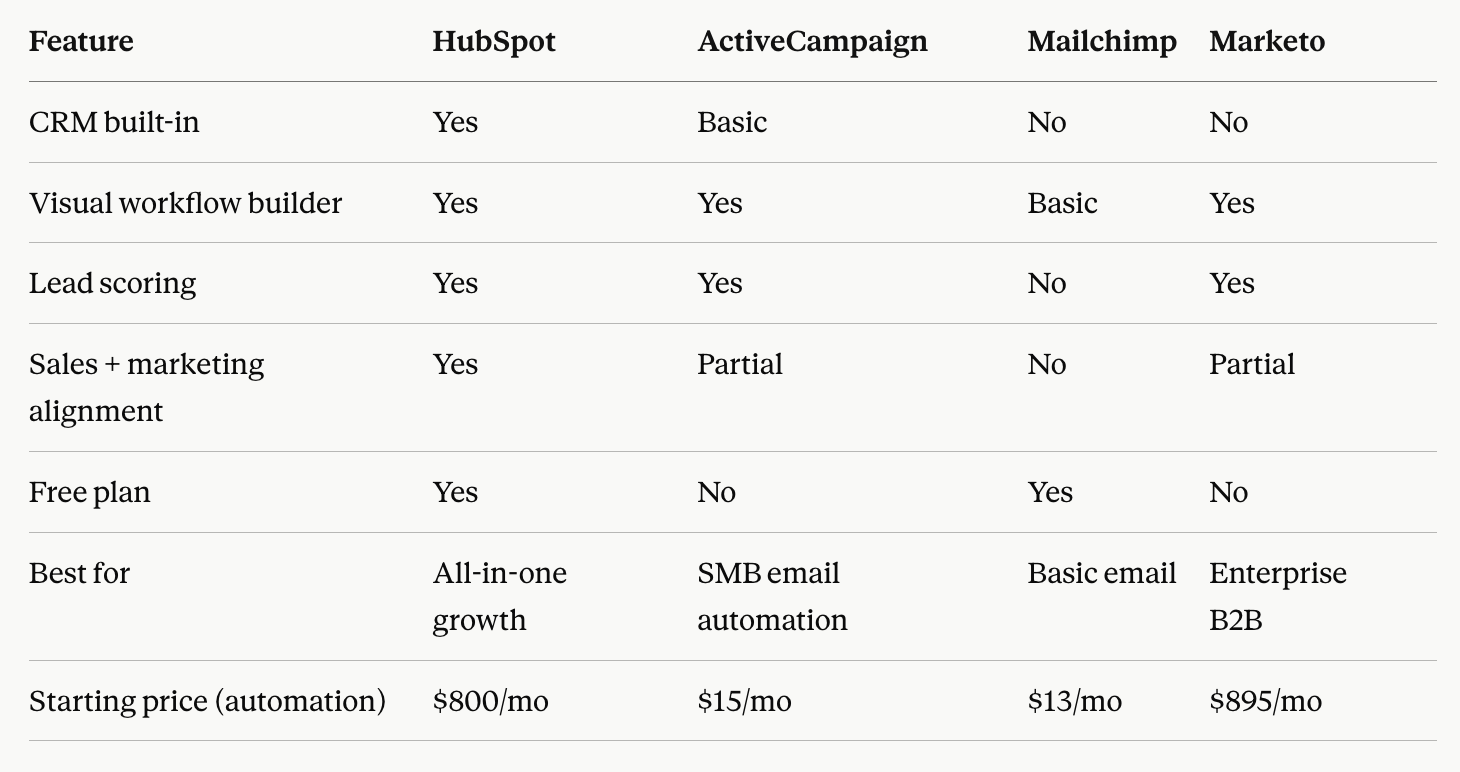
#### HubSpot Marketing Automation vs Competitors: How It Compares
#### **Common HubSpot Marketing Automation Mistakes to Avoid"**
At HuboExperts, we've audited 100+ HubSpot portals. These are the most common [automation mistakes](https://www.huboexperts.com/blog/top-5-hubspot-automation-mistakes-that-are-costing-businesses-thousand) we find:
**Mistake 1 — Building workflows before cleaning your data** Automation is only as good as the data feeding it. Dirty contacts, duplicate records, and missing properties will cause workflows to fire incorrectly or not at all. Always audit your CRM data first.
**Mistake 2 — Over-automating too early** Start with 3–5 core workflows. Businesses that try to automate everything at once end up with conflicting workflows, contacts enrolled in multiple sequences, and emails being sent at the wrong time.
**Mistake 3 — No lead scoring system** Without lead scoring, your sales team treats every lead the same. Set up a basic scoring model from day one — even a simple one — so sales can prioritise their time.
**Mistake 4 — Not testing workflows before going live** Always test every workflow with a test contact before activating it. One misconfigured trigger can send hundreds of wrong emails.
**Mistake 5 — Ignoring workflow analytics** HubSpot shows you exactly how many contacts entered each workflow, where they dropped off, and what actions were taken. Review these monthly and optimise.
For a deeper dive, read our guide: [Top 5 HubSpot Automation Mistakes That Are Costing Businesses Thousands](https://www.huboexperts.com/blog/top-5-hubspot-automation-mistakes-that-are-costing-businesses-thousand)
#### Conclusion
How HuboExperts Helps You Build Marketing Automation That Actually Works
Setting up HubSpot marketing automation correctly from the start is the difference between a system that generates revenue and one that creates confusion.
At **[HuboExperts](https://www.huboexperts.com/)-** [a certified HubSpot Gold Solutions Partner](https://www.huboexperts.com/hubspot-partner-agency)with 220+ businesses served globally — we help businesses:
- Audit existing HubSpot setups and fix broken workflows
- Build clean, structured automation from lead capture to closed deal
- Set up lead scoring models that align marketing and sales
- Create reporting dashboards that show real revenue impact
- Train your team to manage and optimise workflows independently
**[Book a free HubSpot automation consultation →](https://meetings-na2.hubspot.com/div6)**
#### Real-World Example: How HubSpot Automation Helped BrandSocial Scale
A good example of HubSpot marketing automation in action is our work with **BrandSocial**, where HuboExperts implemented HubSpot automation to improve lead nurturing, campaign performance, and sales efficiency.
### The Challenge
BrandSocial needed a more scalable way to manage its growing marketing and sales activities. Manual processes made it harder to consistently nurture leads, segment audiences, prioritize high-value prospects, and efficiently move users from initial interest to onboarding.
### The HubSpot Automation Solution
HuboExperts implemented a connected HubSpot automation strategy that included:
- Automated email marketing and lead nurturing workflows
- Audience segmentation for more targeted campaigns
- Automated lead scoring to identify high-value prospects
- Structured deal stages and sales processes
- Automated sales and marketing handoffs
- Landing pages and dynamic content to improve conversions
- Campaign analytics and A/B testing to continuously optimize performance
Instead of relying on disconnected manual activities, BrandSocial could use HubSpot to automatically move prospects through relevant marketing and sales journeys based on their engagement and behavior.
### The Results
Following the implementation, BrandSocial achieved:
- 35%increase in user sign-ups
- 22% improvement in campaign engagement rates
- 40% reduction in user onboarding time
- 30% increase in team productivity
- 20% improvement in acquisition forecasting accuracy
The project demonstrates that HubSpot marketing automation isn't simply about automating emails. When workflows, segmentation, lead scoring, CRM data, and sales processes work together, automation can improve the entire journey from lead generation through conversion and onboarding.
**Want to see the complete implementation?**
**[Read the BrandSocial Case Study →](https://www.huboexperts.com/brandsocial-case-study)**
#### **Frequently Asked Questions:**
**Q1: What is HubSpot marketing automation?** HubSpot marketing automation is a set of tools within the HubSpot platform that lets you automate repetitive marketing tasks — including email sequences, lead nurturing workflows, lead scoring, contact segmentation, and campaign management — so your team can focus on strategy rather than manual work.
These automations are designed to support every stage of your marketing process and keep things running smoothly as you scale. For example:
- **Welcome and brand consistency workflows:** Automatically send welcome sequences to new contacts and ensure your brand voice is consistent across all communications.
- **Audience-specific messaging:** Use smart segmentation and behavior-driven triggers to tailor messages to different audiences, ensuring the right people get the right content at the right time.
- **Multi-channel amplification:** Coordinate your marketing campaigns with automated scheduling for emails, ads, and landing pages, so your message is amplified across all channels.
- **Continuous improvement:** Track performance, run A/B tests, and automatically deploy winning variants to keep your marketing efforts evolving and effective.
In short, marketing automation helps you deliver consistent, timely, and relevant experiences to your audience—without the manual busywork.
**Q2: Which HubSpot plan includes marketing automation?**
Full workflow automation is available from HubSpot Professional ($800/month) onwards. HubSpot Starter includes basic email automation and simple sequences. The free plan does not include workflow automation. For most growing businesses, Professional is the recommended starting point.
**Q3: What can you automate with HubSpot?**
With HubSpot you can automate email sequences, lead assignment, pipeline stage updates, internal notifications, lead scoring, lifecycle stage changes, contact list management, social media posting, ad audiences, and follow-up tasks — all triggered by contact behaviour, form submissions, page visits, or deal activity.
Advanced automation features go even further, leveraging AI to enhance personalisation and give you greater control over each step of the customer journey. For example, you can use AI-driven workflows to dynamically segment contacts, tailor messaging based on real-time engagement, and automatically adjust lead scores as prospects interact with your website or marketing assets. This means your automation isn’t just about saving time — it’s about delivering the right message to the right person at exactly the right moment, across every channel.
**Q4: How is HubSpot marketing automation different from email marketing?**
Email marketing is one channel — sending emails manually or in batches. HubSpot marketing automation is a complete system that includes email but also triggers actions based on behaviour, scores leads, updates CRM records, assigns tasks to sales reps, and manages the entire lead lifecycle — automatically and across multiple channels.
**Q5: How long does it take to set up HubSpot marketing automation?**
A basic automation setup — welcome sequences, lead scoring, and a sales handoff workflow — can be live in 1–2 weeks with proper planning. A full marketing automation system covering all lifecycle stages typically takes 3–6 weeks. Working with a certified HubSpot partner like HuboExperts significantly reduces setup time and avoids costly mistakes.
**Q6: Can HubSpot automation integrate with other tools?**
Yes. [HubSpot integrates](https://www.huboexperts.com/hubspot-integrations)natively with 1,500+ tools including Gmail, Outlook, Salesforce, Shopify, Zoom, Slack, Google Ads, Meta Ads, and more. Custom integrations via API or Zapier are also available for tools not in the native marketplace.
**Q7: What is lead scoring in HubSpot?**
Lead scoring in HubSpot assigns positive and negative point values to contacts based on their behaviour (email opens, page visits, form fills) and demographic data (job title, company size, industry). When a contact reaches a score threshold, automated actions trigger — like notifying a sales rep or enrolling the contact in a sales sequence. This ensures your sales team focuses on the most qualified leads first.
**Q8: Do I need a HubSpot consultant to set up marketing automation?**
You don't need one- but most businesses that self-implement use less than 30% of HubSpot's automation capabilities and make costly structural mistakes that are difficult to fix later. A certified [HubSpot consultant](https://www.huboexperts.com/blog/hubspot-consultant)ensures your automation is built on a clean CRM foundation, aligned with your actual sales process, and optimised for conversion from day one.
[Book a free consultation](https://meetings-na2.hubspot.com/div6)
Enjoyed the content? Share it with your network:

### About the author
#### Div
Divyansh is the Founder of HuboExperts, a certified HubSpot Gold Solutions Partner. He helps businesses uncover and fix the hidden revenue leaks in their marketing, sales, and customer success funnels — the gaps that quietly cost companies 10–30% of potential revenue every quarter. With 220+ businesses served globally, his focus is simple: help teams convert more, close faster, and grow predictably — without spending more on ads.
## Does your use case match our patterns?
Let’s map out your scope, timeline, and data readiness with Div.
[Book a free scoping call](https://meetings-na2.hubspot.com/div6)
### Popular Posts
- [Best HubSpot Onboarding Services for SaaS Scaleups](https://www.huboexperts.com/blog/best-hubspot-onboarding-services-for-saas-scaleups)
- [Best HubSpot Agencies in India for CRM Migration](https://www.huboexperts.com/blog/best-hubspot-agencies-in-india-for-crm-migration)
- [Best HubSpot Partners for RevOps Forecasting](https://www.huboexperts.com/blog/best-hubspot-partners-for-revops-forecasting)
- [Best HubSpot Agencies for Pipeline Improvement](https://www.huboexperts.com/blog/best-hubspot-agencies-for-pipeline-improvement)
- [Best HubSpot Agencies in India Compared for 2026](https://www.huboexperts.com/blog/best-hubspot-agencies-in-india-compared-for-2026)
### Subscribe To Our Newsletter
**HubSpot Service Provider Worldwide**:
[Singapore](https://www.huboexperts.com/hubspot-automation-expert-singapore) | [Japan](https://www.huboexperts.com/hubspot-agency-japan) | [Perth](https://www.huboexperts.com/hubspot-agency-perth) | [Sydney](https://www.huboexperts.com/hubspot-agency-sydney) | [UK](https://www.huboexperts.com/hubspot-automation-expert-uk)
[](https://www.huboexperts.com)
E-304 GSPL, Industrial Area, Sector 75, Sahibzada Ajit Nagar, Punjab
Call Us : [+1 604-619-4074](https://www.google.com/search?q=RankGood+%7C+HuboExperts+-+Gold+HubSpot+Partner+%7C+Top+Hubspot+Digital+Marketing+Agency+in+Canada&stick=H4sIAAAAAAAA_xXKywoCIRQA0FXRZ1yClsHYQ8d2UTFtgqjWwVUvIjOoOAYGfU1fWm4PZzadL5qy4UKsFNNCckW6ZbumaIZSbQVxkmthOH0nzxv6vgvBwAfOLxVOJVLKIyyhC4OpdI8hwxVT9pT-6RFi1bHq0VmXcYALpp6y8xb2lrx-g_NwQI8Gfx4HT42KAAAA&hl=en-GB&mat=CUihaCYnPpwNElUBmzl_pa2Ugxuq41_YCejR94E_NsHNYs-sLKxsb6Ww3koK0TtnLwnGK05wfbpn8zBUQtFFTzZ7KJHRWy21dsrGCP3-krfYgIuVBNBwvpnSYzVTLJ93&authuser=0#)
33481 Westbury Ave, Abbotsford, Canada
[Follow us on Facebook](https://www.youtube.com/@HuboExperts) [Follow us on LinkedIn](https://www.linkedin.com/company/huboexperts) [Follow us on Facebook](https://www.facebook.com/HuboExperts) [Follow us on Twitter](https://www.instagram.com/huboexperts/)
#### About us
- [Home](https://huboexperts.com/)
- [Blog](https://www.huboexperts.com/blog)
- Our Services
- [CRM Experts](https://www.huboexperts.com/crm-experts)
- [Hubspot Integration](https://www.huboexperts.com/hubspot-integrations)
- [Monday Hubspot](https://www.huboexperts.com/monday-vs-hubspot)
- [T&C and Refund Policy](https://www.huboexperts.com/terms-conditions)
#### Revenue Operations
- [Revenue Assessment](https://www.huboexperts.com/solutions/revenue-assessment)
- [CRM Strategy](https://www.huboexperts.com/solutions/crm-strategy)
- [Revenue Intelligence](https://www.huboexperts.com/solutions/revenue-intelligence)
- [Executive Dashboards](https://www.huboexperts.com/solutions/executive-dashboards)
- [HubSpot Cost Calculator](https://www.huboexperts.com/hubspot-cost-calculator)
#### HubSpot
- [CRM Implementation](https://www.huboexperts.com/solutions/crm-implementation)
- [Marketing Hub](https://www.huboexperts.com/solutions/marketing-hub)
- [Sales Hub](https://www.huboexperts.com/solutions/sales-hub)
- [Service Hub](https://www.huboexperts.com/solutions/service-hub)
- [Operations Hub](https://www.huboexperts.com/solutions/operations-hub)
- [Content Hub](https://www.huboexperts.com/solutions/content-hub)
- [HubSpot Audit App](https://www.huboexperts.com/hubspot-audit-app-huboexperts)
Copyright © HuboExperts (RankGood Tech) 2024. All Rights Reserved. | [Privacy Policy](https://www.huboexperts.com/#)
[](https://wa.me/919306556642) [](https://t.me/web3hubspot)
```json
{
"@context" : "https://schema.org",
"@type" : "BlogPosting",
"author" : {
"@type" : "Person",
"name" : "Div",
"url" : "https://www.huboexperts.com/blog/author/div"
},
"dateModified" : "2026-08-31T09:27:18.142Z",
"datePublished" : "2024-10-25T08:52:15.000Z",
"headline" : "HubSpot Marketing Automation: Complete Guide & Setup Tips 2026",
"image" : [ "https://www.huboexperts.com/hubfs/best%20(1).png" ],
"mainEntityOfPage" : {
"@id" : "https://www.huboexperts.com/blog/hubspot-marketing-automation",
"@type" : "WebPage"
},
"publisher" : {
"@type" : "Organization",
"logo" : {
"@type" : "ImageObject",
"url" : "https://www.huboexperts.com/hubfs/Untitled%20design%20(23)-1.png"
},
"name" : "HuboExperts"
}
}
```