

Introduction
The real estate industry is known for its fast-paced environment, where agents, brokers, and agencies juggle numerous clients, properties, and deals simultaneously. In such a competitive space, effective customer relationship management (CRM) systems are more important than ever. A good CRM helps real estate professionals streamline their operations, track leads, nurture client relationships, and ultimately close more deals. In this blog, we will explore some of the top CRM for real estate and how they can help you boost efficiency and sales success.
.png?width=1200&height=628&name=hubo%20experts%20%20(6).png)
How We Chose the Top Real Estate CRMs
Curious about how we landed on this shortlist? We took a deep dive into the world of real estate technology, putting dozens of popular CRM platforms under the microscope. Our selection process was driven by insights from real estate agents, brokers, and industry experts who know firsthand what features actually save time (and which ones just sound impressive on paper).
Here’s what went into our evaluation:
- Comprehensive Feature Review:
We looked for CRMs that offer robust lead management, easy automation, seamless integrations (think email, calendars, and texting), and reporting tools designed with real estate professionals in mind.
-
User-Friendliness: No one wants to wrestle with clunky software. Ease of use and a hassle-free learning curve were top priorities.
-
Value for Money: From free options to premium tools, we compared pricing, billing flexibility, and overall return on investment so budgets of all sizes are covered.
-
Customer Feedback: We dove into reviews on trusted sites like G2, Capterra, social media, and discussion forums to hear what agents and brokers had to say after months—or years—using these CRMs.
-
Support and Reliability:
Fast, knowledgeable customer support and dependable uptime factored heavily into our analysis.
By weighing both numbers and first-hand experiences, we’ve put together a list that delivers what real estate professionals actually need—not just what looks good in a brochure.
What Clients Say About Working With HuboExperts
Choosing the right CRM is only part of the journey. Successful implementation also depends on having a team that can configure the platform correctly, build reliable automations, and provide ongoing support as requirements evolve.
One of our clients partnered with HuboExperts to build and manage the HubSpot infrastructure for a 12-week webinar series. The project included registration landing pages, forms, complete email sequences, ongoing campaign updates, and attendance-tracking automation.
⭐⭐⭐⭐⭐ “Reliable HubSpot partner for a high-volume email series”
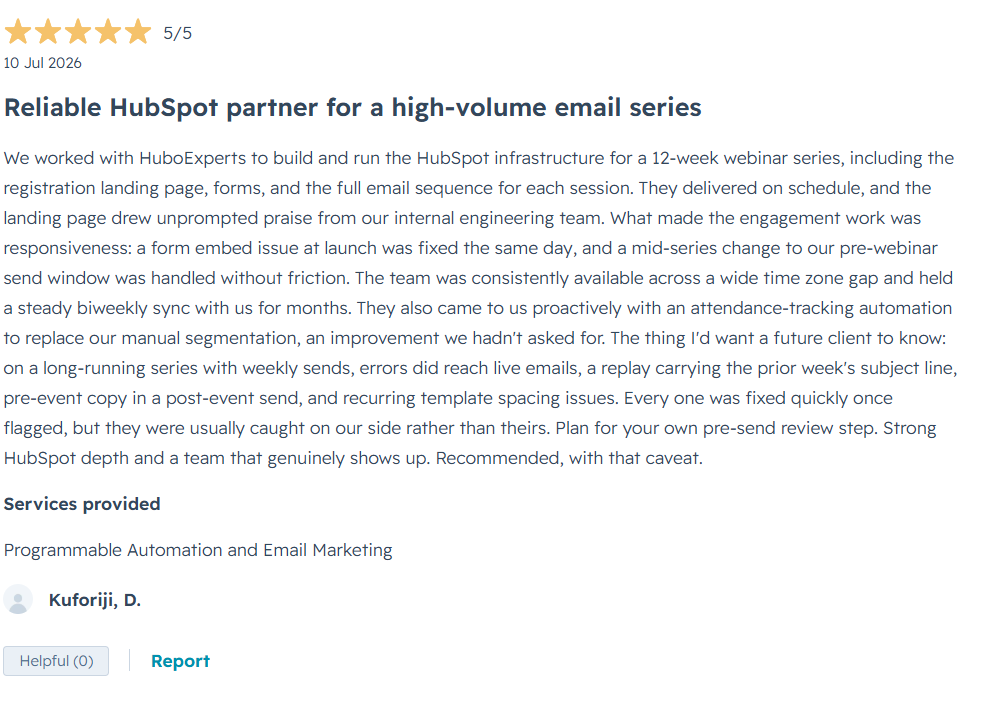
The client highlighted our HubSpot expertise, responsiveness, on-time delivery, and ability to solve issues quickly, including resolving a form embed issue on the same day it appeared. They also appreciated our proactive approach in introducing an attendance-tracking automation that reduced the need for manual segmentation.
The engagement involved ongoing coordination across different time zones and regular biweekly meetings throughout the campaign.
The client also provided valuable feedback around strengthening pre-send email QA for long-running, high-volume campaigns. This feedback helps us continuously improve our processes and build more reliable HubSpot implementations.
Services Provided: Programmable Automation & Email Marketing
Client Rating: ⭐⭐⭐⭐⭐ 5/5
What Makes the Best CRM for Real Estate?
The best CRM for real estate does more than just store contact information. It helps real estate agents, brokers, and property managers manage leads, automate follow-ups, track client interactions, and streamline the entire sales process from inquiry to closing. A good real estate CRM ensures that no lead is missed and that every prospect receives timely, personalized communication.
When evaluating the best CRM for real estate, look for features such as lead management, automated workflows, email and SMS integration, appointment scheduling, property tracking, reporting, and mobile accessibility. The right CRM should not only improve team productivity but also help build stronger client relationships, shorten sales cycles, and drive more successful property transactions.
Key Features to Look for in a Real Estate CRM
- Contact Management:
Organize contacts and leads with ease, ensuring you never miss a follow-up. Look for enhancements like detailed property tracking and automatic reminders so you stay ahead of your pipeline.
-
Lead Nurturing: A robust CRM supports efficient lead nurturing—think bulk emailing and texting, customizable drip campaigns, and reminders for timely outreach. Some platforms even let you call or text leads directly from within the CRM for streamlined communication.
-
Texting and Calling Capabilities: Integrated texting and calling features help you track conversations, schedule bulk messages, and log calls automatically, so nothing falls through the cracks.
-
Automation: Save time on repetitive tasks with automated workflows, such as sending follow-up emails, assigning tasks, or scheduling reminders based on client activity. Advanced automations can even trigger personalized responses when leads interact with your website or communications.
-
Lead Generation Tools: Many CRMs now offer built-in lead generation, allowing you to capture, qualify, and nurture new leads from your website, open houses, or social media—all within one platform.
-
Marketing Support: Create and distribute both digital and print marketing materials without juggling extra software. Some CRMs feature built-in content libraries or AI-assisted tools to help you generate engaging marketing pieces quickly.
MLS/IDX Integration: Direct integration with your local Multiple Listing Service
-
(MLS) or IDX feed enables you to match listings to leads, monitor property interests, and send real-time listing updates—enhancing both client service and efficiency.
-
Deal and Transaction Tracking: Basic deal tracking is essential for monitoring the progress of each transaction. While some agents use dedicated transaction management platforms, having at least simple transaction tracking in your CRM helps you stay organized from contract to close.
Choosing a CRM with the right blend of these features will help you stay organized, responsive, and ready to convert more leads into loyal clients.
Are AI Features Essential in a Real Estate CRM?
The rise of AI in CRM platforms has generated a lot of buzz, but do these high-tech features really make a difference for real estate professionals? The answer depends on what you’re looking for in your day-to-day operations.
While some AI-powered tools—like predictive analytics—can provide valuable insights and help prioritize leads more efficiently, not all AI features are true game changers. Chatbots and automated writing assistants might speed up simple tasks, but their impact on the overall sales pipeline is often incremental rather than transformative, at least for now.
That said, established CRM providers with years of data are in a unique position. Their massive historical databases give them an edge when training AI algorithms, allowing for smarter lead scoring and better recommendations. So, while AI alone shouldn’t be the sole reason to choose a CRM, platforms that successfully leverage years of client
interactions and property transactions may offer subtle boosts to efficiency and organization.
Ultimately, AI features can be a useful bonus, especially for agents handling high lead volumes, but core CRM fundamentals—like robust lead management, communication tools, and workflow automation—remain the pillars of performance.
Evaluating Customer Service Options
Strong customer support is a key ingredient when choosing your CRM partner. After all, even the slickest software can leave you frustrated if help is hard to find when you need it most.
When considering customer service options, keep an eye out for the following features:
-
Multiple Support Channels: Look for CRMs that offer support through various channels, such as phone, email, live chat, or even a chatbot. Some providers also have dedicated help centers, FAQ sections, and video tutorials to help you troubleshoot common issues on your own.
-
Responsive Hours: Check the provider’s support hours. Is help available only during business hours, or do they offer evening and weekend coverage? This is especially important if you work odd hours (and let’s face it, in real estate, who doesn’t?).
-
Quality of Assistance: Don’t hesitate to reach out during a free trial to gauge responsiveness and expertise. Submit a question or two—see how quickly you get a reply and whether the answers are clear and helpful.
-
Customer Community: Bonus points go to providers with active user forums or communities, where agents share advice and practical solutions.
Opting for a CRM with reliable, stellar support can save you headaches down the road and ensures you’re never left stranded during a crucial deal. The right CRM should not only improve team productivity but also help build stronger client relationships, shorten sales cycles, and drive more successful property transactions.
Are Real Estate CRMs Easy to Use?
Absolutely—most real estate CRMs are designed with busy professionals in mind, so user-friendliness is a top priority. Modern systems typically feature intuitive dashboards, straightforward navigation, and simple drag-and-drop tools. Even if you’re not particularly tech-savvy, you’ll find that getting up and running is usually quick. Plus, if you ever hit a snag, many CRMs offer robust support resources, including video tutorials, help centers, and responsive customer service. Some even have active online communities, so you can connect with fellow agents for tips or troubleshooting.
Mobile App Capabilities and Remote Access: What to Expect
In today’s real estate landscape, the ability to stay connected while on the move is essential. Leading real estate CRMs offer mobile apps that empower agents to access crucial information, manage client details, and respond to inquiries from anywhere—whether you're hosting an open house, touring properties, or meeting clients at a café.
Some CRMs feature robust mobile platforms with:
-
Real-time syncing of client interactions, messages, and property notes
-
Instant notifications for new leads and scheduled appointments
-
The ability to log calls, send emails or texts, and update deal stages on the go
Others take it a step further by offering AI-powered insights and voice-to-note features to streamline tasks when you don’t have time to type. Remote access options also differ: while some CRMs work seamlessly through dedicated mobile apps (like Salesforce or Zoho CRM), others rely on cloud-based dashboards accessible from any device with an internet connection.
Ultimately, a strong CRM should make it easy for real estate professionals to manage deals, track conversations, and respond to clients—no matter where business takes them.
Why Ease of Use Matters When Testing CRM Software
Before committing to a CRM, it's essential to ensure the platform is user-friendly for you and your team. Even the most feature-rich CRM won't deliver results if navigation feels like deciphering ancient hieroglyphics. Take full advantage of free trials—put the tools through their paces to make sure everyday tasks like lead input, follow-up reminders, and scheduling are intuitive and require minimal training.
During your evaluation:
-
Check if the interface feels clean and logical, not overwhelming with clutter.
-
Make note of how quickly team members adapt—can everyone jump in without consulting a thick manual?
-
Test the functions you’ll use most, such as sending emails, tracking interactions, or setting appointments.
Choosing a CRM that “just works” means less time troubleshooting and more time focusing on clients and closing deals. Ultimately, this ensures smoother adoption across your agency and gets everyone up and running faster—so you can realize the CRM’s benefits right away.
Why Document Management Matters in a Real Estate CRM
In real estate, paperwork can quickly become overwhelming—think contracts, disclosures, listing agreements, and more. That’s where integrated document management comes into play within a CRM. By seamlessly storing, organizing, and sharing documents, a reliable document management feature keeps you from drowning in piles of paperwork.
Not only does this keep your desk (and your mind) clutter-free, but it also helps you:
- Easily retrieve client documents when needed
- Share files securely with team members and clients
- Reduce errors and lost paperwork
- Speed up transactions by keeping everything in one digital hub
With built-in document management, you’ll spend less time hunting for paperwork and more time focusing on closing deals and building relationships.
Why E-Signature Capabilities Matter in a Real Estate CRM
In real estate, time is of the essence—and so is paperwork. With contracts, disclosures, and agreements often flying back and forth, having e-signature capabilities built right into your CRM can be a game-changer. Instead of chasing clients for wet signatures or relying on multiple third-party platforms like DocuSign or HelloSign, you can speed up transactions directly from your CRM.
Here’s why this matters:
-
Faster Transactions: E-signatures eliminate delays, helping you close deals quickly and keep momentum with eager buyers and sellers.
-
Improved Client Experience: Your clients can review and sign documents from anywhere, at any time—a must in today’s on-the-go market.
-
Centralized Document Management: Keeping all signed documents within your CRM makes it easy to track agreement status, stay organized, and ensure nothing slips through the cracks.
-
Legal Compliance: Leading e-signature solutions are legally binding and secure, providing peace of mind to both agents and clients.
Integrating e-signature tools into your CRM streamlines the entire sales process, helping you focus less on administrative tasks and more on building relationships and closing deals.
How to Evaluate CRM Provider Customer Support
Choosing the right CRM isn’t just about flashy features—it’s also about the support you’ll receive when you inevitably run into a hiccup (or, let’s be honest, a full-blown digital meltdown before an important client meeting). To make sure you won’t be left hanging, put the CRM provider’s customer support under the microscope during your research and trial phase.
Here’s how to separate the support superstars from the subpar:
-
Explore Contact Methods: Check for a variety of support channels such as phone, email, live chat, and chatbots. The more ways you can reach out, the better.
-
Review Availability: Examine their support hours. Are they strictly 9-to-5, or do they offer help nights and weekends when real estate business is humming?
-
Test Responsiveness: Don’t be shy—send a few questions or requests through different channels. Take note of the response time and the tone of their replies. A prompt, helpful, and friendly response is a good sign.
-
Assess Knowledge: Use your trial period to ask both basic and more complex questions. Did the support staff answer confidently? Did they offer solutions, or did you end up more confused than before?
-
Look for Resources: Beyond live help, a robust help center with FAQs, guides, and tutorials shows the CRM company’s commitment to your success.
Friendly, knowledgeable, and reliable support isn’t a “nice to have”—it’s essential for keeping your business running smoothly, especially when you’re juggling multiple deals and clients.
Why Real Estate Professionals Need a CRM
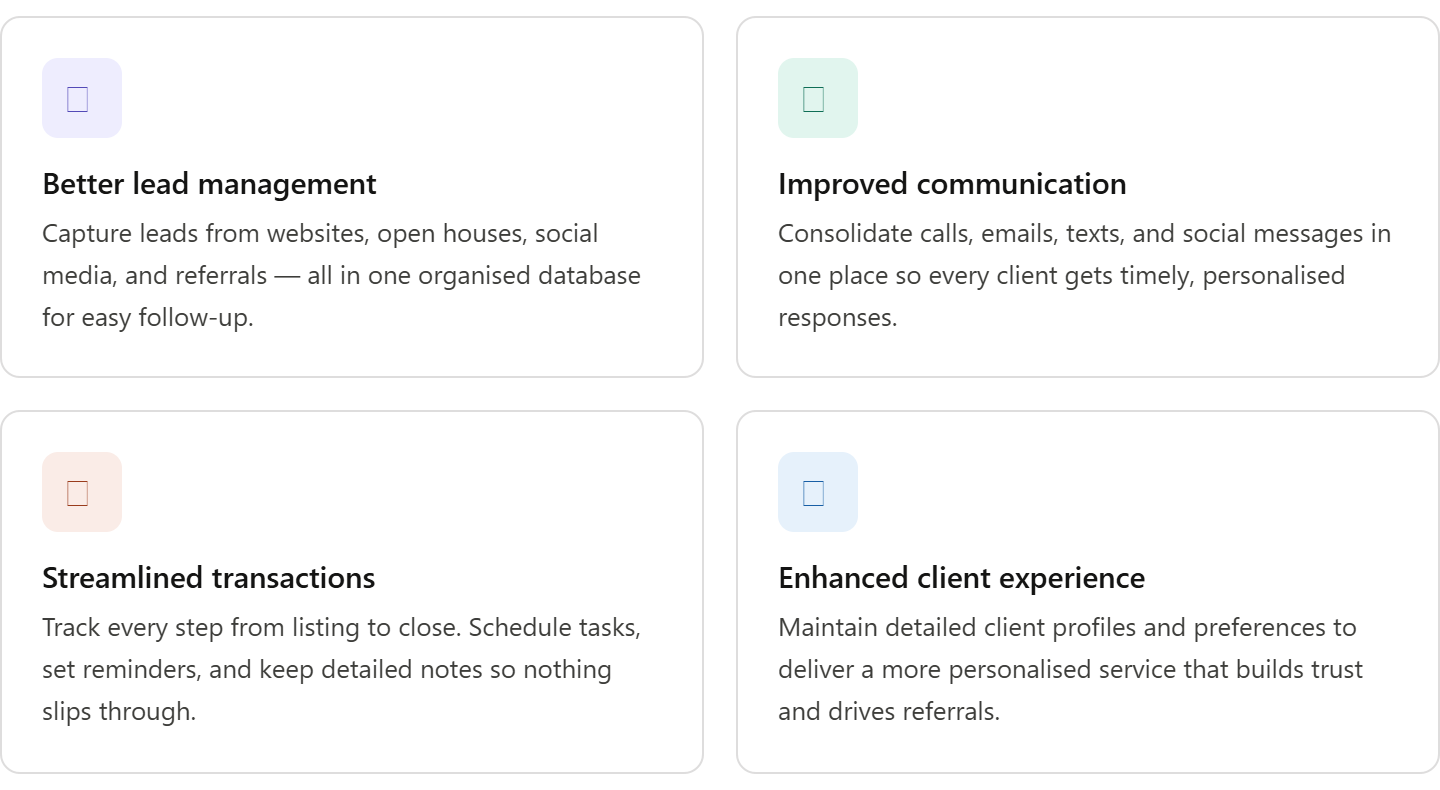 1.Better Lead Management: Real estate professionals deal with a high volume of leads on a daily basis. A CRM helps you capture leads from multiple sources like websites, social media, open houses, and referrals. It organises these leads in one central database, making it easier to follow up and nurture them through the sales process.
2.Improved Communication: Real estate agents often communicate with clients via phone, email, text, and social media. A CRM consolidates all these interactions in one place, so you can track conversations, ensure timely follow-ups, and provide personalized communication at every stage.
A great CRM doesn’t just centralize communication—it actively enhances teamwork and productivity. Many platforms allow agents to collaborate seamlessly by sharing marketing materials, creating checklists, and leaving notes for one another. With features like customizable user permissions, you can control access to sensitive documents, listings, or client information, ensuring the right people have the right information at the right time.
Additionally, built-in marketing and lead generation tools, reporting dashboards, and client transaction portals empower teams to work together efficiently. Some CRMs even support e-signatures and offer integration with IDX websites, streamlining the process for both agents and clients. This comprehensive approach to communication means fewer missed messages, smoother transactions, and an overall boost in client satisfaction.
3.Streamlined Transactions: From listing a property to closing a deal, a CRM helps you keep track of every step in the transaction process. You can schedule tasks, set reminders, and keep detailed notes, ensuring that no important detail slips through the cracks.
4.Enhanced Customer Experience: By maintaining detailed client profiles and knowing their preferences, real estate agents can provide a more personalised and responsive experience. This builds trust, improves client retention, and increases the likelihood of referrals.
Common User Complaints About Real Estate CRMs
While the right CRM can be a game-changer for real estate professionals, many users do encounter frustrations with certain platforms. Here are some of the most frequent pain points cited by agents, brokers, and teams in the field:
-
Slow Performance: Many users report laggy or unresponsive software, especially when juggling multiple records or complex automations. This can slow down daily workflows and create unnecessary stress during busy periods.
-
Complicated Setup and Outdated Interfaces: Some CRMs are notorious for their complex onboarding processes and user interfaces that feel dated or clunky. This steep learning curve can discourage adoption, particularly among teams not steeped in tech.
-
Limited or Poor Integrations: A recurring complaint is the lack of seamless integration with critical real estate tools such as MLS platforms, email providers, or popular listing sites like Zillow and Realtor.com. This can lead to double data entry and decreased efficiency.
-
Technical Issues and Glitches: Bugs, failed data syncs, unreliable notifications, or issues with key features (like landing page builders or mobile apps) often disrupt users’ ability to manage leads smoothly.
-
Unresponsive or Ineffective Support: Fast, effective help is essential, but some users encounter long wait times or unsatisfactory resolutions from customer support—which can be a real headache when time-sensitive issues arise.
-
High Pricing Relative to Value: The cost of some CRMs doesn’t always align with the features offered, particularly for smaller teams. Users sometimes feel like they’re paying a premium without receiving premium functionality.
In short, while a robust CRM is vital for modern real estate businesses, it's important to weigh these common challenges during your decision-making process. Choosing a platform with a reputation for reliability, easy onboarding, solid support, and useful integrations can save you a world of hassle down the line.
Now, let’s dive into some of the top CRM for real estate that can help you achieve these benefits and more.
Pros and Cons of Real Estate CRM Software
No two CRMs are created equal, and each platform brings its own set of advantages (and a few growing pains) to the table. Here’s a bird’s-eye view of what you can generally expect when weighing your best options:
Pros:
-
Comprehensive CRM Suites: Many real estate CRMs now offer an all-in-one package, including lead management, automation, and powerful collaboration tools. These platforms can streamline everything from listing management to post-sale nurturing in one spot.
-
Integration-Friendly: Top contenders boast robust integrations with IDX websites, email, calendar, texting, and even e-signature tools—helping agents connect all their tech without lots of manual entry.
-
Mobile Access: Expect to manage deals and follow up with leads while on the move, thanks to mobile apps that (usually) mirror most desktop features.
-
Automated Workflows: Automation is a common theme, freeing you from repetitive tasks like follow-up reminders or lead routing, so you can focus on client connections.
-
Advanced Reporting: Dashboards and customizable reports offer everything you need to monitor your pipeline, marketing ROI, and team performance.
Cons:
-
Pricing Structure: While some platforms lure you in with free or affordable starter plans, premium features and marketing tools are often tucked behind pricier subscriptions or add-ons.
-
Learning Curve: Not every CRM is a breeze to master. Some tools pack in so many features that onboarding and training can feel like a marathon.
-
User Experience: It’s not unusual to come across dated interfaces, clunky navigation, or occasional lag—especially on platforms with more advanced customization or integrations.
-
Customer Support: Levels of support can vary. Some users find themselves waiting longer than they’d like for help, especially on basic plans.
-
Feature Gaps: A few platforms might lack native e-signature capability or have limited lead generation right out of the box, requiring workarounds or third-party solutions.
Taking stock of these pros and cons can help you zero in on the CRM that fits your workflow, budget, and team size. With that overview in mind, let’s break down some specific real estate CRM contenders and what makes each one stand out.
User-Friendliness: Navigating CRM Interfaces in Real Estate
When choosing a CRM for your real estate business, user-friendliness is a major consideration—no one wants to wrestle with sluggish software or convoluted dashboards during a busy day of showings and closings. The reality is that CRM interfaces can vary widely in terms of ease of use and learning curve.
Some CRMs shine when it comes to intuitive design. Clean layouts, clear menus, and logical organization of contacts and deals allow even new users to get up and running quickly. Platforms that offer drag-and-drop features, easy navigation, and helpful onboarding resources (like tutorials or guides) can be especially valuable for teams who want to hit the ground running without extensive training.
However, not all CRMs are created equal in this department. Some solutions come with interfaces that feel outdated or overwhelming, requiring users to dig through multiple menus just to perform simple tasks. Overly complicated setup processes and slow loading times can add unnecessary friction—taking time away from what you do best: building relationships and closing deals.
Here are some common user-experience scenarios real estate professionals encounter:
-
Smooth and simple onboarding: Some systems walk you through setup step by step, making it painless even for those new to tech.
-
Cluttered dashboards: Platforms with too many features jammed onto the home screen can make it tough to find what you need.
-
Fast, responsive navigation: Snappy menus and quick-loading pages win praise, while laggy software can dampen productivity.
-
Customizability vs. complexity: While flexibility is a plus, too much customization can make CRMs harder to learn and maintain.
-
Quality of customer support: Accessible, knowledgeable support makes a big difference—especially if you run into hiccups with the interface.
Ultimately, the best CRM for your real estate business should feel like a helpful assistant, not an additional chore. Whether you prioritize aesthetics or simplicity, it’s worth demoing a platform and taking advantage of free trials to make sure the interface fits your workflow.
Let’s take a closer look at some popular options and see how they stack up in terms of ease of use and user experience.
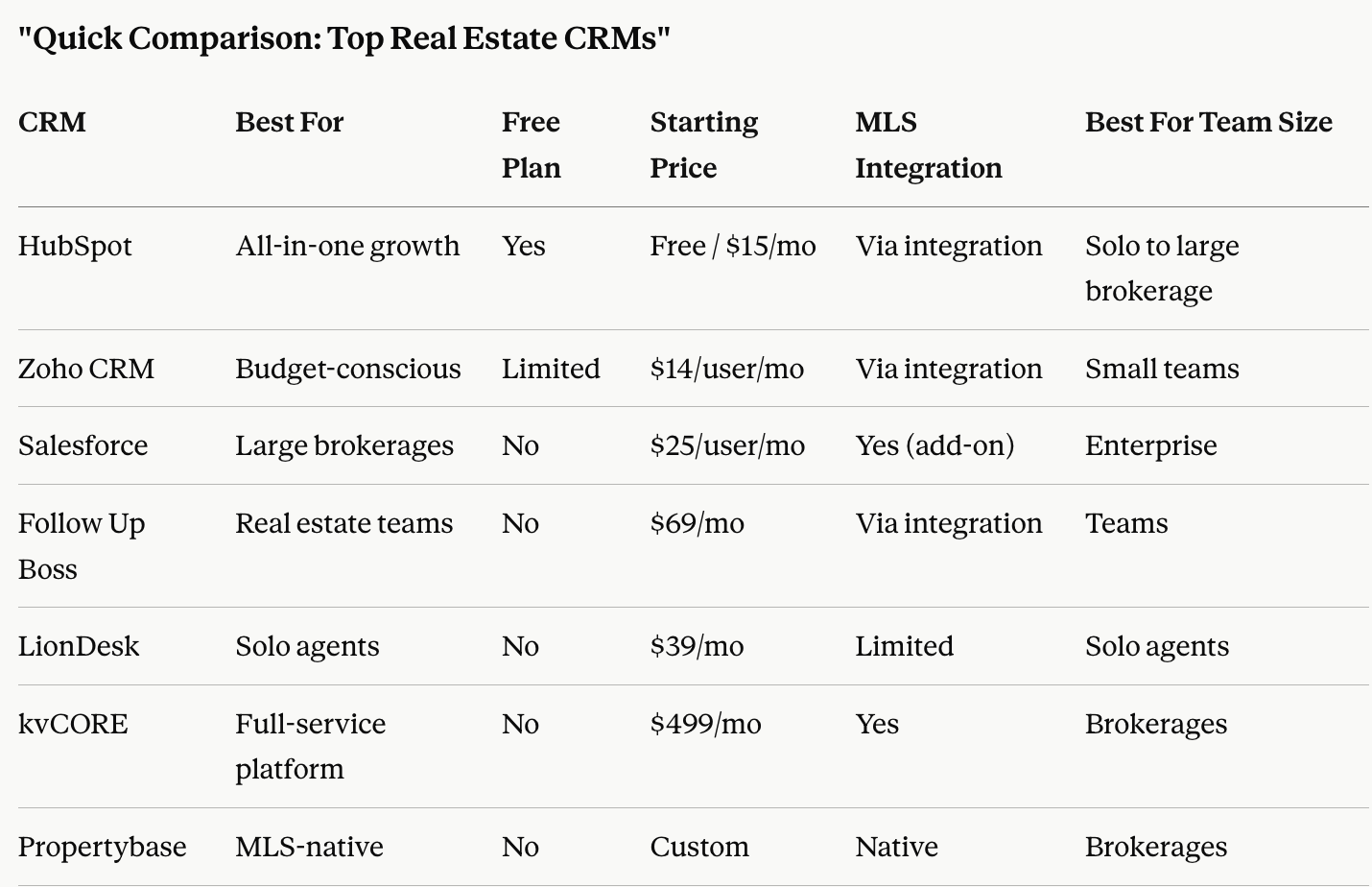
1. HubSpot CRM
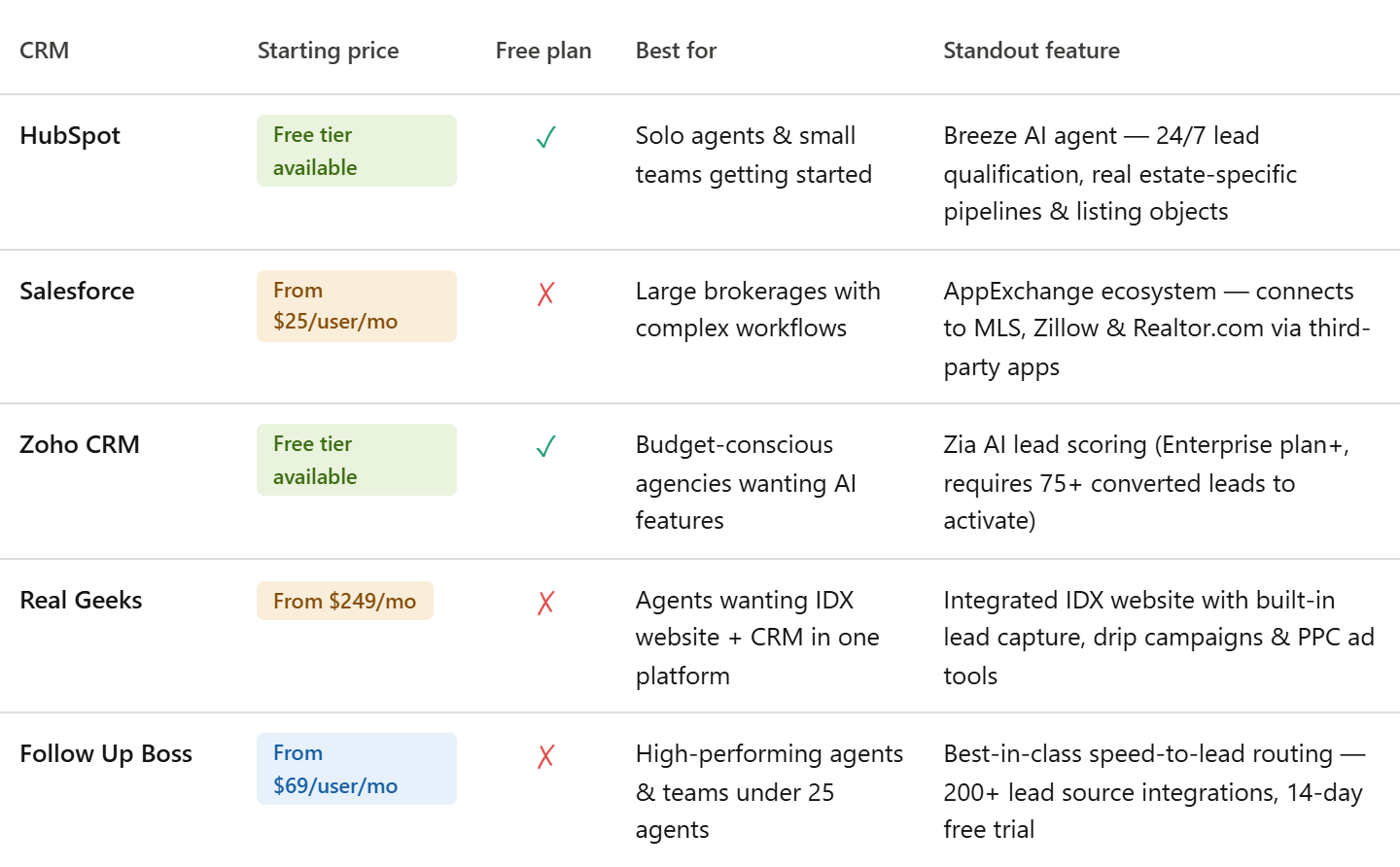
HubSpot is one of the most popular CRM platforms across various industries, and it is also an excellent choice for real estate professionals. Its user-friendly interface, robust features, and continuously evolving AI capabilities make it a go-to CRM for agents and teams of all sizes.
Key Features for Real Estate:
-
Lead Capture: HubSpot allows agents to capture leads through forms, live chat, and integration with landing pages, automatically pulling in prospects from all touchpoints including open houses, social media, and referrals.
Plus, you can create customized landing pages for each property, making it easier to convert website visitors into qualified leads. This ensures that every inquiry—whether from an online listing, a Facebook ad, or a weekend open house—lands directly in your CRM and is organized for follow-up.
-
Real Estate-Specific Pipelines & Listing Objects: HubSpot now includes real estate-specific features such as listing objects, and buyer and seller pipelines, customizable pipelines designed specifically for buying, selling, and leasing workflows. This means agents no longer need to adapt generic sales pipelines to fit real estate; the structure is built for how the industry actually works.
-
Task Management: Easily assign tasks and set reminders to ensure follow-ups happen on time, with automated sequences that pause when a prospect replies — so human touchpoints happen at exactly the right moment.
-
Pipeline Management: Track every stage of your deals, from new leads to closed sales, with pipelines tailored to real estate transaction flows.
-
Email Tracking: HubSpot enables email tracking so agents can see when a client opens an email, helping them time their follow-ups effectively.
-
AI-Powered Breeze Customer Agent: HubSpot now includes the Breeze Customer Agent, an AI-powered assistant that operates around the clock to help teams manage inquiries instantly. It can answer questions the moment buyers or sellers reach out, qualify leads, schedule appointments, and provide quick support using the information already stored in your CRM, ensuring no opportunity is lost due to slow responses, while your team stays focused on high-value conversations.
HubSpot CRM for real estate offers a free version with essential features, making it a great choice for small teams or individual agents looking to get started without a large investment. The platform scales as your business grows, making it equally powerful for larger brokerages managing complex multi-property pipelines.
-
Look for CRMs that also offer à la carte upgrades—so you can add new features, integrations, or advanced reporting as your needs evolve. Platforms like Top Producer, Real Geeks, and CINC are known for robust upgrade options, allowing your CRM to adapt alongside your expanding client base and team. This flexibility ensures you’re never stuck with a solution that’s outgrown your ambitions, whether you’re a solo agent just getting started or leading a rapidly growing brokerage.
2. Salesforce for Real Estate
Salesforce is a highly customizable and powerful CRM used by businesses of all types. Its robust features make it ideal for real estate professionals who need a scalable solution to manage their growing client base and complex workflows.
Key Features for Real Estate:
-
Customizable Dashboards: Salesforce allows you to build dashboards that give you insights into your sales pipeline, agent performance, and client activities.
-
Automation: With Salesforce, you can automate marketing campaigns, follow-up reminders, and more, saving you valuable time.
-
Top 5 Contacts: Easily identify and prioritize your most important leads and clients, so you never lose track of high-value relationships.
-
AI-Generated Follow-Up: Leverage built-in AI tools to automatically generate personalized follow-up messages, keeping your communications timely and relevant.
-
Database Health Monitoring: Stay on top of the quality and accuracy of your contact database with health checks and smart recommendations.
-
Listing-Triggered Campaigns: Set up automated marketing campaigns that launch as soon as a new listing goes live, ensuring immediate exposure.
-
MLS-Powered CMAs and Presentations: Access real-time MLS data to generate up-to-date comparative market analyses and polished presentations for clients.
-
Mobile CRM and AI Tools: Stay connected and productive on the go with a mobile-friendly CRM and AI-driven features that help you manage tasks from anywhere.
-
-
These features work together to streamline your workflow, enhance client engagement, and help you stay organized in a competitive market.
-
Advanced Analytics: Salesforce provides powerful reporting tools, so you can analyze your sales trends and identify areas for improvement.
-
Integration with Real Estate Platforms: Salesforce can connect with popular tools like Zillow, Realtor.com, and various MLS platforms — however, it is important to note that these are not native, out-of-the-box integrations. MLS integration is implemented through AppExchange solutions or custom development, and Zillow and Realtor.com connections are made via third-party connectors to enable automatic listing distribution and lead capture. This means additional setup time, technical expertise, and potentially extra cost should be factored in — especially for smaller teams without a dedicated IT resource.
-
How CRMs Integrate with IDX Websites and Property Search
One of the biggest advantages of modern real estate CRMs is their seamless integration with IDX (Internet Data Exchange) websites and robust property search features. This integration is especially important for agents wanting to capture, nurture, and convert leads directly from their digital presence.
How It Works:
-
Automatic Lead Capture: When a prospective buyer browses properties or completes forms on your IDX-enabled website, their information is instantly fed into your CRM. This means no lead ever slips through the cracks — every inquiry, from property tours to valuation requests, is captured automatically.
-
Personalized Listing Recommendations: CRMs leverage visitor activity from your IDX site—like property views, saved searches, or price drop alerts—to trigger tailored follow-ups. Automated emails or texts can send the latest listings or price reductions that match a lead’s interests.
-
Behavior-Based Nurturing: Most systems monitor how leads engage with properties on your website and can launch drip campaigns based on those behavior. For example, if a lead keeps looking at a certain type of property, the CRM can recommend similar options or send timely updates.
-
Customizable Search Tools: Integrated IDX sites allow for advanced property search, with fully branded experiences. This keeps buyers engaged within your ecosystem instead of bouncing to third-party portals.
-
Automated Workflows: Agents can set up action plans to send sequenced emails, texts, and follow-ups, triggered by specific actions leads take on the website—like saving a home, requesting info, or scheduling a showing.
-
Centralized Activity Tracking: Every lead touchpoint—from viewing listings to opening emails—is logged in the CRM, providing a detailed record for smart follow-ups. This helps keep your pipeline organized and ensures no opportunity is left behind.
-
Value-Added Tools: Extras like home valuation widgets, client-facing mobile apps, and bulk messaging capabilities help agents deliver a more interactive and responsive service.
With these integrations, agents can streamline their marketing, engage prospects with relevant content, and accelerate the path from website visitor to closed deal—all within a single system.
Integration Considerations
When evaluating a CRM like Salesforce, always consider how well it will play with the other tools you already use (or plan to use) in your business—think accounting software, cloud storage, project management tools, and more. Ensuring smooth integration with your existing workflow can save you countless hours and headaches down the line. Ultimately, while Salesforce offers impressive flexibility through integrations, be prepared for extra steps and possibly outside help to get everything running seamlessly, particularly if your agency relies on a suite of different platforms.
-
3. Zoho CRM
Zoho CRM is another highly versatile platform that is suitable for both small agencies and large real estate teams. It offers a wide range of features to help streamline client management and boost sales productivity.
Key Features for Real Estate:
-
Lead and Contact Management: Zoho CRM helps agents capture and organize leads from websites, social media, and other sources.
-
Workflow Automation: Automate repetitive tasks such as email follow-ups, appointment scheduling, and more to save time.
-
AI Integration (Enterprise Plan Only): Zoho's AI assistant, Zia, can predict which leads are most likely to convert based on historical data. However, Zia is only available on the Enterprise plan and above — it is not included in lower-tier subscriptions. Additionally, Zia requires a minimum of 75 converted leads in your CRM history before it can generate its initial predictions, meaning newer or smaller agencies may not benefit from AI lead scoring right away. Once active, the model improves continuously as your team logs more outcomes.
Beyond just lead scoring, Zia leverages a combination of behavioral and property data to fill in gaps within your contact list—offering insight into a lead’s address, mortgage status, and engagement with your marketing efforts. This expanded context allows you to prioritize outreach and strategically focus on prospects who are more likely to transact.
For ongoing engagement, Zoho’s automation tools can be set up to maintain consistent follow-up with both new prospects and older leads. Each time a call, text, or email is logged through the CRM, these automations can trigger additional communication—such as personalized drip campaigns or scheduled reminders—helping agents revive dormant contacts and ultimately book more appointments. This blend of predictive AI and intelligent automation ensures that your database doesn’t just grow, but becomes a well-organized pipeline for future business.
- Customizable Reporting: Create detailed reports that provide insight into your sales performance, lead sources, and client preferences.
4. Real Geeks
Real Geeks is a real estate-specific CRM that is designed with real estate agents in mind. It offers a powerful combination of lead generation tools and CRM functionality, making it a strong all-in-one solution for agents looking to boost their productivity and online presence.
Key Features for Real Estate:
-
Lead Generation Tools: Real Geeks offers integrated IDX websites optimized for lead conversion, with built-in lead magnets like property valuations, automated follow-ups, and extras like property alerts and market reports.
-
Automated Drip Campaigns: Set up automated email and text sequences to nurture leads and stay in touch with clients over time, keeping prospects engaged from first inquiry through to closing.
-
Task & Deadline Tracking: Real Geeks includes basic task management tools to help agents stay on top of appointments, follow-up reminders, and key dates. It is important to note that this is not a full transaction management system — it does not replace dedicated contract and document management tools like Dotloop or SkySlope. Agents handling complex transaction paperwork will need a separate platform alongside Real Geeks for that purpose.
-
While the appeal of an all-in-one real estate platform is strong, it’s worth considering how you might outgrow certain features over time. For example, some agents may want to upgrade their website or start using more advanced transaction management but still keep their CRM data and workflows intact. Real Geeks is designed to work alongside your other tools, so you can integrate new solutions as your business evolves, instead of being locked into a single system that may not meet all your needs down the road.
-
Marketing Integration: Real Geeks integrates with Google and Facebook advertising, allowing agents to run pay-per-click campaigns that drive traffic directly back to their IDX website for lead capture. In addition to digital ad integration, Real Geeks includes an AI-powered blog post creator, which lets agents quickly generate content to engage prospects and boost SEO—no need for separate blogging software. The platform also features built-in tools for designing and sending both digital and print marketing materials, making it easy to create property flyers, email blasts, and other outreach campaigns directly from the CRM. This comprehensive approach streamlines marketing efforts so agents can focus more on selling and less on toggling between multiple platforms.
-
5. Follow Up Boss
Follow Up Boss is one of the most widely adopted real estate CRMs among high-performing agents and teams. It is trusted by 41 of the 50 highest-volume US real estate teams, with over 100,000 agents using it daily. It was acquired by Zillow in 2023 and continues to operate as a standalone product.
Key Features for Real Estate:
-
Lead Routing & Management: Follow Up Boss connects with over 200 lead sources natively — Zillow, Realtor.com, Facebook Lead Ads, IDX websites all feed directly in, with lead routing rules that assign by zip code, price range, agent rotation, or custom logic.
-
Speed-to-Lead Automation: Follow Up Boss engineers every feature around speed to lead — research shows responding to a real estate inquiry within 5 minutes makes an agent 21x more likely to convert.
-
Action Plans & Drip Campaigns: Follow Up Boss action plans automate the entire follow-up process, from initial lead contact through nurture campaigns, allowing agents to create as many action plans as needed.
-
Team Accountability & Reporting: Advanced reporting provides detailed performance insights for agents, teams, and lead sources, helping increase productivity, improve agent accountability, and measure marketing ROI — all within a single platform.
Pricing: Follow Up Boss starts at $69 per user per month on the Grow plan, with a free 14-day trial. The Pro plan is $499 monthly for up to 10 users, and the Platform plan is $1,000 monthly for up to 30 users.
Real estate CRM pricing can vary widely depending on the platform and features you need. While some entry-level CRMs offer free plans that can be ideal for startups or small teams, most paid options typically begin around $20 per user per month. Advanced plans with more robust features, automation, and support often range from $50 per user per month and up. Ultimately, costs will depend on the size of your team and the level of functionality required.
Best for: Individual agents and teams up to 25 agents who want best-in-class lead follow-up and routing. Note that Follow Up Boss does not include native transaction document workflows, so tools like Dotloop or SkySlope are needed alongside it for full transaction management.
Support Resources for Real Estate CRM Users
When choosing a real estate CRM, robust support options are an essential part of the equation. Most leading platforms provide a variety of ways to get help if you run into technical hiccups or have questions about features.
Common support resources include:
-
Direct Customer Support: Access to phone, email, and live chat channels is standard with most major CRMs. Hours of operation and responsiveness can vary, so it’s always wise to put these options to the test during your free trial—ask a few questions to gauge how quickly and effectively the support team responds.
-
Knowledge Bases: Comprehensive online libraries packed with FAQs, troubleshooting guides, and step-by-step tutorials empower you to resolve many issues on your own—perfect for quick problem-solving or learning new features at your own pace.
-
Community Forums: Larger CRM providers often host user communities or discussion boards. Here, agents can swap tips, share best practices, and get insights from peers navigating the same challenges.
A good rule of thumb: if support is slow, unhelpful, or hard to reach, it’s worth considering alternatives that prioritize customer care. Smooth onboarding and ongoing support can make all the difference as you integrate new tech into your real estate workflow.
Monthly vs. Annual CRM Pricing
When comparing CRM pricing, it's important to remember that most providers offer both monthly and annual billing options. Monthly plans provide flexibility, letting you pay as you go—but they typically cost more per month. By opting for an annual plan, you usually lock in savings of anywhere from 10% to 30% off the total cost. That means a lower effective monthly rate, but you'll need to commit and pay upfront for the year. If you’re confident in your choice and want to maximize value, annual billing can significantly reduce your expenses over time.
Onboarding, Tutorials, and Help Resources
Getting up and running with a new CRM can feel daunting, but these top platforms make onboarding as painless as possible. Most offer free trials—so you can click around and experiment risk-free before committing. Guided tutorials and bite-sized setup wizards walk agents through the basics, often with step-by-step videos and knowledge bases loaded with FAQs, checklists, and best practices for real estate.
Live chat and responsive customer support teams are typically just a click or call away to help with both technical hiccups and everyday questions. For more in-depth learning, many CRMs host regular webinars and provide resource libraries full of real estate-specific strategies, so new users can start closing leads confidently, even if it’s their first brush with CRM software.
Real-World Comparisons: Customer Service and Support Across CRMs
When it comes to evaluating real estate CRMs, stellar customer service and reliable support can make all the difference—especially for busy agents dealing with tight deadlines and a constant flow of leads.
Agents frequently highlight how responsive support teams and robust onboarding resources can smooth out growing pains. For example, platforms like Wise Agent and IXACT Contact earn praise for their helpful customer service, user-friendly tutorials, and approachable support during setup. Free trials and easily accessible guides are especially valued by new users looking to get up to speed quickly.
However, not all experiences are seamless. Some CRMs—while offering a comprehensive toolkit—fall short when it comes to support. Common pain points include long response times, complicated onboarding processes, or support that’s primarily limited to email with slow follow-up. Issues such as clunky interfaces or the need for better MLS integrations can compound frustrations if responsive help isn’t just a chat away.
From an agent’s perspective, a CRM with prompt and knowledgeable support is a big win. But even the strongest solutions sometimes have room to grow: improving response speed, offering hands-on onboarding, and ensuring support is available through multiple channels (phone, chat, email) can elevate a CRM from good to indispensable.
Ultimately, while many leading real estate CRMs provide a broad set of tools and features, the best ones back it up with reliable, responsive customer support—helping agents spend less time troubleshooting, and more time closing deals.
Frequently asked questions
Which CRM is best for real estate agents in India?
The best CRM for real estate agents in India depends on team size and budget, HubSpot and Zoho CRM are the two strongest choices. HubSpot offers a free plan with powerful lead capture and pipeline tools, while Zoho CRM is built by an Indian company (headquartered in Chennai), making it well-supported locally with competitive pricing for the Indian market. Both support multi-channel communication and workflow automation suited to the fast-paced nature of Indian real estate.
Is there a free CRM for real estate agents?
Yes — both HubSpot and Zoho CRM offer free plans that are genuinely useful for real estate agents starting out. HubSpot's free CRM includes contact management, deal pipelines, email tracking, and lead capture forms with no time limit. Zoho's free tier covers up to 3 users and includes lead management and basic workflow tools, though advanced features like Zia AI lead scoring require an upgrade to the Enterprise plan.
As with any CRM, it's important to review each plan's details carefully—take note of user limits, contact caps, and which features are included at each tier. While it may seem tedious to compare these points across different providers, this upfront diligence ensures you choose the right software suite for your team’s size and needs. Investing a little time now saves you from headaches (and extra costs) down the road.
What is the difference between HubSpot and Salesforce for real estate?
HubSpot vs Salesforce for real estate comes down to ease of use versus power and customisation. HubSpot is significantly easier to set up, offers a free starting point, and now includes real estate-specific features like listing objects and buyer/seller pipelines out of the box. Just as important, the user interface is intuitive and designed for real-world productivity: the most-used tools are front and center on your dashboard, while less frequent actions are never more than a couple of clicks away. This ease of use isn’t just a nice-to-have — it means agents actually want to log in, update leads, and track deals, maximizing your CRM’s ROI and ensuring important tasks never fall through the cracks. Salesforce is more powerful and scalable for large brokerages, but its real estate integrations, including MLS, Zillow, and Realtor.com connections, require third-party AppExchange apps or custom development, adding time and cost to implementation.
Can I use a CRM for a small real estate team on a tight budget?
Absolutely — there are strong CRM options for small real estate teams that won't break the budget. HubSpot's free plan scales well for teams of 2–5 agents, and Zoho CRM's paid tiers start affordably while offering solid automation and reporting. If your small team's primary need is fast lead follow-up and routing, Follow Up Boss starts at $69 per user per month and offers a 14-day free trial, making it easy to test before committing.
What is the best AI CRM for real estate in 2025?
The best AI CRM for real estate in 2025 is HubSpot, thanks to its newly launched Breeze Customer Agent, an AI assistant that qualifies leads, answers buyer and seller inquiries, and schedules appointments around the clock using data already stored in your CRM. Zoho CRM also offers strong AI features through its Zia assistant, which predicts lead conversion likelihood, though Zia is only available on the Enterprise plan and requires a minimum of 75 converted leads to activate its scoring model. For teams focused purely on AI-powered lead routing and follow-up speed, Follow Up Boss remains the top performer among specialist real estate CRMs.
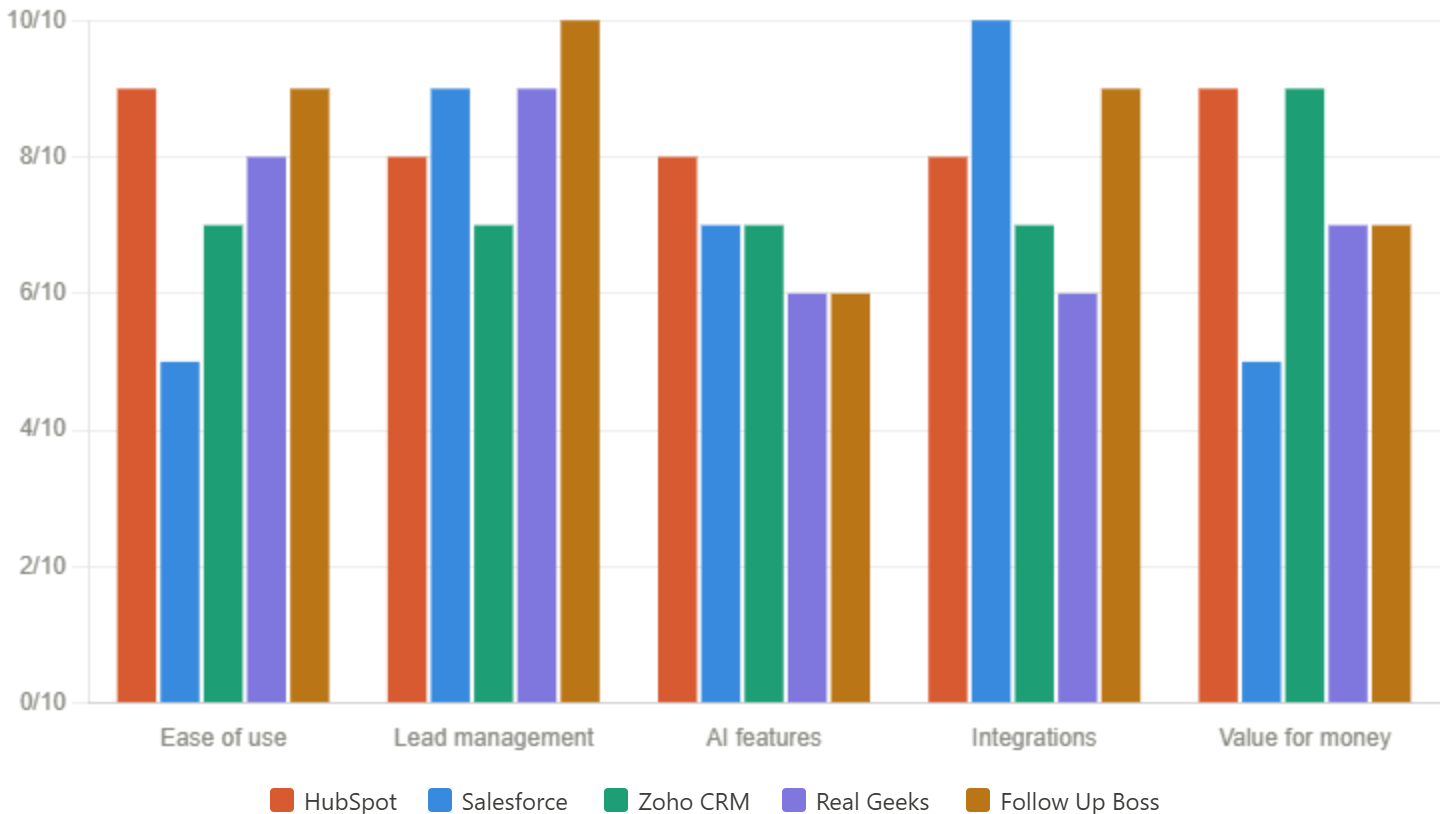
Conclusion
Choosing the best CRM for real estate depends on your business size, sales process, budget, and growth goals. The right platform should help you capture and nurture leads, automate repetitive tasks, manage property transactions, and deliver exceptional client experiences. By evaluating your requirements and comparing the features of leading CRM solutions, you can invest in a system that improves efficiency, strengthens customer relationships, and supports long-term business growth. Whether you're an independent agent, a brokerage, or a growing real estate company, the right CRM can become a valuable asset in scaling your operations and closing more deals.
If you're considering implementing a real estate CRM such as HubSpot, working with an experienced partner can help you customize the platform to your unique workflows, accelerate adoption, and maximize your return on investment or you can hire the HubSpot Experts who can assist you from onboarding to implementation. At HuboExperts, we help real estate businesses design, implement, and optimize CRM systems that drive measurable results.
Onboarding, Training & Ongoing Support Matter
Today’s real estate CRMs are more powerful than ever, but that power comes with complexity. Whether you’re just starting or migrating from another system, choosing a CRM that offers robust onboarding, flexible training options, and responsive customer support will set you up for success. Look for platforms (like HubSpot and Follow Up Boss) that provide live and on-demand training webinars, extensive documentation, and hands-on support to ensure your team can fully leverage every feature from day one.
A smooth onboarding process, paired with ongoing access to expert guidance, doesn’t just help you get up and running faster—it can make all the difference in user adoption and long-term results. Equipping your agents with the right tools and support empowers them to manage leads, automate follow-up, and close more deals with confidence.

