
HubSpot Integration Services: Connect Your Entire Tech Stack
Looking for HubSpot Integrations Partner?
Most businesses run on 10–15 different software tools. CRM. Email marketing. Helpdesk. Accounting. Ads. Communication. Project management. When these tools don't talk to each other, data gets siloed, teams work in isolation, leads fall through the cracks, and your revenue operation runs on guesswork instead of real data. HubSpot integrations fix this. By connecting HubSpot to your existing tech stack, you create one unified system where data flows automatically- eliminating manual data entry, reducing errors, and giving every team a single source of truth. At HuboExperts- a certified HubSpot Gold Solutions Partner, we design, build, and manage HubSpot integrations for businesses of all sizes. From simple native integrations to complex custom API connections, we handle everything so your systems work together seamlessly from day one. Book a free integration consultation.
Types of HubSpot Integrations Services We Offer
1. Native HubSpot Integrations
HubSpot’s marketplace already includes over 1,500 native integrations, from CRMs and communication tools to payment gateways and project management software. Our team helps you identify, configure, and optimize the right native integrations for your business, ensuring they work in harmony with your internal processes. Native integrations are fast to set up and maintained by HubSpot or the app partner.
Some popular native integrations we set up include:
-
Google Workspace, Slack, and Microsoft Teams for collaboration
-
LinkedIn, Facebook, and Google Ads for marketing automation and reporting
-
Shopify, WooCommerce, and Stripe for eCommerce and payments
-
Zoom, Calendly, and Typeform for meetings and lead capture
-
Salesforce, QuickBooks, and Xero for CRM and finance sync
We don’t just connect, we customize these integrations to ensure data mapping, syncing rules, and automation workflows are perfectly aligned with your business operations.
2. Custom Integrations via Zapier, Make (Integromat), or API
When a native integration doesn’t exist or isn’t flexible enough, HuboExperts steps in to build custom integrations using tools like Zapier, Make (Integromat), or direct API development. Custom integrations are built to match your exact business processes and data requirements.
These integrations are ideal for:
-
Automating actions between HubSpot and niche or internal systems
-
Creating multi-step workflows across apps
-
Customizing triggers, filters, and data conditions
-
Building API-based connections for proprietary software
We design these custom solutions to be stable, scalable, and maintainable, ensuring your automation doesn’t break as your business grows.
Why HubSpot Integrations Matter?
Disconnected tools create disconnected teams. Without integrations, you’re stuck with manual data entry, outdated reports, and inefficiencies that slow down growth.
- HubSpot CRM integrations solve these pain points by:
- Keeping data synced between all platforms in real time
- Automating repetitive tasks and workflows
- Improving reporting accuracy
- Providing a 360° view of your customers across the business
- Saving hours of manual work every week
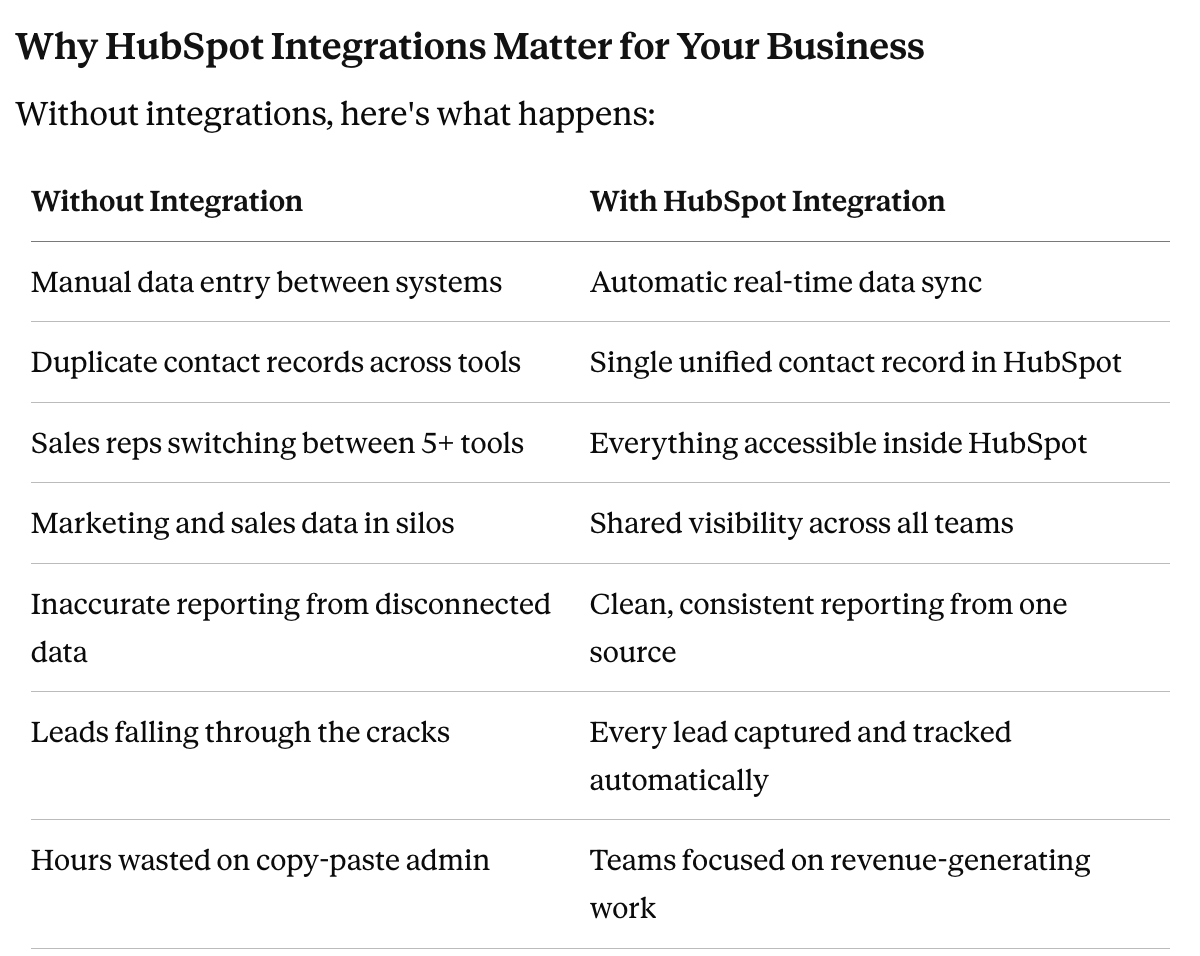
The result of a properly integrated HubSpot system: your business runs faster, your teams work smarter, and your data is always accurate.
Our Process for HubSpot Integration Success
Every integration we build follows a structured, proven process:
Step 1 Discovery & Requirements We map your existing tech stack, identify data flows, and define exactly what needs to connect, how data should sync, and what triggers should fire. This prevents scope creep and ensures the integration matches your actual business process.
Step 2 Integration Architecture We design the data model — field mapping, sync direction (one-way or bi-directional), trigger conditions, error handling, and data validation rules. For custom integrations, we also plan the API architecture.
Step 3 Build & Configuration We implement the integration — whether native setup and configuration or custom API development. All custom integrations are built to HubSpot's developer standards for reliability and maintainability.
Step 4 Testing Every integration is thoroughly tested before going live — including edge cases, error scenarios, and data validation. We test with real data in a staging environment to ensure nothing breaks in production.
Step 5 Go-Live & Monitoring We deploy the integration and monitor it closely for the first 2 weeks to catch any issues early. We provide full documentation and handover so your team understands how the integration works.
Step 6 Ongoing Support Integration environments change — tools update their APIs, business processes evolve, new fields get added. We offer ongoing retainer support to keep your integrations running smoothly as your business grows.
Why HuboExperts ?
With years of HubSpot experience, our team has successfully delivered complex multi-platform integrations for agencies, SaaS companies, and eCommerce brands.
What makes us different:
1. Certified HubSpot Experts – Skilled across Marketing, Sales, and Operations Hubs.
2. Deep Technical Expertise – API, Zapier, and workflow automation pros.
3. Process-Oriented Approach – Each integration is designed to eliminate inefficiencies.
4. Results-Driven Execution – Our goal isn’t just connecting tools, it’s connecting growth.
5. Collaborative Partnership – We work as an extension of your team.
As a certified HubSpot Gold Solutions Partner, we don't just connect tools, we understand how data flows through your CRM and build integrations that support your entire revenue operation, not just one department.
Please fill your details below
Why Businesses Choose HuboExperts for HubSpot Integrations?
| HuboExperts | Generic Developer | DIY / Zapier | |
|---|---|---|---|
| HubSpot certified | Yes | Rarely | N/A |
| Understands CRM data structure | Yes | Sometimes | No |
| Builds to HubSpot best practices | Yes | No | No |
| Handles data migration | Yes | Sometimes | No |
| Ongoing support | Yes | Sometimes | No |
| Speed of delivery | Fast | Slow | Varies |
| Trusted by 220+ businesses | Yes | — | — |
Real Results: SpacePointe Integration Case Study
SpacePointe- a global FinTech payments platform, came to HuboExperts with a fragmented tech stack. Their marketing tools, CRM, and operational systems weren't connected, creating manual data entry, reporting blind spots, and missed leads.
What HuboExperts delivered:
- Integrated all third-party tools with HubSpot, eliminating data silos completely
- Automated data flows between marketing tools and HubSpot CRM, zero manual entry
- Built custom reporting dashboards with data pulling from all connected systems
- Connected lead capture forms to HubSpot with automatic assignment and nurturing triggers
Results:
- 40% reduction in manual data entry time
- 30% increase in landing page conversion rates
- 35% improvement in lead conversion rates
- Full real-time visibility across all marketing and sales data
Read the full SpacePointe case study
Ready to Connect Your Tech Stack to HubSpot?
A disconnected tech stack is one of the biggest hidden revenue leaks in growing businesses. Every hour your team spends on manual data entry, every lead that falls through the cracks between systems, and every inaccurate report from siloed data is costing you money.
HubSpot integrations fix this- and HuboExperts makes it fast, clean, and reliable.
At HuboExperts — a certified HubSpot Gold Solutions Partner with 220+ businesses served globally- we design and build integrations that connect your entire revenue operation in one unified platform.
Book a free HubSpot integration consultation →
No obligation. No sales pressure. Just a clear assessment of what needs to connect and how we can make it happen.
Frequently Asked Questions
Q1: How many tools does HubSpot integrate with natively? HubSpot's App Marketplace has 1,500+ native integrations covering CRM, marketing, sales, service, finance, communication, and operations tools. For tools without a native integration, custom API integrations are available.
Q2: How long does a HubSpot integration take to set up? Native integrations typically take 1–3 days to configure and test properly. Custom API integrations depend on complexity — simple custom connections take 1–2 weeks, while complex multi-system integrations can take 3–6 weeks. We provide a clear timeline during the discovery phase.
Q3: What is the difference between a native and custom HubSpot integration? A native integration is a pre-built connector available in HubSpot's App Marketplace — quick to set up, maintained by the app partner. A custom integration is built specifically for your business using HubSpot's API — it gives you complete control over exactly what data syncs, when, and how, but requires development work.
Q4: Can HubSpot integrate with Salesforce? Yes. HubSpot has one of the most robust Salesforce integrations available — supporting bi-directional sync of contacts, leads, accounts, opportunities, activities, and custom objects. This is commonly used by businesses running both platforms or migrating from Salesforce to HubSpot.
Q5: Can you integrate HubSpot with WhatsApp? Yes. HubSpot has a native WhatsApp Business integration that allows you to send and receive WhatsApp messages directly inside HubSpot, trigger WhatsApp messages from workflows, and log all conversations to contact records automatically.
Q6: Can HubSpot integrate with our custom internal tool? Yes. HubSpot's open API allows integration with virtually any system — including proprietary internal tools, legacy systems, ERPs, and custom databases. HuboExperts has built custom integrations for a wide range of internal business systems.
Q7: What happens if an integration breaks? Integration failures can occur when an API is updated, authentication tokens expire, or data formats change. With HuboExperts' ongoing support retainer, we monitor your integrations and resolve issues before they affect your business operations.
Q8: Do HubSpot integrations affect my data quality? Poorly configured integrations can create duplicate contacts and data inconsistencies. This is why proper field mapping, data validation rules, and deduplication logic are essential parts of our integration setup process. We build integrations that improve data quality, not compromise it.
Q9: Can you migrate our data from another CRM while setting up integrations? Yes. Data migration and integration setup often go hand in hand. HuboExperts handles full CRM migrations from Salesforce, Zoho, Pipedrive, and legacy systems — including data cleansing, field mapping, and import validation, alongside integration setup.
Q10: How much does a HubSpot integration cost? Native integration setup typically costs $500–$2,000 depending on configuration complexity. Custom API integrations range from $2,500 to $15,000+ depending on the systems involved, data complexity, and development requirements. Contact us for a free scoping call and accurate quote.

