

Introduction
If you blinked in June, you missed a lot. HubSpot closed out the first half of 2026 with one of its biggest release waves in recent memory, and Breeze — HubSpot's AI layer — sits at the center of nearly all of it. From a full commerce rebrand to five new AI touchpoints scattered across the CRM, this month's changes aren't cosmetic. They change how reps prospect, how quotes get built, and how support tickets get routed.
At HuboExperts, we track every HubSpot release so our clients don't have to comb through changelogs themselves. This roundup covers what actually shipped in Breeze and the surrounding product ecosystem this July, who it affects, and what you should do about it before your portal drifts out of sync with what HubSpot now considers "default" behavior.

We've grouped this month's changes into four buckets: the Revenue Hub rebrand and its new billing capabilities, the five new places Breeze AI now shows up across the CRM, the wider rollout of Prospecting Agent, and a handful of service-team and admin-level changes that are easy to miss if you're not actively looking for them. By the end of this roundup you should have a clear sense of what to act on this week versus what can wait for your next quarterly review.
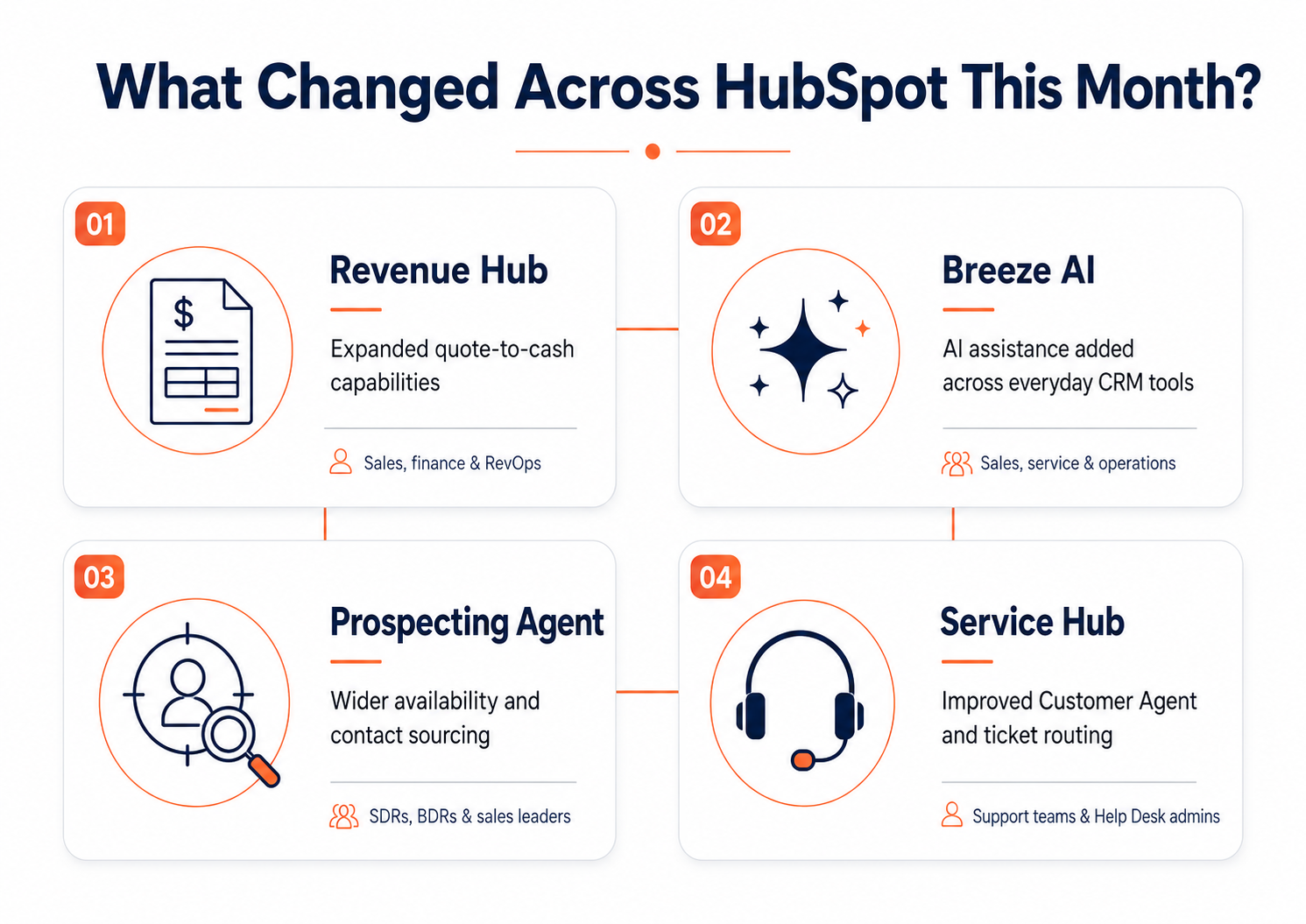
The Headline Change: Commerce Hub Is Now Revenue Hub
Before we get into Breeze specifically, it's worth flagging the biggest structural shift of the month. Commerce Hub has been renamed and expanded into Revenue Hub. This isn't just a label swap — HubSpot used the rename as an opportunity to fold in a longer list of billing, tax, and financing capabilities that had been on the roadmap for a while.
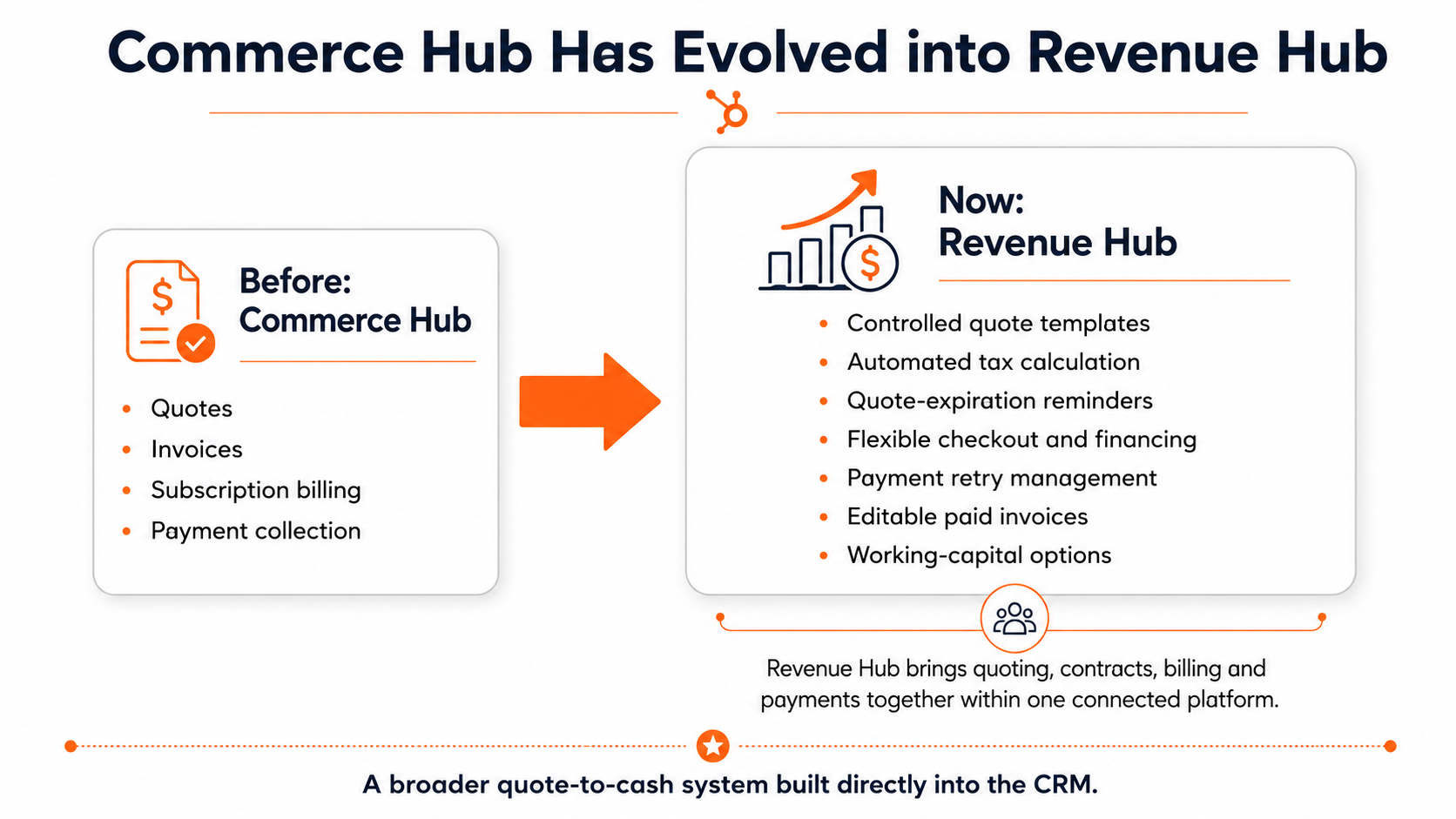
Everything that used to live under Commerce Hub — quoting, invoicing, subscription billing, payments — carries forward unchanged in terms of core functionality. What's new sits on top:
-
Locked quote templates, so admins can restrict which sections reps are allowed to edit, protecting approved pricing and legal language from accidental changes.
-
Automated sales tax calculation on quotes, based on line-item category and buyer address, with no separate tax integration required.
-
Automated quote expiration reminders that go out to signers on a schedule you set.
-
Buy-now-pay-later checkout options through Klarna and Affirm, with the seller still paid in full upfront.
-
Manual retry on failed subscription payments, so a declined card doesn't require a support ticket to resolve.
-
Editable paid invoices, with balances recalculated automatically when line items change.
-
HubSpot Capital, a working-capital financing option for US and UK customers using HubSpot Payments or Stripe.
If your team, your internal wiki, or your onboarding materials still say "Commerce Hub," it's worth a five-minute cleanup pass. HubSpot's own UI and help docs have already moved on, and new hires poking around the portal will only find "Revenue Hub" from here forward.
The naming change is easy to shrug off, but the features layered on top of it aren't. Locked quote templates, for instance, solve a genuinely common headache: a rep tweaks a discount line or deletes a legal clause on a quote without realizing it, and finance finds out after the deal has already closed. Now an admin can lock down exactly which modules are editable, so reps still have flexibility where it's safe (adding line items, adjusting quantities) without being able to touch the parts that matter for compliance or margin protection.
The automated tax and financing pieces matter for a different reason — they're aimed at reducing the number of tools stitched together around a deal. Teams that previously bolted on a separate tax engine or financing partner now have a native option inside the same record they're already working in. That won't be the right fit for every business, especially ones with complex multi-state or international tax obligations, but for straightforward domestic sellers it removes a genuine integration headache.
Breeze AI Gets Five New Places to Show Up
Breeze itself didn't get a single flashy new feature this month so much as it got everywhere. HubSpot's strategy with Breeze has consistently been to embed AI assistance directly into the workflows people are already using, rather than asking them to open a separate AI tool, and July's release leans hard into that approach.
1. Actionable search results : Global contact search now returns more than a list of matching records. Breeze generates a short summary of the contact and suggests a next action — follow up on an open deal, flag a stalled ticket, that kind of thing — right in the search results panel. It's a small change, but for reps who live in the search bar, it removes a click and a decision every single time.
2. Inline email composition : You can now invoke Breeze directly from the CRM's email composer to draft a message or get suggested phrasing without leaving the contact record. This has existed in some form before, but it's now more tightly wired into the composer itself rather than living as a separate panel.
3. AI-powered CTAs in assignment notifications : When a record gets assigned to someone, the notification email now includes an action button that opens Breeze with a pre-filled summary of the record. The idea is to shrink the gap between "I got assigned this" and "I understand what this is and what to do next."
4. Mobile meeting prep : Breeze can now generate a meeting briefing — pulled from CRM and deal context — right inside the HubSpot mobile app. This one is aimed squarely at reps who are checking their phone in a parking lot five minutes before a call, which, let's be honest, is most reps.
5. HubSpot Agent for Microsoft 365 Copilot : This is arguably the most interesting addition for larger orgs. Live deal, ticket, and contact data from HubSpot becomes accessible inside Microsoft 365 Copilot without that data ever being indexed into Microsoft 365 itself. For teams that live in Outlook and Teams all day, this closes a real gap — no more tab-switching to check deal status before replying to an email thread.
-1.png?width=1200&height=628&name=Untitled%20design%20(4)-1.png)
Breeze Projects Got a Redesign
Separately from those five touchpoints, Breeze Projects — HubSpot's shared AI workspace — was rebuilt this release. It now supports:
-
Direct file uploads into a project
-
@mentions of CRM records, so a project can pull live context from a specific deal, contact, or ticket
-
Team collaboration with permission levels, so you can control who can see or edit a given project
-
Pre-configured templates for common use cases like prospecting research and meeting prep
If you tried Breeze Projects earlier in the year and found it too bare-bones to be useful, this redesign is worth a second look. The template library in particular makes it much easier for non-power-users to get value out of it without having to figure out prompting from scratch.
Prospecting Agent Is Now Open to Everyone
Up to this point, Prospecting Agent had been limited to a smaller set of early-access accounts. That restriction is gone. Any paid HubSpot portal can now set up Prospecting Agent, with access controlled through standard user-level permissions rather than a waitlist.
Alongside the wider rollout, Prospecting Agent picked up a new integration with Seamless, which it uses to surface net-new contacts that match your defined target personas. In practice, this means the agent isn't just working the contacts already sitting in your CRM — it can go find people who aren't in your database yet but fit your ideal customer profile.
For sales teams, this is probably the single most consequential Breeze update this month. If you've been paying for a separate prospecting tool, it's worth running a side-by-side pilot before you renew that contract.
What Changed for Service Teams
Breeze's Customer Agent and the broader Help Desk experience also picked up meaningful changes:
-
Coaching Opportunities for Customer Agent, which surfaces moments where the AI's handling of a conversation could be improved, giving admins a feedback loop instead of a black box.
-
Lead Qualification Triggers, letting Customer Agent take a more active role in qualifying inbound leads before they ever reach a human rep.
-
Skill-based routing enforcement in Help Desk, along with expanded macros.
That last one deserves a flag of its own. The new routing enforcement can conflict with existing routing logic if you haven't reviewed it since the update landed, so this is one of the few July changes we'd put in the "check this before it breaks something" bucket rather than the "explore when you have time" bucket.
Smaller Changes Worth Knowing About
A few additional updates didn't make the headline list but are worth a mention:
-
Buyer Intent added 20 new company news signals, plus stakeholder and pain-point signals pulled directly from deal-related emails, notes, and call transcripts. Customers with HubSpot Credits can also build custom intent signals from plain-language descriptions rather than picking from a fixed list.
-
Segment exclusion limits were removed — the old 25-contact cap on list and segment exclusions is gone, which matters if you've been working around that limit with workflow gymnastics.
-
A new visual theme is in public beta and available to try now. It isn't mandatory yet, but it becomes the default for all portals on August 31, so it's worth switching over early to get familiar with it before HubSpot flips the switch for you.
How to Prioritize This Release
Not every item on this list needs action today. Here's how we'd sort it if we were triaging a client portal this week:
Deal with first:
-
Revenue Hub's tax and quote-template changes, since these touch live invoicing
-
Help Desk routing enforcement, since it can silently change ticket assignment behavior
Pilot before rolling out broadly:
-
Prospecting Agent, especially if you already use a separate prospecting tool
-
Breeze Projects, if your team hasn't adopted it yet
Low urgency, but worth knowing about:
-
The new visual theme
-
Search and notification-level Breeze touchpoints, which will surface naturally as people use the product
The Bigger Picture
This release wave confirms that HubSpot is no longer positioning Breeze as a separate AI feature. It is becoming part of the everyday CRM experience, appearing across search, email, notifications, mobile workflows and connected platforms such as Microsoft 365 Copilot.
At the same time, the move from Commerce Hub to Revenue Hub shows that HubSpot is expanding beyond lead generation and pipeline management. Its goal is to support more of the complete quote-to-cash journey, from building and approving quotes to collecting payments and managing financing.
For HubSpot admins, the priority should be practical rather than reactive. Start by reviewing Help Desk routing, quote-template permissions and any active payment processes. Then pilot Prospecting Agent and Breeze Projects with a small group before rolling them out across the wider team.
At HuboExperts, we help businesses assess which HubSpot updates genuinely improve operations, configure them correctly and ensure new AI features work with the portal’s existing data, workflows and governance. The strongest results will not come from turning on every new feature. They will come from choosing the right capabilities, testing them properly and connecting them to a well-structured CRM.
See AI-Powered HubSpot Automation in Action
The latest Breeze updates show how AI is becoming part of everyday CRM workflows. But getting value from AI still depends on having connected systems, structured data and the right automation underneath it.
See how HuboExperts helped Rust Construction connect Quo, HubSpot and JobTread through AI-powered automation. Incoming call transcripts were automatically analysed, qualification details were extracted and structured customer information was added to HubSpot without manual data entry.
The result was faster lead capture, more consistent qualification and a smoother handoff between sales and operations.
Frequently Asked Questions
1. What is the biggest HubSpot change in the July 2026 roundup?
The biggest structural change is the expansion of Commerce Hub into Revenue Hub. Revenue Hub brings quoting, contracts, billing and payments into a more connected quote-to-cash system within HubSpot.
2. Is Commerce Hub being discontinued?
Commerce Hub has been repositioned under the Revenue Hub name. Existing commerce functions such as quotes, invoices, subscriptions and payments form part of the expanded Revenue Hub experience. Teams should update their internal documentation, training material and process names accordingly.
3. Will existing quotes and payment configurations need to be rebuilt?
A product rename does not ordinarily require teams to rebuild their existing quote, invoice or payment setup. However, admins should review their portal, permissions and product-update notices to confirm whether any specific Revenue Hub feature requires additional configuration.
4. What should administrators check first after these updates?
Help Desk routing should be reviewed first when ticket distribution is business-critical. Administrators should test skill-based routing, fallback rules, working hours, team availability and ticket ownership to ensure conversations still reach the correct people.
5. How is Breeze becoming more useful for everyday HubSpot users?
Breeze is increasingly appearing inside the tools users already work with, including CRM research, email composition, meeting preparation, record context and prospecting. The goal is to reduce manual research and unnecessary movement between different applications.
6. What is Breeze Projects used for?
Breeze Projects provides a shared AI workspace for repeatable business tasks. Teams can use it for activities such as account research, meeting preparation, content planning, campaign briefs and CRM analysis while keeping relevant files and CRM context together.
7. Is Breeze Prospecting Agent available to every HubSpot user?
Availability can depend on the customer’s subscription, seat, region, permissions and current product rollout. Administrators should check the Product Updates area and the user-permission settings inside their own portal before planning a deployment.
8. Can Prospecting Agent replace Apollo, Zoom Info or another prospecting platform?
It may replace parts of an existing prospecting workflow, but it should not be treated as an automatic like-for-like replacement. Run a pilot comparing contact accuracy, ICP fit, research quality, reply rates, meetings booked, rep adoption and total cost before cancelling another platform.
9. Do Breeze agents use HubSpot Credits?
HubSpot’s credit model is increasingly relevant to agent usage. HubSpot states that agents will consume HubSpot Credits from July 23, 2026, and recommends reviewing estimated usage and setting execution limits to manage spending.
10. How should companies roll out these Breeze updates safely?
Start with a small group, define approved use cases, review user permissions, set credit limits and require human review for customer-facing or sales-facing outputs. Measure accuracy, adoption and business results before expanding access across the portal.

