

If your HubSpot workflows are not triggering, the most common reasons are incorrect enrollment triggers, workflow suppression settings, lifecycle conflicts, or missing property values.
Automation is one of the most powerful features inside HubSpot, but when workflows suddenly stop triggering, it can affect lead nurturing, email marketing, sales follow-ups, and overall CRM performance. Many businesses rely heavily on workflows to automate repetitive tasks, improve customer engagement, and increase conversions. However, even a small error in workflow logic can break the entire automation process.
If contacts are not entering workflows, emails are not sending, or deals are not updating automatically, the issue usually comes from trigger configuration, contact data problems, workflow conflicts, or incorrect CRM settings. Understanding why workflows fail is important for improving automation performance and maintaining a smooth customer journey.
In this blog, we will explore the most common reasons HubSpot workflows fail, how to fix workflow enrollment issues, the process of auditing workflow logic, and a real client example that shows how workflow optimization can improve marketing automation results.
“Automation applied to an efficient operation will magnify the efficiency.” — Bill Gates
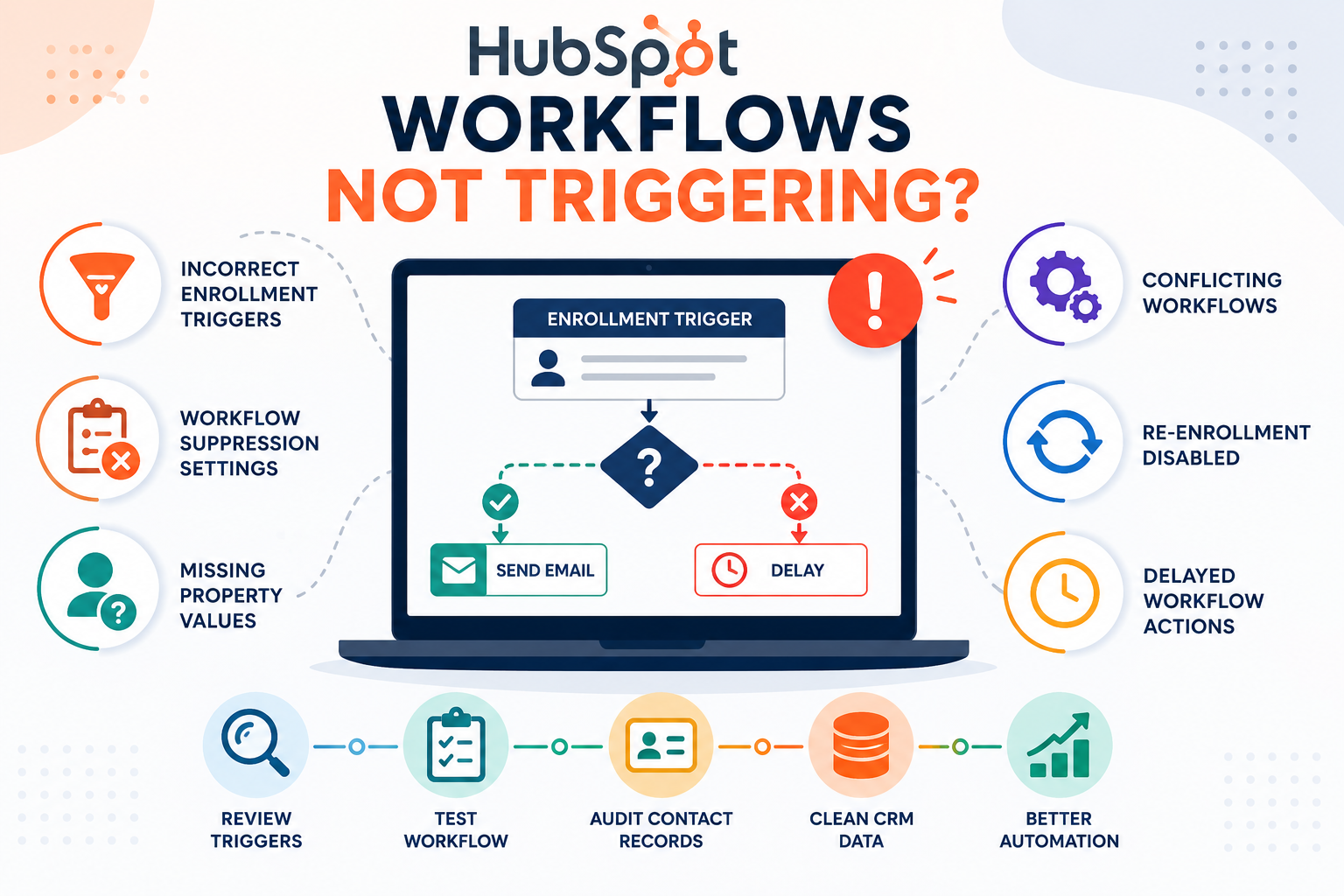
Common Reasons HubSpot Workflows Fail
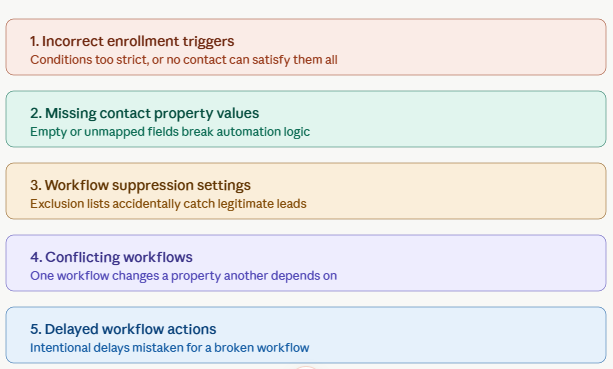
Incorrect Enrollment Triggers
Enrollment triggers are the foundation of every workflow. They determine when contacts, companies, deals, or tickets should enter an automation sequence. One of the biggest reasons workflows fail is because the trigger conditions are either too strict or incorrectly configured.
For example, many marketers accidentally create conditions that no contact can satisfy. A workflow may require a contact to have a specific lifecycle stage, form submission, and lead score simultaneously. If even one condition is missing, the contact will never enroll.
Common enrollment mistakes include:
-
Using “equals” instead of “contains”
-
Incorrect lifecycle stage selection
-
Wrong date filters
-
Conflicting AND/OR conditions
-
Using inactive lists
Sometimes businesses copy workflows from templates without checking whether the conditions match their CRM structure. This leads to automation failures and incomplete lead nurturing.
To avoid these problems, always simplify enrollment triggers and test them before activating workflows.
Missing Contact Property Values
HubSpot workflows rely heavily on CRM properties. If important data fields are empty or incorrectly mapped, the workflow may stop functioning properly.
Some commonly missing properties include:
-
Email address
-
Phone number
-
Lifecycle stage
-
Lead status
-
Deal owner
-
Form submission details
-
Country or region data
For example, if a workflow sends region-specific emails but the “Country” property is blank, the automation may fail completely.
Data quality is extremely important for marketing automation. Businesses often focus on workflow design while ignoring CRM cleanliness. Poor CRM hygiene creates workflow issues, reporting inaccuracies, and segmentation errors.
To fix this problem:
-
Standardize CRM fields
-
Remove duplicate contacts
-
Ensure forms capture required data
-
Audit integrations regularly
-
Validate imported data
A clean CRM significantly improves workflow performance and automation accuracy.
Workflow Suppression Settings
Suppression lists are used to prevent certain contacts from entering workflows. While suppression settings are useful for excluding customers, unsubscribed users, or internal employees, they can sometimes block legitimate leads unintentionally.
For example, a company may suppress all contacts tagged as “Existing Customers.” However, if lifecycle stages are incorrectly assigned, many active leads may also become suppressed accidentally.
Common suppression issues include:
-
Overlapping exclusion lists
-
Incorrect lifecycle stage filters
-
Imported suppression contacts
-
Internal testing records
-
Duplicate CRM entries
When workflows fail unexpectedly, reviewing suppression settings should be one of the first troubleshooting steps.
Conflicting Workflows
Large CRMs often contain multiple workflows running simultaneously. If these workflows modify the same contact properties, automation conflicts can occur.
For example:
-
Workflow A changes lifecycle stage from “Lead” to “Marketing Qualified Lead”
-
Workflow B only enrolls users with lifecycle stage “Lead”
As soon as Workflow A updates the property, Workflow B becomes invalid for that contact.
Conflicting workflows create problems such as:
-
Contacts skipping workflows
-
Duplicate email sends
-
Incorrect lead stages
-
Reporting inconsistencies
-
Automation loops
This issue becomes more common as businesses scale their marketing automation systems.
To reduce workflow conflicts:
-
Document workflow purposes clearly
-
Use consistent naming conventions
-
Limit unnecessary automation
-
Assign ownership to workflow management
-
Audit workflow dependencies regularly
A simplified workflow structure improves CRM organization and automation efficiency.
Delayed Workflow Actions
Many users think workflows are broken when they are actually delayed intentionally.
HubSpot allows delays such as:
-
Wait 1 day
-
Delay until a weekday
-
Delay until a contact opens an email
-
Delay until a specific date
These delays are designed to improve email timing and customer engagement. However, if users forget about these conditions, they may assume workflows are not functioning.
Another reason for delays can be workflow queue processing during periods of heavy CRM activity.
Always check workflow history and action logs before assuming the automation has failed.
How to Fix Workflow Enrollment Issues
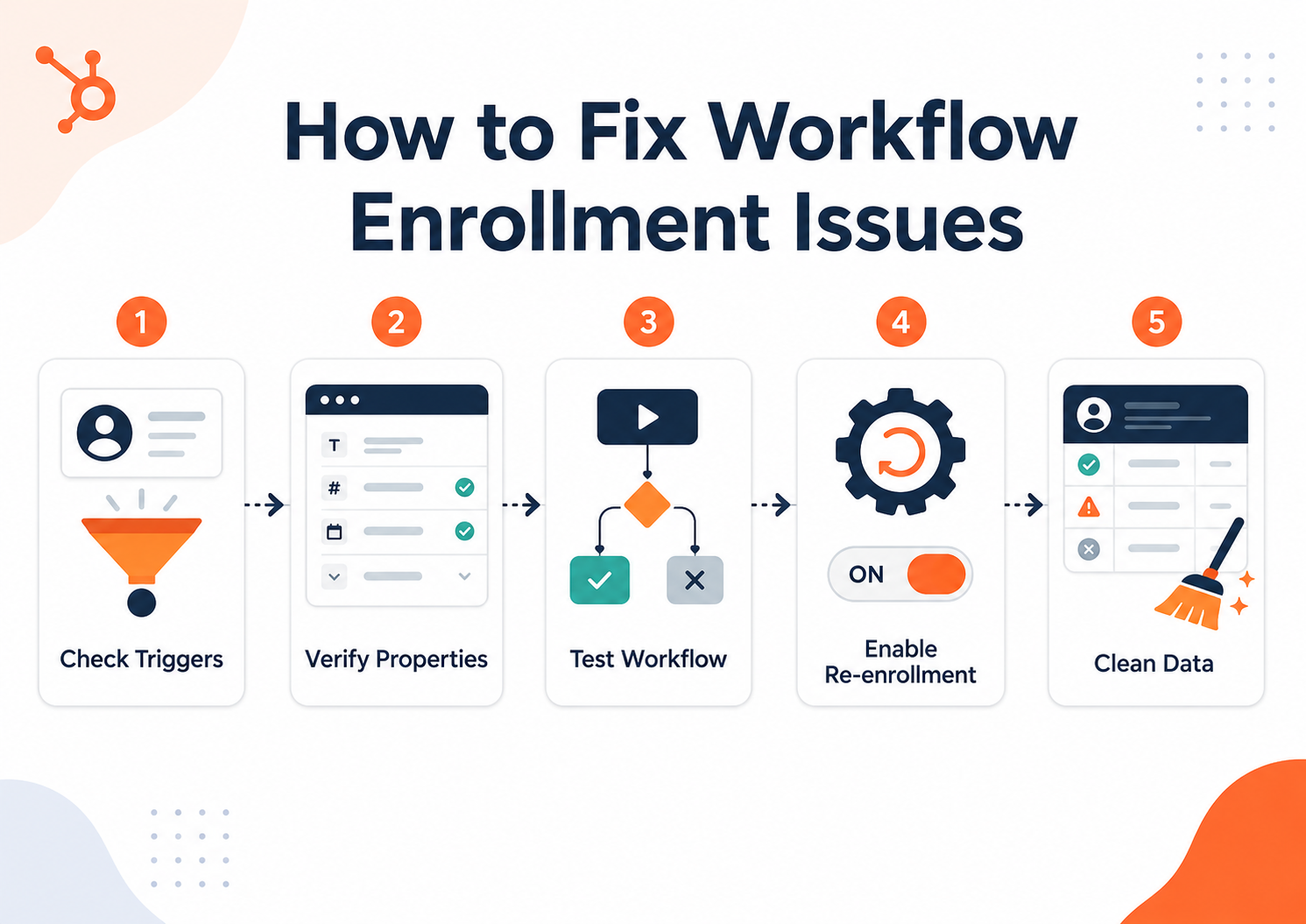
Review Workflow Triggers Carefully
The first step in troubleshooting is reviewing enrollment conditions.
Best practices include:
-
Simplifying trigger logic
-
Reducing unnecessary conditions
-
Testing workflows with sample contacts
-
Verifying property values
-
Reviewing list filters
Complex workflows are harder to debug. Simpler workflows usually perform more reliably.
Use HubSpot Workflow Testing Tools
HubSpot provides workflow testing features that help identify why contacts are not enrolling.
Testing tools can reveal:
-
Missing properties
-
Trigger mismatches
-
Workflow suppression issues
-
Re-enrollment restrictions
-
Delayed actions
Before launching any automation, businesses should always run multiple workflow tests using real CRM scenarios.
Check Contact Timelines
A contact’s activity timeline provides valuable troubleshooting information.
Review:
-
Form submissions
-
Email interactions
-
Property changes
-
Lifecycle stage updates
-
Sales activity
Sometimes the workflow is functioning correctly, but the contact never completed the required action.
Enable Re-enrollment Properly
Re-enrollment settings allow contacts to enter workflows multiple times.
Without re-enrollment:
-
Webinar attendees may only receive one email sequence
-
Repeat customers may not re-enter campaigns
-
Returning leads may miss automation
Businesses should carefully define when re-enrollment is needed.
Clean CRM Data Regularly
Workflow performance depends heavily on CRM accuracy.
Regular CRM maintenance should include:
-
Removing duplicate records
-
Updating outdated properties
-
Standardizing field formats
-
Verifying integration syncing
-
Auditing inactive contacts
Clean data improves automation reliability and reporting accuracy.
How We Audit Workflow Logic
A professional workflow audit helps businesses identify automation weaknesses and optimize CRM performance.
Step 1: Analyze the Customer Journey
We begin by understanding:
-
Lead generation sources
-
Customer touchpoints
-
Sales funnel stages
-
Conversion goals
-
Marketing objectives
This ensures workflows align with real business processes.
Step 2: Review Workflow Dependencies
Next, we evaluate:
-
Enrollment triggers
-
Branch logic
-
Delays
-
Goal criteria
-
Re-enrollment settings
-
Suppression rules
This helps identify workflow conflicts and automation gaps.
Step 3: Audit CRM Data Quality
Poor CRM data causes major workflow failures.
We check:
-
Property consistency
-
Duplicate contacts
-
Integration mapping
-
Custom field usage
-
List segmentation accuracy
Better data leads to stronger automation performance.
Step 4: Optimize Workflow Structure
Finally, workflows are simplified for:
-
Faster enrollment
-
Better segmentation
-
Improved email targeting
-
Cleaner reporting
-
Stronger lead nurturing
A streamlined CRM improves operational efficiency and customer experience.
Case Study: How HuboExperts Improved CRM Data Quality and Marketing Segmentation for SpacePointe
A common reason HubSpot workflows fail is poor CRM data quality. If contact properties are missing, lists are not maintained properly, or segmentation logic is incorrect, workflows may not trigger as expected.
SpacePointe faced similar challenges with contact management and targeted marketing. Their CRM needed a more structured approach to lists, segmentation, and contact data organization.
HuboExperts helped SpacePointe improve their HubSpot setup by focusing on better contact management, list segmentation, and smart list usage. This helped reduce contact data errors and improve the accuracy of targeted marketing campaigns.
This case study is a strong example of why workflow performance depends on clean CRM data. When properties, lists, and segmentation rules are properly managed, workflows become more reliable, contacts enroll correctly, and marketing automation performs better.
Read the full SpacePointe case study to see how HuboExperts helped improve HubSpot contact data quality and segmentation.
Frequently Asked Questions
Why isn't my HubSpot workflow triggering at all?
Nine times out of ten it's one of three things: the enrollment trigger criteria don't actually match the record you're testing with, the workflow is still in draft instead of turned on, or re-enrollment is off and the contact already passed through it once before. Check enrollment criteria first — open the contact, look at its actual property values, and compare them line by line against what the trigger requires.
Why did a contact meet the criteria but still not enroll?
HubSpot evaluates most triggers when a property changes, not continuously. If the contact already had that property value before the workflow existed, or before you added that filter, they won't retroactively enroll just because they now match. You'd need to manually enroll them or trigger the property change again.
What's the difference between "is known" and "is equal to" in workflow filters, and why does it matter?
"Is known" just checks that the property has any value at all. "Is equal to" checks for a specific value. People often build a filter expecting it to catch a specific status, but accidentally use "is known," which lets everything with any value through — or the reverse, where they're too specific and exclude records that should qualify.
Why is my workflow only enrolling some contacts and not others, even though they look identical?
Check for AND vs OR logic in your filter groups first — a misplaced "AND" where you meant "OR" silently excludes contacts that should qualify. Then check whether suppression lists or unsubscribe status are filtering some contacts out quietly in the background, which won't show up as an obvious error.
Why did my workflow work for weeks and then suddenly stop triggering?
Something upstream usually changed: a form field got renamed, a property got deprecated or merged during a cleanup, an integration that used to update a trigger property got disconnected, or someone edited the workflow itself without re-publishing it correctly. Check the workflow's revision history before assuming HubSpot is broken.
Does turning on re-enrollment fix workflows that aren't triggering for returning contacts?
Only if that's actually the problem. Re-enrollment lets contacts go through the workflow again after meeting the criteria a second time, but if they never met the criteria the first time, re-enrollment won't help — you're solving the wrong problem. Confirm initial enrollment is broken before touching that setting.
Why isn't my workflow triggering off a form submission?
Check whether the form is actually connected to the workflow's enrollment trigger or whether you accidentally set the trigger on a different form with a similar name. Also check if the contact already existed in HubSpot before submitting — depending on your trigger setup, this can sometimes prevent a "new submission" type trigger from firing the way you expect.
Can a workflow fail silently without showing an error anywhere?
Yes, and this is the most frustrating version of the problem. A workflow can be active, correctly configured, and still produce zero enrollments because the trigger condition is technically never true — no error gets logged because nothing actually went wrong from HubSpot's perspective. Use the workflow's enrollment history tab to confirm whether anyone has ever enrolled, not just whether the workflow looks "on."
Why are deal-based workflows not triggering when a deal moves stages?
Confirm the trigger is actually set to the specific pipeline and stage you expect — workflows scoped to "any pipeline" behave differently than ones scoped to a specific one, and a deal moving in the wrong pipeline simply won't match. Also check whether the stage change happened through an API or integration that might be bypassing the usual stage-change event.
How do I troubleshoot a workflow that won't trigger without just guessing?
Pull up a record you expect to qualify, open the workflow's enrollment criteria side by side, and check each filter against that record's actual current property values — not what you assume they are. Then check the enrollment history tab to see whether anyone has ever enrolled, which tells you if this is a brand-new problem or one that's always existed. Most "mystery" triggering issues turn out to be one mismatched property value once you actually look.
Conclusion
In conclusion, HubSpot workflows play a critical role in modern marketing automation and revenue operations. Even small workflow configuration issues can impact lead nurturing, sales follow-ups, reporting accuracy, and overall customer experience. Problems such as incorrect enrollment triggers, duplicate logic, missing CRM data, and workflow conflicts are some of the most common reasons automation systems fail.
Regular workflow audits, CRM data governance, proper lifecycle management, and simplified automation structures can significantly improve workflow performance and operational efficiency. Businesses that continuously optimize their automation ecosystem are better positioned to improve lead conversion, customer engagement, and long-term scalability.
At HubSpot Gold Solutions Partner HuboExperts, we help businesses build scalable CRM systems, optimize workflows, improve automation accuracy, and create revenue-focused HubSpot ecosystems designed for long-term growth.
Looking to optimize your HubSpot workflows and improve automation performance? Connect with HuboExperts for a workflow audit and strategic CRM consultation.

