

Marketing teams are under constant pressure to do more with less — more leads, more conversions, more revenue, without ballooning headcount or budget. HubSpot's automation tools are built to solve exactly that problem. Used well, they don't just save time; they directly improve the return you get on every dollar spent on marketing.
For many businesses, marketing automation is still seen as a time-saving tool. It helps send emails, assign leads, trigger reminders, and reduce repetitive manual tasks. While that is useful, it is only the starting point. The real value of HubSpot automation is much bigger. When implemented correctly, automation helps businesses improve the return they get from every marketing dollar by making the entire lead-to-customer journey more structured, measurable, and scalable.

At HuboExperts, we often see businesses investing in paid ads, content marketing, email campaigns, social media, landing pages, and lead generation activities, but losing potential revenue because their follow-up process is slow, inconsistent, or not properly tracked. Leads come in, but they are not segmented correctly. Sales teams receive poor-quality handoffs. Hot prospects are treated the same as cold contacts. Email nurturing is either too generic or completely disconnected from buyer intent. In these situations, the problem is not always the marketing channel. The problem is often the lack of a connected automation system behind it.
Here's a practical guide to using HubSpot automation to drive real, measurable ROI.
Why Automation Is a Direct Lever on ROI
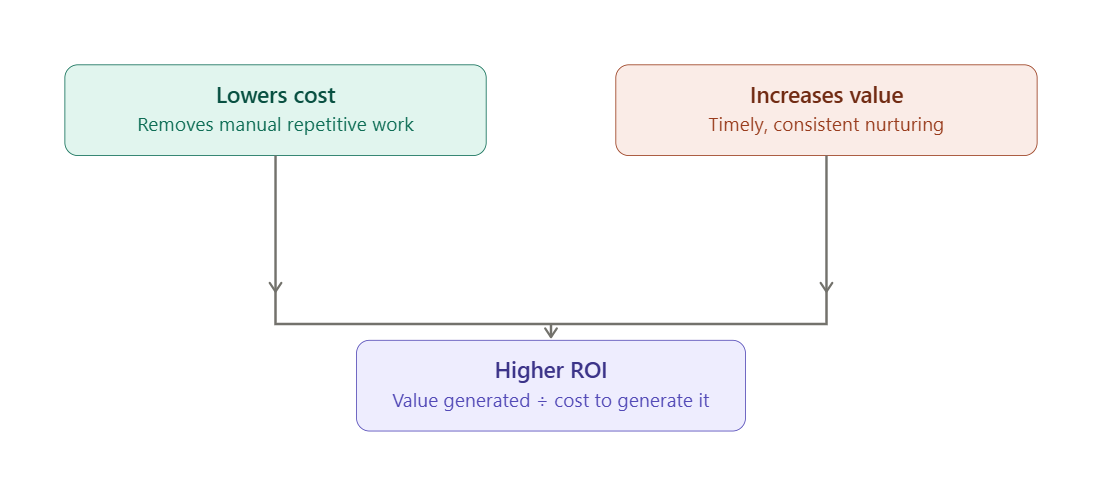
ROI is a simple equation: the value you generate divided by the cost it took to generate it. Automation attacks both sides of that equation at once.
-
It lowers cost by removing manual, repetitive work — manually tagging leads, sending one-off follow-up emails, updating deal stages, scheduling social posts.
-
It increases value by making your marketing more consistent and timely — leads get nurtured the moment they show interest, instead of days later when interest has cooled.
When you stop thinking of automation as "a nice efficiency feature" and start thinking of it as a revenue mechanism, your whole approach to setting it up changes.
Start With the Workflows That Touch Revenue Directly
Not all automation is equal. Some workflows save your team five minutes a week. Others directly move leads toward becoming customers. Prioritize the second kind first.
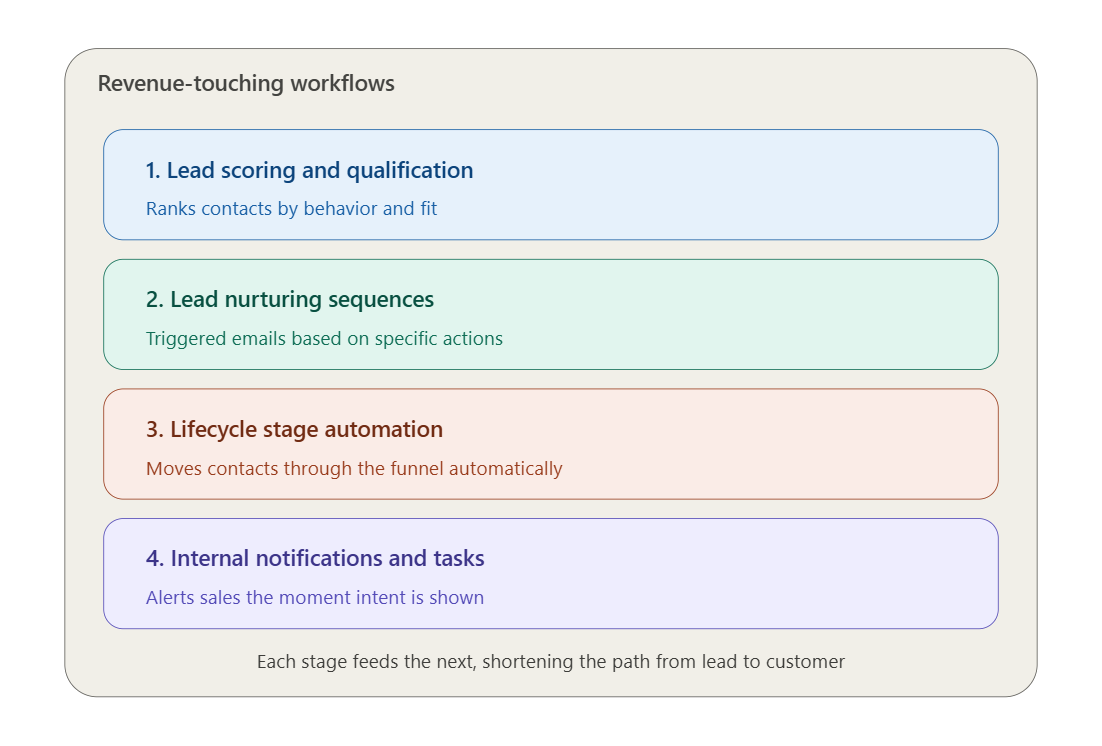
1. Lead scoring and qualification Set up HubSpot's lead scoring to automatically rank contacts based on behavior (page visits, email opens, form fills) and fit (job title, company size, industry). This means your sales team spends time on leads who are actually ready to buy, not chasing cold contacts — which improves your sales-to-close ratio and shortens your sales cycle.
2. Lead nurturing sequences Build automated email workflows triggered by specific actions: downloading a whitepaper, visiting a pricing page, abandoning a demo request. These nurture sequences keep prospects engaged without requiring a person to manually track and follow up with every single lead.
3. Lifecycle stage automation Automatically move contacts through lifecycle stages (subscriber → lead → MQL → SQL → customer) based on defined triggers. This keeps your funnel data clean and gives you accurate, real-time visibility into where revenue is actually coming from — which is essential for calculating ROI in the first place.
4. Internal notifications and task creation Automatically notify sales reps when a high-value lead takes a key action, or create follow-up tasks automatically. This reduces the lag between intent and outreach, which is often the difference between winning and losing a deal.
Connect Automation to Attribution
Automation only proves its ROI value when you can tie it back to revenue. HubSpot's reporting tools make this possible if you set them up correctly:
-
Use multi-touch attribution reporting to see which campaigns, emails, and workflows are actually contributing to closed deals — not just which ones got clicks.
-
Build custom reports and dashboards that track cost-per-lead, cost-per-customer, and revenue generated per workflow.
-
Tag campaigns consistently using UTM parameters and HubSpot's campaign tool so that every automated touchpoint can be traced back to a source.
Without this layer, automation might be working beautifully behind the scenes — and you'd have no way to prove it.
Practical Tips for Higher-Impact Automation

-
Don't automate a broken process. If your sales handoff or lead qualification criteria are unclear, automating it just scales the confusion. Fix the process first, then automate it.
-
Segment before you automate. Generic workflows sent to your entire database tend to underperform. Use HubSpot's lists and smart content to tailor workflows to specific personas or behaviors.
-
Test before scaling. Use A/B testing on subject lines, send times, and content within workflows. Small improvements compound quickly across an automated sequence running continuously.
-
Audit your workflows quarterly. Automation that made sense a year ago may be stale today. Old workflows can quietly hurt deliverability or send irrelevant content if left unchecked.
-
Combine automation with personalization tokens. HubSpot allows dynamic personalization (name, company, behavior-based content) inside automated emails — this keeps automated outreach from feeling robotic, which protects conversion rates.
Measuring the ROI Itself
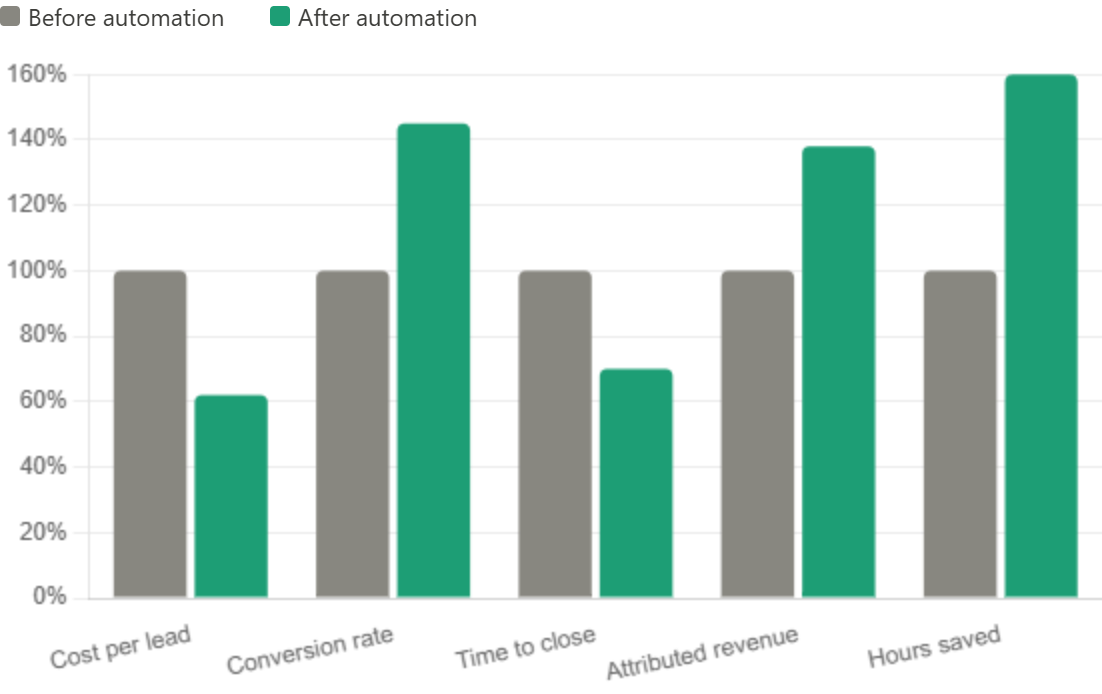
To actually quantify the ROI of your HubSpot automation, track these metrics over time:
| Metric | What It Tells You |
|---|---|
| Cost per lead (before vs. after automation) | Efficiency gains in lead generation |
| Lead-to-customer conversion rate | Whether nurturing is actually working |
| Time-to-close | Whether automation is speeding up the sales cycle |
| Marketing-attributed revenue | Direct contribution to the bottom line |
| Hours saved on manual tasks | Operational efficiency, translated to cost savings |
Compare these metrics from before automation was implemented (or before key workflows were added) to after, over a comparable time period. That before-and-after comparison is usually the clearest way to demonstrate ROI to stakeholders.
Related Case Study: How SpacePointe Improved Marketing Performance with HubSpot Automation
A strong example of HubSpot automation improving marketing ROI is the work HuboExperts completed for SpacePointe, a financial technology company that wanted to modernize its sales and marketing process.
Before working with HuboExperts, SpacePointe faced several challenges inside HubSpot. Their email engagement was low, landing pages were not converting well, reporting was difficult to manage, and lead nurturing workflows were not fully optimized. As a result, the team had limited visibility into which marketing activities were actually helping generate qualified leads and move prospects closer to conversion.
HuboExperts helped SpacePointe improve its HubSpot setup by implementing targeted email campaigns, advanced segmentation, A/B testing, optimized landing pages, progressive profiling, automated lead nurturing workflows, lead scoring, and simplified reporting dashboards. These improvements helped SpacePointe create a more structured marketing system where contacts could be segmented properly, leads could be nurtured based on behavior, and marketing performance could be measured more clearly.
The results were directly aligned with marketing ROI. SpacePointe achieved a 20% increase in email open rates, a 15% decrease in unsubscribe rates, a 30% increase in landing page conversion rates, and a 25% increase in qualified leads generated from their revamped landing pages. HuboExperts also helped reduce manual data entry time by 40%, improve data accuracy by 25%, and improve lead conversion rates by 35% through HubSpot lead scoring and workflow automation.
This case study shows why HubSpot automation is most powerful when it is connected to real marketing outcomes. Instead of only saving time, the automation system helped SpacePointe improve engagement, increase qualified leads, reduce manual work, and create a clearer view of marketing performance.
Final Thoughts
HubSpot automation delivers the strongest ROI when it is built around your actual revenue process, not just around convenience or time-saving tasks. Many businesses start with automation by asking, “What can we automate?” but the better question is, “Which parts of our marketing and sales process directly influence revenue, and how can automation make them faster, clearer, and more measurable?”
At HuboExperts, we believe automation should never be treated as a set-it-and-forget-it function. It should be designed as a revenue growth system that connects marketing activity, sales follow-up, customer engagement, and attribution data in one clear flow. When workflows are created with this mindset, HubSpot becomes more than a CRM or marketing tool. It becomes the operating system behind your revenue engine.
The most effective HubSpot automation strategies are the ones that move leads closer to becoming customers. This means prioritizing workflows that improve lead response time, segment contacts based on real behavior, assign leads to the right sales owner, nurture prospects based on buying intent, and alert teams when action is needed. A workflow should not exist just because it is possible to build it. It should exist because it supports a measurable business outcome.
The real value of HubSpot automation is not just efficiency. The real value is predictability. When your workflows are aligned with your funnel, your CRM data is clean, your attribution is accurate, and your team knows exactly what happens at every stage, your revenue engine becomes easier to manage, measure, and scale.
For growing businesses, this is where HubSpot becomes extremely powerful. It allows you to bring marketing, sales, service, and reporting into one connected system. But the results depend on how well the system is planned, built, and optimized. Automation without strategy can create confusion. Automation with the right revenue strategy can create a scalable foundation for long-term growth.
At HuboExperts, we help businesses build HubSpot automation systems that are practical, measurable, and aligned with real revenue goals. From lead nurturing and lifecycle stage management to attribution reporting, sales handoffs, customer journeys, and ROI dashboards, the goal is always the same: make HubSpot work as a clear, connected, and revenue-focused platform.
When automation is built correctly, your team does not just work faster. They work smarter, your pipeline becomes easier to understand, and your marketing ROI becomes easier to prove.
Frequently Asked Questions
1. What is HubSpot marketing automation? HubSpot marketing automation refers to using built-in tools like workflows, lead scoring, and lifecycle stage triggers to automatically execute marketing actions — such as sending emails, updating contact properties, or notifying sales — based on a contact's behavior or attributes, without manual intervention.
2. How does HubSpot automation actually improve marketing ROI? It improves ROI by lowering the cost side of the equation (less manual work, fewer wasted hours on repetitive tasks) while increasing the value side (faster follow-up, more consistent nurturing, better-qualified leads reaching sales). Since ROI is value divided by cost, automation moves both numbers in your favor at once.
3. Which HubSpot automation workflows should I set up first? Start with workflows that touch revenue directly:lead scoring and qualification, lead nurturing sequences, lifecycle stage automation, and internal sales notifications. These have the most direct impact on conversion and close rates compared to lower-priority automations like social scheduling.
4. Can HubSpot automation work without good attribution tracking? It can run, but you won't be able to prove its ROI without attribution. Multi-touch attribution reporting, consistent UTM tagging, and HubSpot's campaign tool are what let you trace automated touchpoints back to actual closed revenue.
5. Should I automate a process that isn't working well yet? No. Automating a broken process just scales the dysfunction faster. Fix the underlying process — like unclear lead qualification criteria or a messy sales handoff — before building automation around it.
6. How do I measure the ROI of HubSpot automation specifically? Track metrics before and after implementing key workflows: cost per lead, lead-to-customer conversion rate, time-to-close, marketing-attributed revenue, and hours saved on manual tasks. Comparing these over a similar time period gives you a clear before-and-after picture.
7. Does HubSpot automation work for small marketing teams? Yes — in fact, smaller teams often see the biggest relative ROI gains, since automation replaces manual work that a small team can't otherwise scale. Starting with one or two high-impact workflows (like lead nurturing) is usually more effective than trying to automate everything at once.
8. How often should I review or update my HubSpot workflows? Audit your workflows at least quarterly. Workflows that made sense a year ago can become outdated, hurt email deliverability, or send irrelevant content to contacts whose behavior or segment has changed.
9. Does personalization matter in automated campaigns? Yes. Automated emails that use personalization tokens (name, company, behavior-based content) consistently outperform generic blasts, because they avoid feeling robotic — which directly protects conversion rates and therefore ROI.
10. What's the biggest mistake marketers make with HubSpot automation? Treating automation as "set and forget." The biggest ROI gains come from teams that continuously test (subject lines, send times, segmentation), monitor attribution data, and refine workflows based on what's actually converting — not just letting workflows run unchanged indefinitely.

