

Acquiring a new SaaS customer can cost significantly more than retaining an existing one. However, many SaaS businesses still focus most of their HubSpot investment on lead generation, paid campaigns, and sales pipeline reporting, while customer retention is managed through manual processes and disconnected spreadsheets.
In 2026, retention has become one of the most important growth metrics for SaaS companies, making HubSpot CRM for SaaS companies a key solution for improving customer relationships, increasing engagement, and driving long-term growth. Metrics such as Net Revenue Retention (NRR), customer health, product adoption, renewals, and expansion revenue show whether customers continue to receive value from your product over time.

HubSpot now gives SaaS teams the tools to manage retention directly within their CRM. With customer health scores, churn-risk alerts, renewal pipelines, automated workflows, customer success reporting, and AI-powered insights, businesses can identify at-risk accounts earlier and take action before churn becomes a problem.
For SaaS companies, sustainable growth is not only about acquiring new customers. It also depends on reducing churn, improving product adoption, strengthening customer relationships, and finding expansion opportunities within existing accounts.
In this guide, HuboExperts explains how to set up HubSpot for SaaS retention in 2026. You will learn which HubSpot hubs and tiers may support your retention strategy, how to create a meaningful customer health score, how to automate renewals, and which reports can help you measure retention performance.
Why SaaS Retention Matters in 2026
-1.png?width=1200&height=628&name=Untitled%20design%20(2)-1.png)
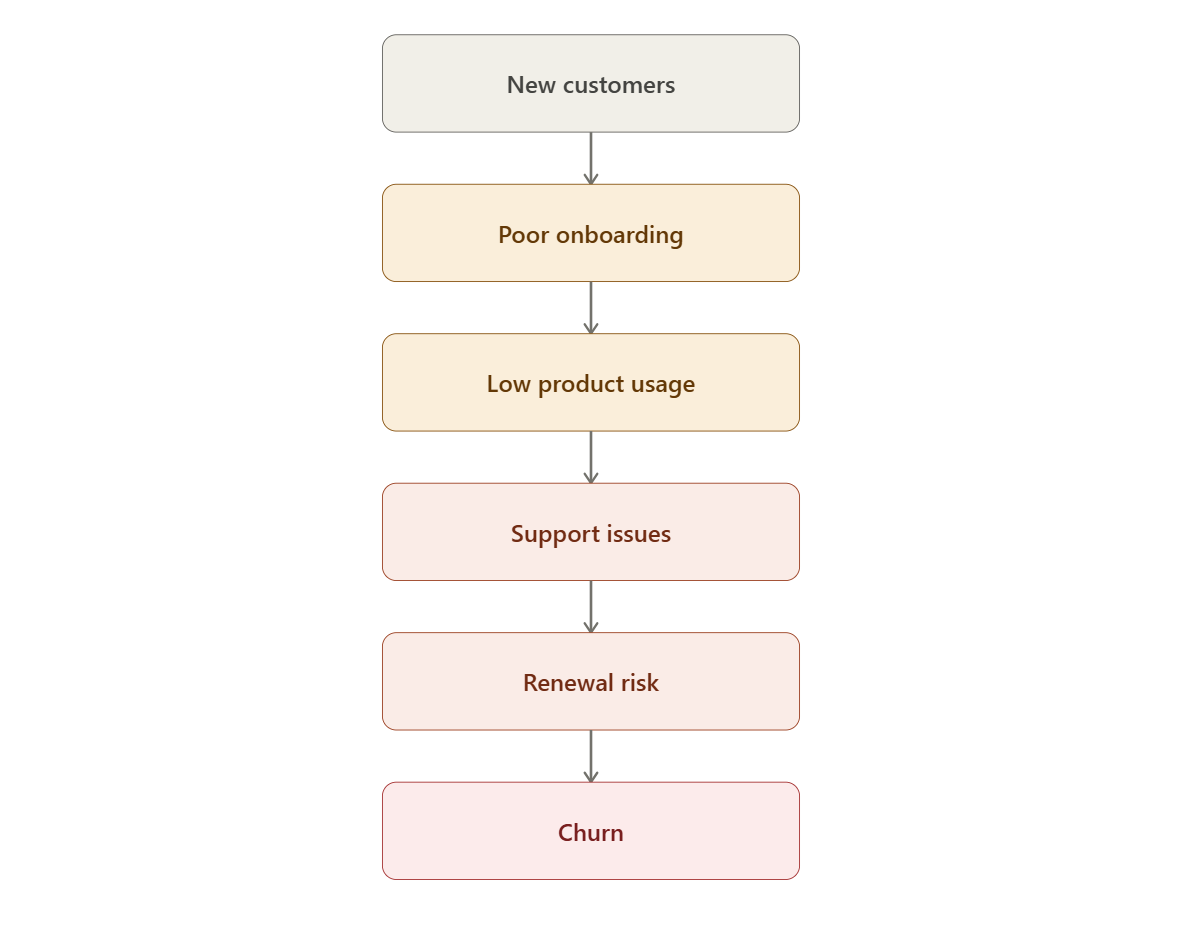
SaaS growth is no longer just about filling the top of the funnel. Many SaaS companies spend heavily on acquisition but lose revenue because customers do not adopt the product properly, renewal conversations start too late, or customer success teams do not have early warning signals.
Retention matters because it directly impacts:
-
Monthly recurring revenue
-
Annual recurring revenue
-
Customer lifetime value
-
Churn rate
-
Net revenue retention
-
Expansion revenue
-
Customer satisfaction
-
Forecast accuracy
A SaaS company with strong retention does not only keep customers for longer. It also creates more opportunities for upsells, cross-sells, referrals, and long-term customer advocacy.
The challenge is that retention data is often spread across multiple tools. Product usage may be in one platform, support tickets in another, subscription data somewhere else, and customer success notes inside spreadsheets or separate systems.
HubSpot CRM helps solve this by bringing customer data, communication history, workflows, tickets, deals, tasks, and reporting into one connected system.
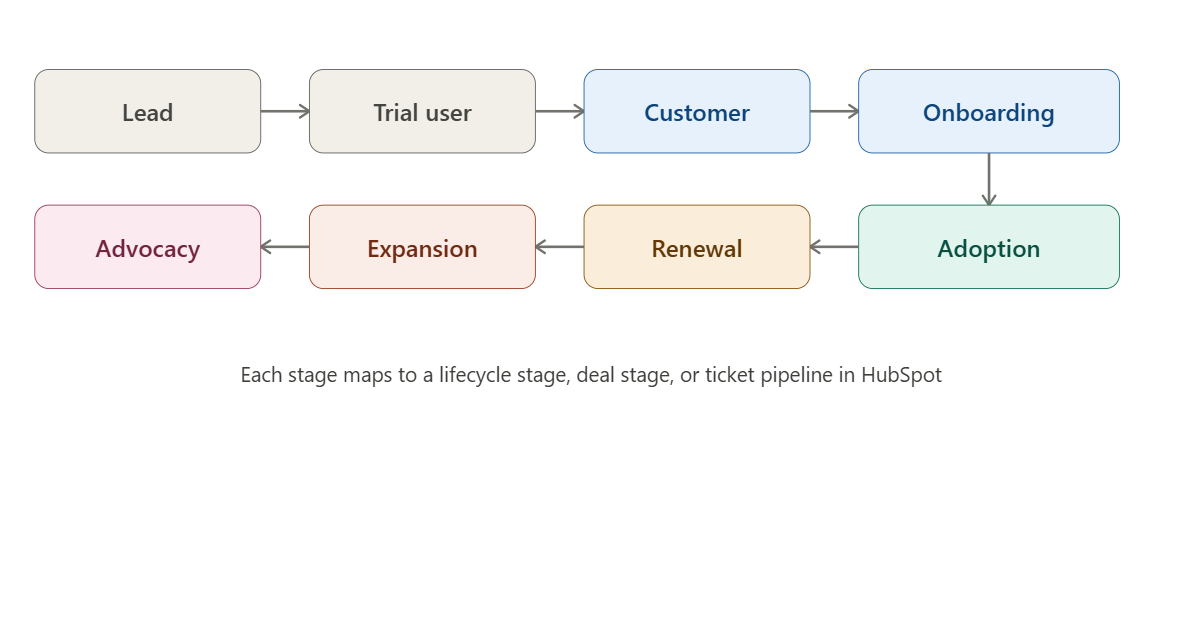
Build the Complete SaaS Customer Journey in HubSpot
The SaaS customer retention journey in HubSpot starts from the moment a lead enters the CRM and continues through trial usage, customer conversion, onboarding, adoption, renewal, expansion, and advocacy. Each stage represents a different part of the customer lifecycle and should be mapped properly inside HubSpot using lifecycle stages, deal stages, ticket pipelines, custom properties, and automation. For example, leads and trial users can be managed by the sales and marketing team, while customers moving into onboarding and adoption can be supported through customer success workflows and ticket pipelines. Once the customer reaches the renewal stage, HubSpot can help trigger renewal reminders, health score checks, and account review tasks.
If the customer shows strong product usage and engagement, they can move into expansion opportunities such as upsells or cross-sells. Finally, satisfied customers can become advocates through referrals, reviews, testimonials, or case studies. This complete journey helps SaaS companies use HubSpot not just as a CRM, but as a structured retention system that connects sales, onboarding, support, and customer success teams in one place.
Why Retention Is the SaaS Metric of 2026
A small drop in churn produces an outsized jump in revenue, because retained customers compound — they renew, expand, and refer. That's the entire logic behind treating retention as a CRM function rather than a support afterthought.
Three shifts are pushing SaaS teams toward CRM-native retention tooling this year:
-
Capital is more expensive. New-logo acquisition through paid channels costs more per lead than it did two years ago, so every renewal saved is cheaper growth than a new deal won.
-
Buyers expect proactive service. Customers increasingly expect a vendor to flag a problem before they have to open a ticket — reactive support reads as poor product experience.
-
Data lives in too many places. Product usage sits in the app, support tickets sit in a help desk, billing sits in Stripe, and the deal sits in the CRM. Without one record, nobody sees the full risk picture until it's too late.
HubSpot's answer is to put all of that inside the CRM record itself, so a renewal conversation and a support escalation are reading from the same page.
What's New in HubSpot for Retention in 2026
If you set up HubSpot a year or two ago, a few things changed worth knowing before you rebuild your retention stack:
| Update | What it does for retention |
|---|---|
| Customer Success Workspace (Service Hub Pro/Enterprise) | Dedicated book-of-business view with health scores, renewal pipeline, and usage data in one workspace |
| Breeze Customer Agent (multi-brand support) | AI agent answers tickets 24/7 and can run separate brand voices/knowledge bases if you serve multiple products |
| Onboarding & Success Plans | Turns the Projects object into a structured onboarding pipeline, shareable with the customer via portal |
| Snowflake direct sync (beta) | Pulls product usage and billing-health data straight into CRM records without middleware |
| Predictive churn scoring (Enterprise) | Custom health-score algorithms and predictive analytics, not just rule-based scoring |
| Notetaker with Smart Deal Progression | Auto-suggests CRM updates and next steps after calls — useful for CSMs who skip logging renewal conversations |
The HubSpot Retention Stack: What You Actually Need
Retention features are split across Service Hub and the broader Smart CRM, and the tier you're on determines what's available.
| Tier | Price (per month, approx.) | Retention capability |
|---|---|---|
| Free CRM | $0 | Contact timeline, basic tickets, manual health tracking |
| Starter | ~$20/user | Ticket pipelines, shared inbox, simple automation |
| Professional | ~$50/user | Customer health scoring, renewal tracking, customer success workspace, NPS/CSAT surveys |
| Enterprise | ~$75/user | Custom health-score algorithms, predictive churn analytics, advanced workflow automation, executive dashboards |
Customer Success Management — the actual health-scoring and renewal workspace — is only available on Service Hub Professional or Enterprise. If retention is a board-level priority, the Professional tier is the realistic starting point; Enterprise is worth it once you have enough historical data for predictive scoring to be statistically meaningful rather than a guess.
Step 1: Build a Single Customer Record (Stop the Data Silos)
Before any score or workflow matters, every team touching the customer — sales, onboarding, support, and product — needs to write to the same record.
What to connect:
-
Deals and billing — renewal date, contract value, plan tier
-
Support tickets — volume, resolution time, sentiment
-
Product usage — login frequency, feature adoption, seat utilization (via native integration, Snowflake sync, or a webhook if your product analytics tool isn't natively supported)
-
Marketing engagement — email opens, webinar attendance, community participation
If product usage doesn't sync natively, the practical fallback most SaaS teams use is a webhook from their product analytics tool Amplitude, Mixpanel, or a custom event pipe) into a custom HubSpot object or custom contact/company properties. This is the single most common gap in HubSpot retention setups — sales and support data sync easily; usage data takes deliberate engineering work.
Step 2: Build a Health Score That Actually Predicts Churn
A health score is only useful if it's built from leading indicators, not lagging ones. Contract value and tenure tell you who's valuable — they don't tell you who's about to leave.
In Professional, you build this with HubSpot's standard health score tool using weighted properties. In Enterprise, you can build a custom algorithm and let predictive analytics flag risk patterns that a simple weighted average would miss — for example, a customer with high usage but a recently departed champion, which a static score might rate as "healthy" right up until the day they cancel.
Set three tiers (Healthy / At Risk / Critical) and automate what happens at each threshold — that's the next step.
Step 3: Automate the Churn-Risk Workflow
A health score that doesn't trigger an action is just a number on a dashboard. Build workflows so a status change does something automatically:
-
Health score drops to "At Risk" → Task created for the assigned CSM, due in 24 hours, with context pulled from the record (last login, last ticket, contract end date)
-
No product login in 14 days (for usage-based SaaS) → Automated check-in email triggered, CC'd to CSM
-
CSAT score below threshold after a ticket → Escalation task to support manager + flag added to account record
-
Contract renewal inside 90 days AND health = Critical → Alert to CSM's manager and a save-play sequence (call + executive outreach) kicks off, not just an email
This is where Service Hub's automation and the customer success workspace genuinely save CSMs from babysitting a spreadsheet — the system surfaces who needs attention today instead of someone manually scanning every account weekly.
Step 4: Use HubSpot for Onboarding (Where Most Churn Actually Starts)
A large share of SaaS churn is decided in the first 90 days, before a customer ever reaches a "renewal" stage. HubSpot's Onboarding and Success Plans (built on the Projects object) let you:
-
Create a templated onboarding pipeline shared with the customer through the portal, so they see their own progress
-
Assign milestone-based tasks (kickoff call, integration complete, first value moment, training complete)
-
Track time-to-value per cohort, so you can see which onboarding step actually correlates with later retention
If a customer stalls at the "integration complete" milestone for more than two weeks, that's a far better churn predictor than waiting for a renewal-month health score to flag them.
Step 5: Run the Renewal Motion Inside the CRM, Not Outside It
Treat renewals like a sales pipeline, because that's effectively what they are.
A simple renewal pipeline structure:
-
120 days out — Renewal deal auto-created from the original deal record; CSM notified
-
90 days out — QBR scheduled; usage and ROI summary auto-generated from CRM data
-
60 days out — Commercial terms discussed; expansion or downgrade risk flagged
-
30 days out — Contract sent; if health score is "At Risk," save-play sequence activates automatically
-
Renewal closed — Deal marked won/lost with reason code captured (critical for the next step)
Capturing a churn reason code on every lost renewal is the step teams skip most often — and it's the one that turns your CRM into a feedback loop instead of just a record-keeper. Without it, you can see that churn happened, never why.
Step 6: Report on Retention the Way Leadership Actually Reads It
Build a dashboard, not a pile of individual reports. The metrics that matter for a SaaS retention dashboard:
| Metric | What it tells you | Where it lives in HubSpot |
|---|---|---|
| Net Revenue Retention (NRR) | Whether expansion is outpacing churn | Custom report combining deal + renewal data |
| Gross churn rate | Raw logo loss, no expansion offset | Renewal pipeline win/loss report |
| Health score distribution | How many accounts are trending risky right now | Customer Success Workspace |
| Time-to-first-value | Onboarding speed, a leading churn indicator | Success Plans / Projects reporting |
| CSAT/NPS trend | Whether sentiment is improving or sliding | Service Hub feedback surveys |
| Ticket volume per account | Support burden as a churn proxy | Service Hub reporting |
Enterprise customers can build executive dashboards that combine all six into a single view CSMs, support managers, and finance can all look at without arguing about whose number is right.
A Realistic 2026 Setup Timeline
Large enterprises report fully operationalizing Service Hub's customer success tooling in around 13 weeks on average. For a mid-market SaaS team, a tighter, phased rollout looks like this:
| Phase | Weeks | Focus |
|---|---|---|
| Foundation | 1–3 | Unify data sources, connect product usage, clean up properties |
| Scoring | 4–6 | Build and test health score, validate against known churned accounts |
| Automation | 7–9 | Build churn-risk workflows, onboarding pipeline, renewal pipeline |
| Reporting | 10–11 | Build retention dashboard, set up exec-facing reports |
| Rollout | 12–13 | Train CSMs and support team, document playbooks, go live |
Common Mistakes That Quietly Kill Retention Efforts

Retention does not usually fail because one major thing goes wrong. In most SaaS companies, retention breaks slowly because small operational gaps are ignored for too long. The CRM may have customer data, the support team may have ticket history, the CSM may know which accounts are unhappy, and the sales team may know which renewals are at risk — but if none of this information is connected, the business only reacts after the customer has already decided to leave.
A strong retention system inside HubSpot CRM is not just about tracking metrics. It is about making sure every risk signal leads to action. Below are some common mistakes that quietly reduce renewal rates, increase churn, and make customer success teams reactive instead of proactive.
Treating Health Score as a Vanity Metric
A customer health score is only useful if it creates action. Many SaaS companies build a health score in HubSpot, display it on a dashboard, and then stop there. The number may look useful, but if no one is notified when the score drops, it becomes just another CRM field.
For example, if an account moves from healthy to at risk, HubSpot should automatically create a task for the customer success manager, notify the account owner, or move the account into a retention workflow. Without this, the team may only notice the problem during a renewal review, when it is already too late.
The goal is not just to measure customer health. The goal is to use health data to trigger the right next step. A score should help the team decide who needs outreach, who needs product education, who needs executive attention, and who may be ready for expansion.
Skipping the Churn Reason Code on Lost Renewals
When a customer churns, most teams record the renewal as lost and move on. This creates a serious long-term problem because the business loses the opportunity to understand why the customer left.
Every lost renewal should include a clear churn reason code. Common examples include low product adoption, missing features, pricing concerns, poor onboarding, lack of executive buy-in, support dissatisfaction, competitor switch, or no measurable ROI. Without these reasons, the same mistakes repeat across future accounts.
In HubSpot, churn reason should be made mandatory when a renewal deal is marked as closed lost. This gives leadership a reliable view of why customers are leaving. Over time, the data can show whether churn is caused by product gaps, customer fit issues, onboarding weakness, poor usage, or pricing pressure.
Retention improves when churn data becomes a learning system, not just a reporting field.
Keeping Product Usage Data Disconnected from the CRM
One of the biggest retention mistakes in SaaS is keeping product usage data outside HubSpot. Sales and support data usually get connected quickly because they are easier to manage inside the CRM. But product usage data often stays in the product analytics tool, database, or separate dashboard.
This creates a blind spot. A customer may stop logging in, stop using key features, reduce seat activity, or avoid important workflows — but the CSM may not know until the renewal conversation. By then, the customer may already feel the product is not delivering enough value.
For SaaS retention, HubSpot should capture the most important usage signals. This does not mean syncing every product event. It means syncing the indicators that matter, such as last login date, active users, feature adoption, usage frequency, license utilization, onboarding completion, and product engagement score.
When usage data is connected to HubSpot, teams can build workflows around real customer behavior. Low usage can trigger education emails, CSM tasks, training invitations, or renewal risk alerts. This turns HubSpot from a record-keeping CRM into an active retention engine.
Building the Health Score Once and Never Updating It
A health score is not something a SaaS company should build once and forget. Customer behavior changes, product features evolve, pricing changes, market expectations shift, and churn patterns become different over time.
A health score that worked last year may not be accurate today. For example, support ticket volume may not always indicate risk. Some high-value customers create many tickets because they are actively using the product. At the same time, a silent customer with no tickets may actually be disengaged and close to churn.
That is why SaaS companies should revalidate the health score regularly against actual churned accounts. Look at the customers who left and ask: did the health score detect risk early enough? Which signals were missing? Were some signals overweighted? Did low engagement, poor onboarding, inactive users, or delayed support response show up before churn?
In HubSpot, health scoring should be treated as a living model. Review it quarterly or at least twice a year, especially if your customer base, product usage patterns, or renewal process changes.
Assigning Renewal Ownership to Whoever Has Time
Retention suffers when renewal ownership is unclear. In many teams, renewals are handled by whoever is available — sometimes sales, sometimes customer success, sometimes the account manager, and sometimes no one until the renewal date is close.
This approach creates confusion. Customers may receive inconsistent communication, internal teams may assume someone else is handling the account, and renewal risks may go unnoticed. For SaaS companies, every renewal should have a clear owner inside the CRM.
HubSpot should track the renewal owner, renewal date, renewal stage, account health, last customer touchpoint, and next required action. When ownership is visible, leadership can see which accounts are being managed properly and which ones are slipping through the cracks.
A renewal is not just an invoice event. It is the result of the customer’s entire experience with the product. Assigning clear ownership ensures that someone is responsible for protecting the relationship, identifying risk, creating expansion opportunities, and moving the renewal forward.
Case Study: How SAMA Improved Revenue Visibility and Customer Operations with HubSpot
SAMA, a B2B professional coaching platform, needed a cleaner and more scalable CRM system to manage its growing sales and customer operations. Before working with HuboExperts, the team was dealing with scattered contact data, limited pipeline visibility, manual reporting, and inefficient lead capture processes.
HuboExperts helped SAMA rebuild its HubSpot CRM foundation by cleaning and organizing the contact database, improving sales pipeline visibility, setting up a custom deal card system, automating board pack creation, and streamlining website-to-CRM lead capture. Spam booking filters were also implemented to reduce unnecessary meeting disruptions and keep the team focused on qualified opportunities.
For SaaS and subscription-based businesses, this kind of CRM setup is especially important. Retention depends on having accurate customer data, clear visibility into account activity, and a structured process for follow-ups, renewals, and customer engagement. When teams rely on manual tracking or incomplete CRM data, at-risk customers can easily be missed.
With HubSpot, SAMA was able to create a more reliable revenue operation where sales and customer-facing teams had better visibility, cleaner data, and faster access to the information they needed. This made it easier to manage relationships, track opportunities, and support long-term customer growth.
This is a strong example of how HubSpot CRM can support SaaS retention by improving data quality, operational visibility, automation, and team alignment.
Final Thoughts
SaaS retention in 2026 requires more than occasional check-ins and renewal reminders.
Your team needs a connected CRM system that tracks customer health, product adoption, support activity, renewal timelines, and expansion opportunities.
HubSpot CRM can help SaaS companies manage the full customer lifecycle from onboarding to renewal and expansion. With the right workflows, dashboards, and customer success processes, HubSpot can become a powerful retention engine for your SaaS business.
If your SaaS company wants to reduce churn, improve customer success visibility, and build smarter retention workflows, HuboExperts can help.
FAQs
Does HubSpot replace a dedicated customer success platform like Gainsight or Catalyst?
For most SaaS companies under a few thousand accounts, Service Hub Professional/Enterprise now covers health scoring, renewal tracking, and onboarding well enough to skip a second platform. Companies with very large, highly segmented customer bases and complex product-usage modeling may still find a dedicated CSM tool worth the added cost and integration overhead.
What's the minimum HubSpot tier for serious retention work?
Service Hub Professional. The free and Starter tiers don't include customer health scoring or the customer success workspace.
How long does it take to see retention results after setup?
Expect to see workflow and onboarding improvements within the first quarter, but NRR movement typically takes two to three renewal cycles to show clearly, since renewals are often annual.
Can HubSpot predict churn, or only flag it after the fact?
Enterprise tier includes predictive health-score algorithms that use historical patterns to flag risk before obvious signals (like a support ticket spike) appear. Professional tier's scoring is rule-based and reactive to the signals you define.
How can SaaS teams use HubSpot CRM to track renewal risk?
SaaS teams can track renewal risk in HubSpot by combining customer health scores, support ticket volume, product engagement, renewal dates, payment status, and CSM activity into one customer view. When risk signals appear, workflows can automatically create tasks, notify account owners, or trigger re-engagement campaigns before the renewal date arrives.
What HubSpot properties should SaaS companies track for retention?
Key retention properties include renewal date, contract value, subscription plan, customer health score, product usage level, last login date, support ticket count, NPS score, churn risk reason, renewal owner, expansion opportunity, and onboarding status. These fields help teams segment accounts and take action before churn happens.
Can HubSpot help improve net revenue retention for SaaS companies?
Yes. HubSpot can support net revenue retention by helping teams identify upsell opportunities, monitor account health, automate renewal follow-ups, and keep sales, support, and customer success aligned. The biggest value comes when lifecycle data, support history, and renewal workflows are connected inside the CRM.
How should SaaS companies use workflows for customer retention?
SaaS companies should use workflows to automate onboarding reminders, renewal alerts, low-engagement notifications, support escalation, NPS follow-ups, and upsell triggers. The goal is not to automate every customer interaction, but to make sure no important customer signal is missed.
Is HubSpot CRM enough for SaaS onboarding management?
For many small and mid-sized SaaS companies, HubSpot CRM is enough to manage onboarding. Teams can use pipelines, tickets, tasks, playbooks, email sequences, and onboarding dashboards to track each customer’s progress. Larger SaaS companies with complex implementation journeys may need additional project management or customer success tools.
What is the biggest mistake SaaS companies make with HubSpot retention setup?
The biggest mistake is treating HubSpot as only a sales CRM and not connecting post-sale data. If customer success, support, onboarding, renewal, and product engagement data stay separate, the team cannot see churn risk early. A strong retention setup starts by building one shared customer view inside HubSpot.

