

Introduction
HubSpot onboarding is not just about creating an account and importing contacts. A proper HubSpot onboarding checklist helps your team set up CRM data, pipelines, automation, reporting, email tools, forms, integrations, and user permissions in the right order. Getting started with HubSpot can be exciting, but also a little overwhelming. A well-structured HubSpot onboarding checklist is crucial for maximizing your ROI and ensuring you leverage the platform's full potential.
.jpg?width=1200&height=628&name=hubo%20experts%20%20(8).jpg)
This comprehensive guide will walk you through the essential steps, from initial setup to ongoing optimization, helping you achieve your marketing, sales, and customer service goals. This guide covers the practical steps businesses should follow before, during, and after HubSpot onboarding so they can avoid messy data, broken workflows, poor adoption, and reporting issues.
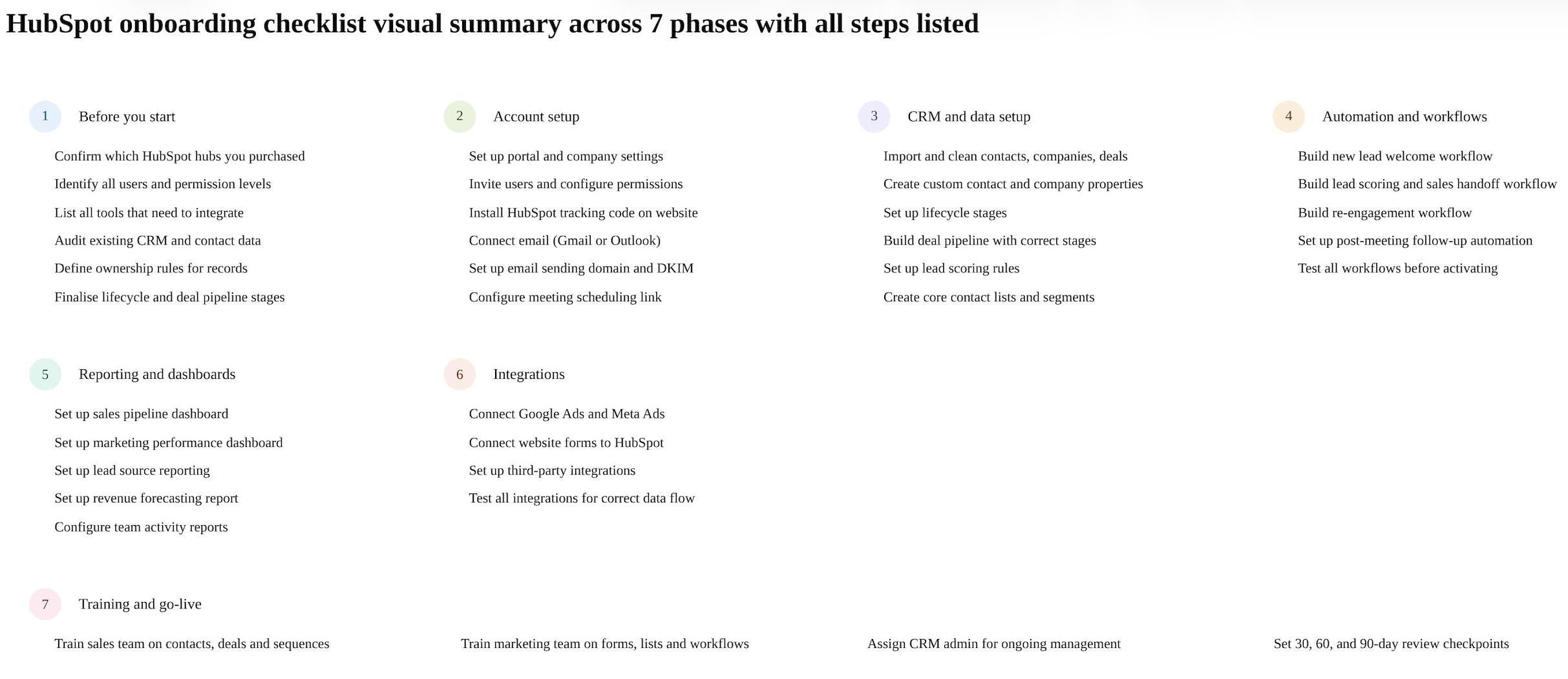
Why Most HubSpot Onboarding Fails (And How to Avoid It)
Many businesses dive into HubSpot with enthusiasm, only to stumble over recurring pitfalls that can derail even the best intentions. Successful onboarding is about much more than just checking boxes—it's about laying a solid foundation for your entire business process. Here’s what separates high-performing teams from the rest:
-
Master the core features. Resist the urge to configure every shiny option. Focus on what your team will actually use to drive results.
-
Invest in diagnostics. Spend 1–2 weeks mapping your current processes, auditing data quality, and defining success metrics before you touch the configuration.
-
Assign ownership early. Establish data stewardship from day one by assigning clear ownership for each CRM object and scheduling regular data quality audits.
-
Put process before automation. Document every workflow before you automate it. Map it out, get buy-in, and then build the automation.
-
Build a strong foundation for AI. Clean data and streamlined pipelines are prerequisites for leveraging advanced features like AI-powered tools. Don’t rush—add these only after your basics are rock solid.
-
Track adoption, not just setup. Check in at 30, 60, and 90 days to ensure your team is not only logging in, but using the system as intended.
-
Treat onboarding as transformation. The organizations that see real ROI treat onboarding as a business transformation project—not just a software installation.
By taking a process-first approach, working with realistic timelines, and ensuring clean migrations (from platforms like PipeDrive or Salesforce), you’ll set your team up for long-term success and future readiness for features like AI agents.
With this mindset, you’ll avoid common mistakes and set up HubSpot in a way that truly supports your business goals—right from the start.
Why Business Transformation Matters in HubSpot Onboarding
Focusing on true business transformation—rather than simply installing software—sets successful organizations apart when onboarding HubSpot. Treating onboarding as a holistic shift means your team will rethink processes, align departments, and map out clear strategies before toggling any settings.
If you simply treat HubSpot like another app to plug in, you risk layering new technology onto old, inefficient habits. Instead, first consider how your workflows, sales cycle, and reporting structures need to evolve. A customer-centric mindset ensures every configuration supports your goals—whether that's tighter pipeline management or clearer marketing attribution.
Ultimately, approaching onboarding as a strategic transformation (not a checklist of features) means HubSpot becomes a catalyst for your business growth, not just another line item in your tech stack.
HubSpot Onboarding Checklist Before You Start
Before you start setting up HubSpot, it is important to prepare the right information, users, tools, and business process. Many companies make the mistake of jumping directly into HubSpot setup without first understanding what needs to be configured. This can lead to messy data, unclear ownership, broken workflows, and reporting issues later.
A critical misstep is skipping the documentation phase. If your business processes aren’t clearly mapped out and written down before you start building automations, you risk codifying inefficiencies and confusion right into your HubSpot account. In other words, automating a broken process only makes it break faster.
Tip:
Before you touch a single workflow or import a list, take the time to document your sales, marketing, and service processes. Outline who owns each step, what tools are used, and what the ideal outcome looks like. This provides a blueprint for your setup and ensures your automations—and your data—work for you, not against you.
A strong HubSpot onboarding process should begin with proper planning. The goal is to make sure your CRM setup matches your sales, marketing, service, and reporting requirements from the start.
Here are the key things you should check before starting HubSpot onboarding:
Risks of Implementing AI Before Stabilizing Data and Processes
Before jumping into AI integrations in HubSpot—or any CRM system—it’s crucial to have your core data and business processes firmly in place. Introducing AI tools too soon can compound any existing issues and create even more confusion for your team.
Here's why getting your foundation right matters:
-
Messy Data Gets Magnified: AI systems depend on the quality of your data. If your CRM is filled with duplicates, inconsistencies, or outdated records, AI-driven automations can multiply these mistakes, spreading errors throughout your sales, marketing, and service operations.
-
Broken Workflows Become Bottlenecks: AI thrives on clear, repeatable processes. If your lead routing, deal stages, or support ticket systems are unclear or constantly changing, AI tools will accelerate confusion instead of creating efficiency.
-
Reporting Goes Haywire: Unstable processes and unreliable data make it hard to trust AI-generated reports or insights. This can lead to poor decision-making and reduced confidence in your CRM overall.
Summary:
Think of AI as a powerful engine—it will drive your business forward only if the vehicle (your data and workflows) is already in good shape. Take time up front to stabilize your processes and clean up your data. This way, when you do bring in AI tools, you can trust the results and avoid costly headaches down the road.
1. Confirm Which HubSpot Hubs You Purchased
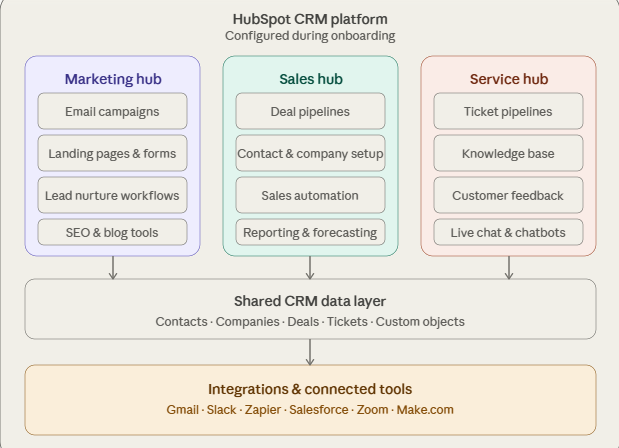
The first step is to confirm which HubSpot products your business is using. This could include HubSpot CRM, Sales Hub, Marketing Hub, Service Hub, Operations Hub, or CMS Hub.
Each hub has different features, so your onboarding checklist should be based on the tools available in your HubSpot subscription. For example, Sales Hub onboarding may focus more on pipelines, deals, tasks, meetings, and sequences, while Marketing Hub onboarding may focus more on forms, lists, email campaigns, landing pages, and workflows.
2. Identify All Users and Permission Levels
Before inviting your team to HubSpot, create a list of all users who need access. This may include sales reps, marketing team members, service team members, managers, admins, and leadership.
You should also decide what each user can access. Not every team member needs full admin permissions. Setting the right permission levels helps protect your CRM data and keeps the system organized.
For example, sales users may need access to contacts, companies, deals, tasks, and sequences, while marketing users may need access to forms, emails, landing pages, lists, and workflows.
3. List Current Tools That Need to Integrate With HubSpot
Most businesses already use multiple tools before moving to HubSpot. These may include email platforms, website forms, ad accounts, accounting tools, calling software, WhatsApp tools, calendars, payment systems, or other CRMs.
Before onboarding, make a list of all tools that should connect with HubSpot. This will help you understand what integrations are required and which data should flow between systems.
Common HubSpot integrations include:
-
Gmail or Outlook
-
Website forms
-
Google Ads and Meta Ads
-
Calling and SMS tools
-
Calendly or meeting tools
-
Accounting or billing platforms
-
Customer support tools
-
Existing CRM or spreadsheets
This step is important because your tech stack can directly affect your HubSpot onboarding plan.
4. Audit Existing CRM, Spreadsheets, and Contact Databases
Before importing data into HubSpot, review your existing contact, company, deal, and customer data. Many businesses have duplicate records, outdated contacts, missing fields, inconsistent naming, and incomplete deal information.
If this data is imported without cleanup, the same problems will move into HubSpot.
Your data audit should include:
-
Removing duplicate contacts and companies
-
Checking missing email addresses and phone numbers
-
Reviewing existing lifecycle stages
-
Cleaning company names and domains
-
Checking deal records and pipeline stages
-
Removing old or irrelevant records
-
Mapping existing fields to HubSpot properties
Clean data helps your team trust the CRM and improves the accuracy of reports, workflows, and segmentation.
5. Decide Ownership Rules for Records
Ownership rules are very important in HubSpot. Before setting up the CRM, decide who should own contacts, companies, deals, and tickets.
For example, you may want sales reps to own contacts and deals, account managers to own companies, and support team members to own tickets. If ownership is not clearly defined, leads may get missed, follow-ups may be delayed, and reporting may become confusing.
You should decide:
-
Who owns new leads?
-
Who owns companies?
-
Who owns open deals?
-
When should ownership change?
-
Should ownership be assigned manually or automatically?
-
What happens when a user leaves the company?
Clear ownership rules help your team manage follow-ups properly and improve accountability.
6. Define Lifecycle Stages and Deal Stages Before Importing Data
Lifecycle stages and deal stages should be finalized before importing data into HubSpot. These stages help your team understand where each contact, company, or deal stands in the customer journey.
Lifecycle stages may include Subscriber, Lead, Marketing Qualified Lead, Sales Qualified Lead, Opportunity, Customer, and Evangelist.
Deal stages may include New Inquiry, Qualified, Proposal Sent, Negotiation, Closed Won, and Closed Lost.
Before setup, make sure these stages match your actual sales process. Avoid creating too many stages, as this can confuse the team and make reporting harder.
A well-defined lifecycle and pipeline structure helps HubSpot work as a proper revenue system instead of just a contact database.
Final Tip Before Starting HubSpot Onboarding
HubSpot onboarding should always be based on your business goals, team structure, current tools, data quality, and sales process. The more clearly you prepare these details before setup, the smoother your onboarding experience will be.
At HuboExperts, we always recommend starting with a clear onboarding plan before building properties, pipelines, workflows, reports, and integrations. This helps businesses avoid rework and build a HubSpot setup that is easier to manage, scale, and use every day.
| Business Type | Estimated Timeline |
|---|---|
| Small business with simple CRM setup | 2 to 4 weeks |
| Sales Hub or Marketing Hub setup | 4 to 8 weeks |
| Multi-hub implementation | 8 to 12 weeks |
| Complex CRM migration and integrations | 12+ weeks |
The timeline depends on data quality, number of hubs, integrations, automation requirements, and how quickly internal teams approve the setup.
HubSpot Onboarding Checklist by Hub
Not all HubSpot onboardings are the same. Here's what to focus on depending on which hubs you've purchased:
Sales Hub Onboarding Checklist:
-
Configure deal pipelines and stages
-
Set up email sequences for prospecting
-
Configure meeting scheduling links
-
Set up call recording and logging
-
Build sales activity reports and forecasting dashboards
-
Train sales reps on deal management and task creation
Marketing Hub Onboarding Checklist:
-
Set up email sending domain and authentication
-
Build contact segmentation lists
-
Create and test lead nurturing workflows
-
Set up landing pages and forms
-
Connect Google Ads and Meta Ads
-
Configure UTM tracking and source attribution
-
Build campaign reporting dashboards
Service Hub Onboarding Checklist:
-
Set up ticketing pipeline and stages
-
Configure inbox and email channel
-
Build ticket automation workflows
-
Set up customer satisfaction surveys (CSAT/NPS)
-
Build a knowledge base with core articles
-
Configure SLA policies and response time alerts
Operations Hub Onboarding Checklist:
-
Set up data sync with third-party tools
-
Configure programmable automation for complex workflows
-
Set up data quality automation — deduplication and formatting
-
Build custom reporting with calculated properties
Planning and Preparation: HubSpot Onboarding Checklist
Before diving into the technical aspects, a solid plan is the foundation of a successful HubSpot implementation.
1. Define Your Goals and Objectives
What do you hope to achieve with HubSpot? Increased leads? Improved customer engagement? Streamlined sales processes? Clearly defined goals will guide your onboarding process and help you measure success. Be specific – instead of "increase leads," aim for "increase qualified leads by 20% in the next quarter."
2. Identify Your Key Performance Indicators (KPIs)
How will you track your progress towards your goals? Identify the KPIs that matter most, such as website traffic, conversion rates, customer acquisition cost, and customer lifetime value. These metrics will help you monitor the effectiveness of your HubSpot Onboarding Checklist strategies.
3. Audit Your Existing Data
Clean and accurate data is essential for effective HubSpot usage. Audit your existing customer data, CRM records, and marketing materials. Identify any outdated or inaccurate information and plan for data cleansing and migration.
4. Choose the Right HubSpot Onboarding Hubs and Tools
HubSpot offers various hubs (Marketing, Sales, Service, CMS) and tools. Select the hubs and tools that align with your business needs and goals. Don't overspend on features you won't use.
5. Assign Roles and Responsibilities
Clearly define who will be responsible for each aspect of HubSpot management. This includes content creation, campaign management, reporting, and system administration.
Technical Setup and Configuration: HubSpot Onboarding Checklist
Now that you have a plan in place, it's time to configure your HubSpot account.
6. Set Up Your HubSpot Account and PortalCreate your HubSpot account and configure your portal settings. This includes setting up your company information, time zone, and language preferences.
7. Integrate with Your Existing SystemsConnect HubSpot with your existing CRM, website, and other marketing tools. Seamless integration is crucial for data synchronization and streamlined workflows.
8. Configure Your Tracking CodeInstall the HubSpot tracking code on your website to capture visitor data and track website activity. This is essential for understanding user behavior and measuring the effectiveness of your marketing campaigns.
9. Set Up Your Email Marketing ToolsConfigure your email sending domains, create email templates, and set up your email marketing workflows. Effective email marketing is a cornerstone of HubSpot's inbound methodology.
10. Configure Your Forms and Calls-to-Action (CTAs)Create compelling forms and CTAs to capture leads and guide visitors through your sales funnel. Optimize your forms for conversion by keeping them short and relevant.
11. Set Up Your CRM and Contact ManagementImport your existing contact data into HubSpot CRM and organize your contacts into lists and segments. Effective contact management is crucial for personalized marketing and sales efforts.
12. Configure Your Sales ToolsIf you're using HubSpot Sales Hub, configure your sales tools, including deals, pipelines, and automation workflows. Streamline your sales process and improve sales team efficiency.
13. Set Up Your Service HubIf you're using HubSpot Service Hub, configure your ticketing system, knowledge base, and customer feedback tools. Improve customer service and build customer loyalty.
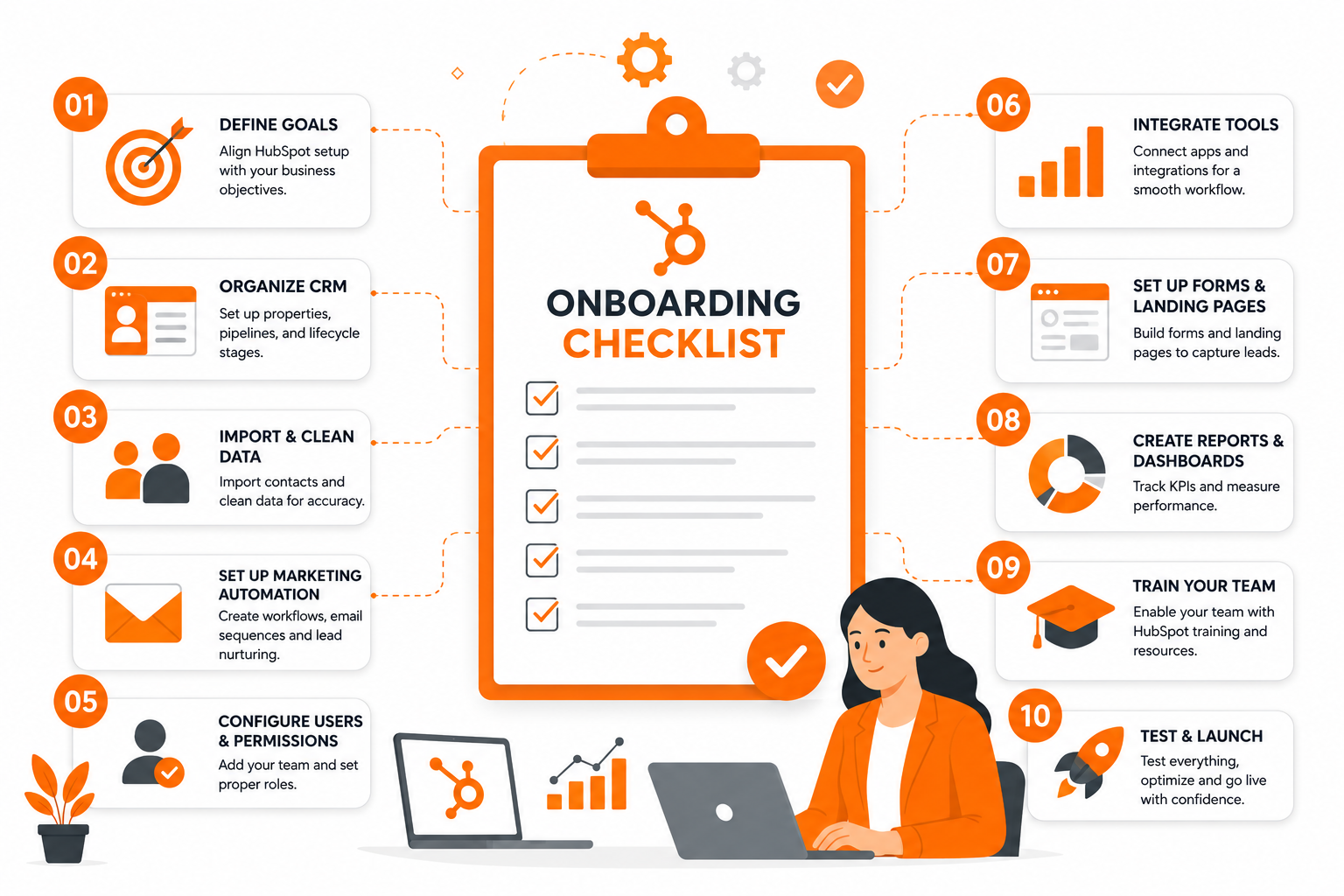
Content Creation and Inbound Strategy: HubSpot Onboarding Checklist
With your HubSpot account configured, it's time to focus on content creation and inbound strategy.
14. Develop Your Content StrategyCreate a content calendar and start producing high-quality, valuable content that resonates with your target audience. Focus on creating blog posts, ebooks, white papers, and other resources that address your audience's needs and pain points.
15. Optimize Your Content for Search EnginesOptimize your content for relevant keywords to attract organic traffic from search engines. Use HubSpot's SEO tools to identify keyword opportunities and track your rankings.
16. Create Landing Pages and Thank You PagesCreate dedicated landing pages for your marketing campaigns and thank you pages to nurture leads. Optimize your landing pages for conversion by including clear calls-to-action and compelling copy.
17. Set Up Your Social Media IntegrationsConnect your social media accounts to HubSpot and schedule your social media posts. Use social media to promote your content and engage with your audience.
Testing, Optimization, and Ongoing Management
Onboarding is an ongoing process. Continuous testing, optimization, and analysis are crucial for maximizing your HubSpot ROI.
18. Test Your Workflows and AutomationThoroughly test your workflows and automation to ensure they are functioning correctly. Identify and fix any errors or bottlenecks.
19. Analyze Your Data and ReportsRegularly analyze your HubSpot data and reports to track your progress towards your goals. Identify areas for improvement and adjust your strategies accordingly.
20. Stay Up-to-Date with HubSpot UpdatesHubSpot is constantly evolving. Stay up-to-date with the latest updates and features to ensure you are leveraging the platform's full potential.
21. Continuous Improvement and OptimizationContinuously improve and optimize your HubSpot strategies based on your data and insights. Experiment with new approaches and refine your tactics to achieve better results. Keep referring back to your HubSpot Onboarding Checklist to ensure you are consistently progressing toward your goals and maximizing the platform’s potential.
How Much Does HubSpot Onboarding Cost?
HubSpot onboarding cost depends on the hub, plan, data migration complexity, number of users, automation requirements, and integrations. A simple onboarding project may only include CRM setup, pipelines, and basic reports, while a larger implementation may include data migration, custom objects, workflows, lead scoring, sales automation, and team training.
Not Sure Where to Start With HubSpot Onboarding?
Every business has a different HubSpot setup requirement. Some companies only need a basic CRM setup, while others need data migration, sales pipelines, marketing automation, reporting dashboards, integrations, and team training.
If you are not sure what level of onboarding your business needs, HuboExperts can review your current setup and recommend the right onboarding plan based on your goals, team structure, tools, and current CRM process.
7 Most Common HubSpot Onboarding Mistakes to Avoid
At HuboExperts we've audited 100+ HubSpot portals. These are the mistakes we see most often:
Mistake 1 Importing dirty data Importing contacts without cleaning them first causes duplicates, broken workflows, and inaccurate reports that take months to fix. Always clean data before import.
Mistake 2 Skipping lifecycle stage setup Without defined lifecycle stages, your CRM becomes a contact database- not a revenue system. Set these up before importing a single contact.
Mistake 3 Giving everyone admin access Too many admins leads to accidental changes, broken workflows, and CRM chaos. Set permission levels from day one.
Mistake 4 Building workflows before testing Always test every workflow with a test contact before activating it. One wrong trigger can send hundreds of incorrect emails.
Mistake 5 No deal pipeline ownership If there's no clear ownership rule, leads get missed and deals stall. Define who owns what before your first deal is created.
Mistake 6 Not connecting your website tracking code Without the HubSpot tracking code on your website, you lose all page visit data, can't trigger website-based automations, and lose attribution for your traffic sources.
Mistake 7 Treating onboarding as a one-time event HubSpot onboarding is not a one-week project. The most successful implementations include a 30, 60, and 90-day review to optimise workflows, fix reporting gaps, and improve adoption.
But there’s another pitfall lurking beneath the surface: assuming that once onboarding is “done,” everything will run smoothly forever. In reality, data quality and user habits can quickly drift off course without ongoing oversight. The key is to treat onboarding as the launchpad for continuous improvement—not a box to check and forget.
What To Do Instead:
-
Establish clear ownership for each object type (deals, contacts, tickets, etc.) from day one.
-
Assign a data steward or champion within your team to monitor data hygiene and user engagement.
-
Schedule regular monthly check-ins or quality audits to catch errors early, address adoption issues, and keep workflows aligned with your evolving business needs.
By making onboarding an ongoing process, you ensure your CRM investment keeps paying dividends long after the initial rollout.
Mistake 8 Trying to configure everything at once
It’s tempting to dive in and turn on every feature HubSpot offers, but this almost always backfires. When you try to implement every bell and whistle from day one, your team quickly gets overwhelmed by choices and clutter. Instead of making things easier, you end up with a confusing system that nobody wants to use.
Focus instead on the essential tools that solve your immediate problems—like deal pipelines, workflows, and reporting. Master those, and introduce new features gradually as your team builds confidence and your business needs expand. Simple, focused onboarding leads to faster adoption, cleaner processes, and way fewer headaches down the line.
Real Example: SuperFi's Excel to HubSpot Onboarding
SuperFi — a financial services company — was running their entire business on Excel spreadsheets with no CRM, no automation, and no pipeline visibility.
HuboExperts delivered a complete HubSpot onboarding in under 4 weeks:
-
Migrated all contacts, companies, and deals from Excel to HubSpot
-
Built custom deal pipelines matching their actual sales process
-
Set up automated workflows for follow-ups and lead nurturing
-
Created reporting dashboards for real-time pipeline visibility
-
Trained the full team on HubSpot independently
Result: SuperFi went from zero CRM to a fully automated HubSpot revenue operation — clean data, clear pipelines, and automated processes running from day one.
Read the full SuperFi case study
Conclusion
A successful HubSpot onboarding is a journey, not a destination. By following this HubSpot onboarding checklist and dedicating yourself to continuous improvement, you can unlock the full potential of HubSpot and achieve your marketing, sales, and customer service goals. Remember to leverage HubSpot's extensive resources, including their knowledge base, community forums, and training materials. And if you need expert assistance, consider partnering with a HubSpot Gold solutions partner like HuboExperts to accelerate your success. We can help you navigate the complexities of HubSpot, ensuring you get the most out of your investment. Don't hesitate to reach out for a consultation and let us help you transform your business with HubSpot.
Frequently Asked Questions
Q1: What is included in HubSpot onboarding?
HubSpot onboarding typically includes CRM configuration, data preparation/import, pipelines, lifecycle stages, integrations, automation, reporting, permissions, testing, and user training. The exact scope depends on your HubSpot products and business requirements.
Q2: How long does HubSpot onboarding take?
HubSpot onboarding typically takes 2–12 weeks depending on complexity. A simple CRM-only setup can be live in 2–4 weeks. A multi-hub implementation with data migration, custom integrations, and automation can take 8–12 weeks. With HuboExperts, most clients are live in 2–4 weeks.
For Professional Hubs, you can generally expect 6–8 weeks from kickoff to go-live. This includes diagnostic work, data migration, technical configuration, and team training. If you're migrating from straightforward tools like PipeDrive, the process can move even faster. In contrast, complex Salesforce migrations tend to require additional time and planning.
For Enterprise Hubs, timelines depend heavily on your specific requirements and technical complexity. Solution architecture, custom objects, and advanced automation features call for a methodical, staged implementation. It's important not to rush—cutting corners on Enterprise rollout often leads to issues that take months to fix down the road.
Q3: How much does HubSpot onboarding cost?
HubSpot charges a mandatory onboarding fee for Professional and Enterprise plans — $3,000 for Professional and $6,000 for Enterprise. Working with a certified HubSpot partner like HuboExperts can waive this fee while delivering a more comprehensive, customised setup. Partner-led onboarding typically costs $2,500–$10,000 depending on scope.
Q4: Do I need HubSpot's paid onboarding or can I use a partner?
HubSpot allows you to use a certified Solutions Partner instead of their direct onboarding. This is often better value — partners like HuboExperts provide more customised setup, deeper training, and ongoing support compared to HubSpot's standard onboarding package.
Q5: What data do I need to prepare before HubSpot onboarding?
Before HubSpot onboarding you should prepare a clean export of all contacts, companies, and deals from your existing CRM or spreadsheets. You should also have a list of all users who need access, your existing sales pipeline stages, any tools that need to integrate with HubSpot, and a clear understanding of your sales process from lead to closed deal.
Q6: Can I migrate from Salesforce or Zoho to HubSpot during onboarding?
Yes. CRM migration is a common part of HubSpot onboarding. HuboExperts handles full migrations from Salesforce, Zoho, Pipedrive, Monday, and Excel — including data cleansing, field mapping, and import validation to ensure zero data loss.
For Enterprise-level migrations, it’s important to scope each hub according to its complexity. Advanced implementations—such as those involving solution architecture, custom objects, and sophisticated automation—require a methodical, step-by-step approach. Rushing through an Enterprise deployment can result in issues that may take months to resolve, so we focus on careful planning and thorough execution to ensure a smooth transition.
Q7: What happens after HubSpot onboarding is complete?
After onboarding, your team should be fully trained, your CRM should have clean data, core workflows should be live, and reporting dashboards should be active. We recommend a 30-day, 60-day, and 90-day review to optimise workflows, fix any gaps, and improve team adoption. HuboExperts offers ongoing retainer support for clients who need continued optimisation.
Q8: What's the difference between HubSpot onboarding and implementation?
Onboarding focuses on getting your organization successfully started with HubSpot. Implementation can encompass a broader technical and operational scope including CRM architecture, migration, automation, integrations, custom development, reporting, and RevOps process design.
Q9. Should I choose HubSpot direct onboarding or a Solutions Partner?
It depends on your requirements. Standard product guidance may be sufficient for a simpler implementation, while businesses requiring migration, customized automation, integrations, or broader RevOps work may benefit from a Solutions Partner.

