

Turning HubSpot Into a Customer Onboarding Command Center
A welcome email and a kickoff call used to be enough. Not anymore. By 2026, customers expect onboarding to feel structured, personal, and transparent from the moment the contract is signed — and they notice immediately when it isn't.
That expectation creates a real operational problem for growing businesses. Sales, customer success, support, implementation, and finance all need to work from the same playbook. When onboarding instead lives in spreadsheets, scattered Slack threads, and disconnected project tools, the experience becomes slow, inconsistent, and almost impossible to measure.
This is the gap HubSpot CRM is built to close. Configured correctly, it stops being just a sales database and becomes a true onboarding command center — one place to manage handoffs, track milestones, automate reminders, watch customer health, and protect retention.
At HuboExperts, this is what we build: HubSpot onboarding systems that connect sales, service, and customer success into a single, smooth post-sale journey.
Why onboarding carries more weight in 2026
Acquisition costs keep climbing and competition keeps tightening, which means customers have less patience for slow, clunky implementation. Winning the deal matters — but keeping the customer engaged after the sale is where long-term revenue actually gets built.
A strong onboarding process delivers measurable upside:
| Benefit | What it looks like in practice |
|---|---|
| Reduced early churn | Customers don't disappear in the first 90 days |
| Faster product adoption | Customers reach value sooner, not eventually |
| Clearer expectations | No surprises about timelines or scope |
| Stronger internal accountability | Everyone knows who owns the next step |
| Early risk detection | Problems get flagged before they become escalations |
| Better renewal and upsell odds | A good first experience compounds into more revenue |
In 2026, onboarding can't run on memory and goodwill alone. It needs to live inside the CRM, where every team member can see what needs to happen, when, and who's responsible.
What customer onboarding actually means inside HubSpot
In practice, onboarding in HubSpot means using its contacts, companies, deals, tickets, tasks, workflows, and reporting tools to manage everything that happens after a deal closes — without treating onboarding as a separate process bolted on outside the CRM.
When a deal moves to Closed Won, HubSpot can automatically:
-
Create an onboarding ticket
-
Assign an onboarding owner
-
Generate internal tasks
-
Send a welcome email
-
Notify the customer success team
-
Trigger document collection
-
Start an implementation checklist
-
Track onboarding stage progress
-
Add the customer to reporting dashboards
The result is a handoff from sales to onboarding that doesn't drop any context along the way.
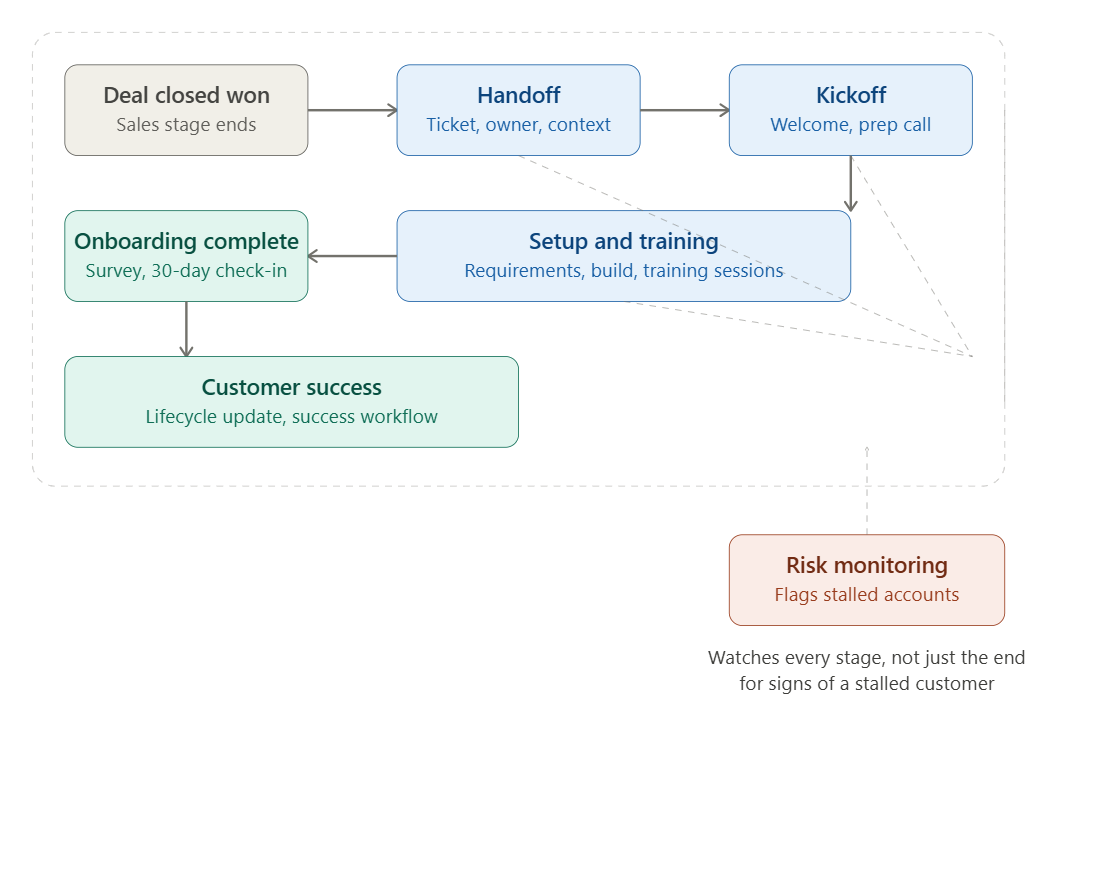
The diagram above shows the shape of that journey — from the moment a deal closes, through the stages that follow, into a completed onboarding that feeds straight into customer success. Notice the dashed line running alongside it: every stage is also being watched for risk signals, so a stalled customer gets flagged before they become a churn statistic.
Five reasons HubSpot works well for this
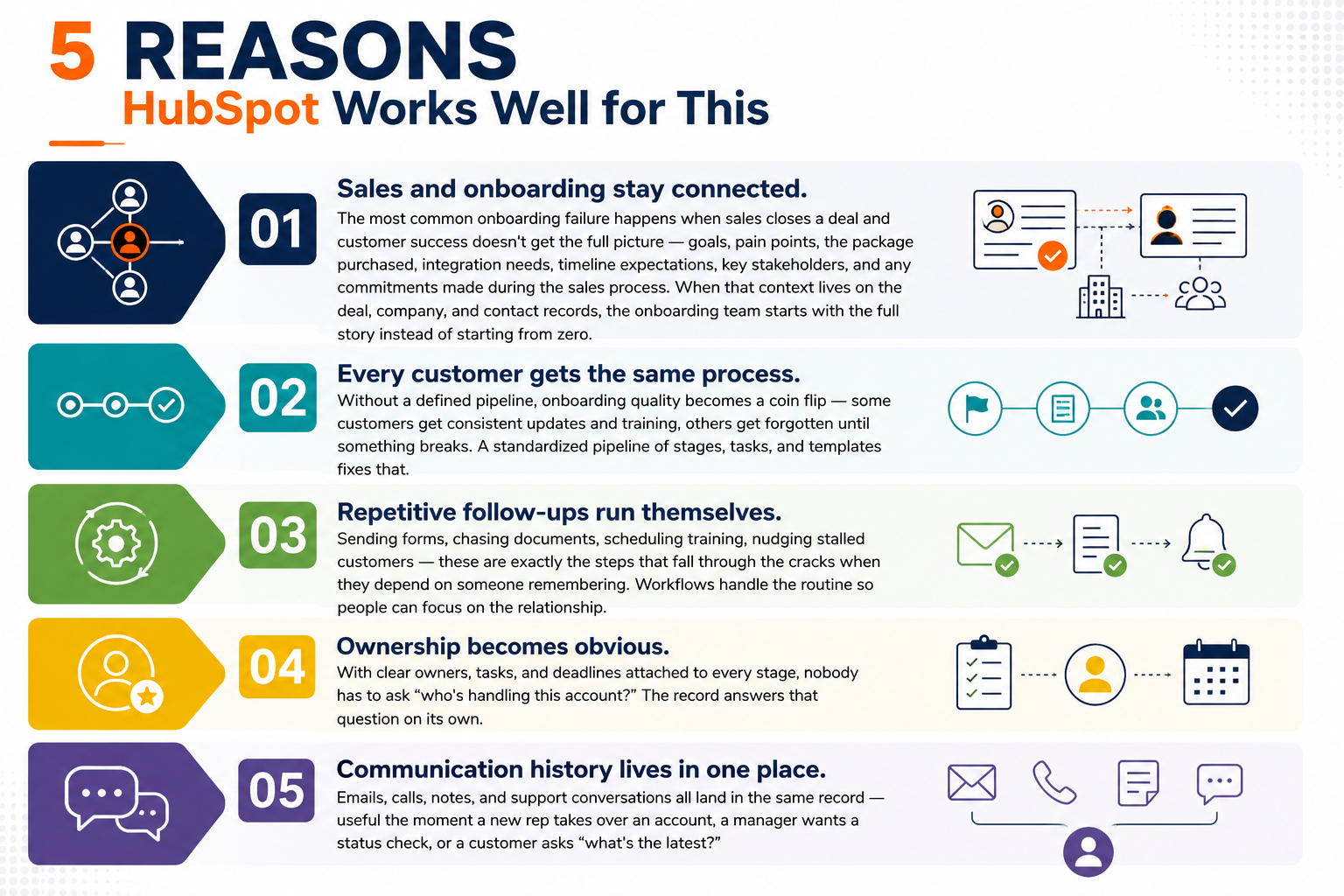
1. Sales and onboarding stay connected. The most common onboarding failure happens when sales closes a deal and customer success doesn't get the full picture — goals, pain points, the package purchased, integration needs, timeline expectations, key stakeholders, and any commitments made during the sales process. When that context lives on the deal, company, and contact records, the onboarding team starts with the full story instead of starting from zero.
2. Every customer gets the same process. Without a defined pipeline, onboarding quality becomes a coin flip — some customers get consistent updates and training, others get forgotten until something breaks. A standardized pipeline of stages, tasks, and templates fixes that.
3. Repetitive follow-ups run themselves. Sending forms, chasing documents, scheduling training, nudging stalled customers — these are exactly the steps that fall through the cracks when they depend on someone remembering. Workflows handle the routine so people can focus on the relationship.
4. Ownership becomes obvious. With clear owners, tasks, and deadlines attached to every stage, nobody has to ask "who's handling this account?" The record answers that question on its own.
5. Communication history lives in one place. Emails, calls, notes, and support conversations all land in the same record — useful the moment a new rep takes over an account, a manager wants a status check, or a customer asks "what's the latest?"
Building the process: a 10-step structure
Step 1 — Map the journey before touching HubSpot
Before configuring anything, answer the foundational questions: What happens the instant a deal closes? Who owns the sales-to-onboarding handoff? What information must sales capture before onboarding even starts? What counts as "successful" onboarding, and what typically causes delays? Answering these first means the CRM reflects your actual process instead of a generic template.
Step 2 — Choose the right pipeline structure
There isn't one correct setup — it depends on how onboarding actually runs in your business.
| Pipeline type | Best for | Example stages |
|---|---|---|
| Ticket pipeline | Service-driven onboarding needing task tracking and internal coordination — SaaS, agencies, support-heavy teams | Onboarding created → Kickoff pending → Requirements pending → Setup in progress → Training pending → Customer review → Completed → Blocked |
| Deal pipeline | Onboarding tied closely to revenue delivery, project milestones, or expansion potential — consulting, professional services, high-ticket B2B | Closed won → Project handoff → Implementation started → Delivery in progress → Client approval → Completed → Expansion opportunity |
| Custom object | Complex setups where one company has multiple onboarding tracks — multiple products, locations, or parallel implementations | Varies by business; built around the specific structure |
Step 3 — Capture the properties that actually drive decisions
Properties are the backbone of any onboarding system — they're what turns a record into something a manager can act on. Useful ones to build out include onboarding status, owner, kickoff and go-live dates, expected vs. actual completion dates, package purchased, required integrations, documents received, training completion, customer health status, blocker reason, churn risk, and renewal date.
Step 4 — Design a real sales-to-onboarding handoff
This is the step most onboarding programs get wrong. A strong handoff carries forward: the main contact and decision maker, the sales owner, the package and contract value, the customer's stated goals and pain points, timeline expectations, any promises made during the sales process, required setup details, billing status, and known risks. Required deal properties, internal notes, and automated workflows all help enforce this rather than leaving it to memory.
Step 5 — Automate the first actions after handoff
Once the handoff is complete, the first wave of onboarding work shouldn't wait on a human to start it manually. A typical Closed Won trigger creates the onboarding ticket, assigns the owner, copies deal context across, creates the kickoff task, notifies the internal team, sends the welcome email, and sets the due date — all in the same motion.
Step 6: Use Playbooks and Tasks to Keep the Process Consistent
HubSpot playbooks and tasks help your team follow the same onboarding process for every new customer. Instead of each rep handling onboarding differently, playbooks can guide calls, discovery questions, setup checklists, training steps, and internal reviews.
Tasks can also be created automatically for important actions such as scheduling the kickoff call, collecting required information, completing setup, sending training material, or checking onboarding progress.
This creates a more consistent onboarding experience and reduces the chance of important steps being missed.
Step 7: Use Email Templates and Sequences for Routine Communication
During onboarding, many customer emails follow a similar pattern. Teams often need to send welcome emails, kickoff reminders, training links, setup instructions, follow-up emails, and next-step updates.
HubSpot email templates and sequences help save time while keeping communication professional and clear. The goal is not to make the process robotic, but to make sure every customer receives timely and helpful communication.
Templates can still be personalized with the customer’s name, company, plan type, onboarding stage, or assigned success manager.
Step 8: Build an Onboarding Dashboard for Visibility
An onboarding dashboard gives leadership and customer-facing teams a clear view of how onboarding is progressing.
The dashboard can show how many customers are currently in onboarding, which accounts are stuck, how long each stage is taking, which tasks are overdue, and how many customers have completed onboarding successfully.
This helps managers identify delays early and support the team before small issues become bigger customer problems.
Step 9: Create a Clean Handoff into Customer Success
Onboarding should not be treated as the end of the customer journey. Once onboarding is complete, the customer should move smoothly into ongoing customer success management.
HubSpot can help by updating the customer lifecycle stage, assigning the customer success owner, creating follow-up tasks, and adding the customer to the right success workflow.
This ensures the customer continues to receive support, product guidance, check-ins, and renewal attention after onboarding is finished.
Step 10: Monitor Risk Signals After Onboarding
Even after onboarding is complete, HubSpot should continue monitoring customer activity and risk signals.
Common warning signs include no response for several days, missed training sessions, incomplete onboarding tasks, repeated support tickets, low product usage, or delayed communication.
HubSpot workflows can flag these risks automatically, notify the customer success manager, and create follow-up tasks. This helps the team take action early before the customer becomes unhappy or starts moving toward churn.
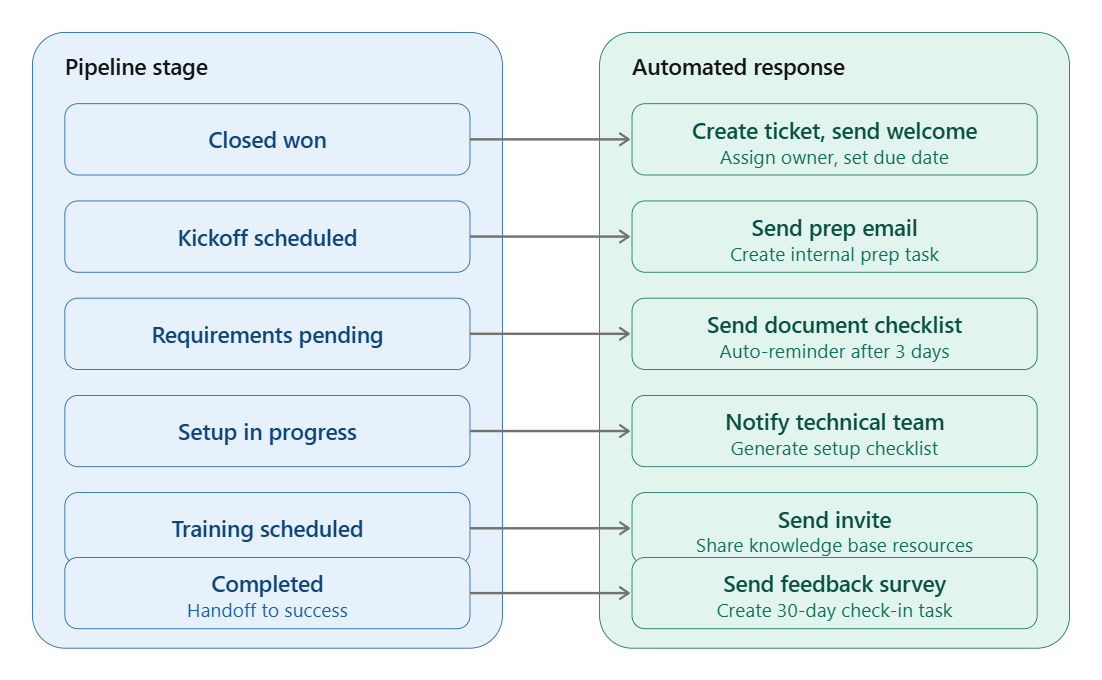
A sample automated workflow, end to end
| Trigger | Stage | Automated response |
|---|---|---|
| Deal marked Closed Won | Handoff | Create ticket, assign owner, send welcome email, set due date |
| Stage → Kickoff Scheduled | Kickoff | Send prep email, create internal prep task |
| Stage → Requirements Pending | Setup | Send document checklist, auto-reminder after 3 days if incomplete |
| Stage → Setup in Progress | Setup | Notify technical team, generate setup checklist |
| Stage → Training Scheduled | Training | Send invite, share knowledge base resources |
| Stage → Completed | Handoff to success | Send feedback survey, create 30-day check-in task, move to success journey |
Automation here isn't meant to replace the human side of customer success — it exists so the predictable, repetitive steps never get missed, freeing the team to focus on judgment calls and relationship-building.
Metrics worth tracking
A program you can't measure is a program you can't improve. These are the core numbers worth putting on a dashboard:
| Metric | Formula | What it tells you |
|---|---|---|
| Onboarding completion rate | Completed onboardings ÷ Total onboardings × 100 | How many customers make it through the full process |
| Average time to onboard | Total days to complete ÷ Number completed | Speed and efficiency of the process |
| Time to first value | Date of first value − Onboarding start date | How quickly customers feel the product's impact |
| Stuck customer rate | Customers stuck beyond SLA ÷ Total in onboarding × 100 | Early warning for at-risk accounts |
| Handoff accuracy | Complete handoffs ÷ Total Closed Won deals × 100 | How reliably sales passes along full context |
| Onboarding satisfaction score | Collected via post-onboarding survey | Direct read on customer experience quality |
Best practices and common mistakes
| Do this | Instead of this |
|---|---|
| Keep the pipeline to the essential stages | Building a complicated pipeline nobody maintains |
| Make key fields mandatory before a deal can close | Letting deals close with missing onboarding context |
| Use automation for reminders and routine tasks | Automating away genuine customer relationships |
| Review stuck accounts weekly | Discovering delays only when a customer complains |
| Track time spent in each stage | Guessing where the process bottlenecks |
| Connect support tickets to the onboarding record | Letting confusion go unnoticed by the success team |
| Treat "completed" as the start of customer success | Ending the relationship the moment setup is done |
Is HubSpot the right fit for your onboarding?
HubSpot tends to be a strong match when a business has B2B customers, a clear sales-to-success handoff, multiple teams involved post-sale, and a real need for better visibility into where customers stand. It shows up often in SaaS, professional services, agencies, financial services, healthcare services, real estate, construction, education, and consulting.
The HubSpot toolset that supports this — CRM records, pipelines, workflows, tasks, playbooks, templates, a knowledge base, customer portal, and dashboards — covers most of what's needed, though the exact mix depends on your subscription tier and how deep the setup goes.
Case Study: How Rust Construction Streamlined Lead-to-Project Handover with HubSpot
Rust Construction needed a better way to manage customer information, lead qualification, and project handover across disconnected systems. Their team was using HubSpot for CRM, Quo for inbound calls, and JobTread for project operations, but the lack of integration created manual work, data silos, and delays between sales and operations.
HuboExperts helped Rust Construction build a connected HubSpot ecosystem using automation, Zapier, AI-powered data extraction, and HubSpot-to-JobTread integration. When a lead entered through a phone call or form, customer details were captured in HubSpot, qualified by the sales team, converted into a deal, and then passed into JobTread for project execution.
This created a smoother handoff from sales to operations, reduced manual data entry, improved customer and project data accuracy, and gave the team a more scalable lead-to-project workflow.
For businesses using HubSpot for onboarding, this is a strong example of how CRM automation can reduce handoff gaps, improve internal visibility, and help teams move customers from sales into delivery without losing important context.
The bigger picture
Using HubSpot for customer onboarding in 2026 isn't really about automation for its own sake. It's about building one connected journey from Closed Won to genuine product adoption — where sales hands off the right information, onboarding follows a structure instead of improvising, managers can see performance at a glance, and customers feel the difference.
The businesses that pull ahead this year won't just close more deals. They'll onboard faster, get customers to value sooner, and turn that early experience into longer, stronger relationships.
If onboarding is still running through spreadsheets, scattered emails, and manual reminders, that's the clearest sign it's time to move it into the CRM.
HuboExperts helps businesses build HubSpot onboarding systems that reduce delays, improve customer experience, and support long-term growth.
FAQs
1. What does "customer onboarding" mean in HubSpot, and is it different from sales onboarding?
Customer onboarding in HubSpot refers to the process of guiding a new customer (post-sale) through setup, adoption, and early success with your product or service — using HubSpot's CRM, workflows, and Service Hub tools. It's distinct from sales onboarding, which is about training your own sales reps to use HubSpot. Most businesses use Service Hub and CRM automation specifically for the customer-facing version.
2. Which HubSpot Hub do I need for customer onboarding — Marketing, Sales, or Service?
Service Hub is the primary hub for onboarding workflows (tickets, playbooks, customer feedback surveys), but most teams also lean on core CRM features (deals, custom objects, workflows) that come with any paid hub. Sales Hub helps if onboarding is tied to a handoff from a closed deal. Many companies use a combination rather than a single hub in isolation.
3. Can HubSpot automate the entire onboarding process?
Largely, yes. Workflows can trigger welcome emails, assign onboarding tasks to CS reps, create tickets for each onboarding milestone, and send reminders if a step stalls. However, full automation usually isn't ideal — most successful onboarding programs combine automated touchpoints (emails, task creation) with human check-ins (calls, QBRs) at key moments.
4. How do I track onboarding progress for each customer in HubSpot?
Common approaches include: a custom "Onboarding Stage" property on the contact or company record, a dedicated onboarding pipeline (using deals or tickets), or a custom object built specifically for onboarding milestones. Pipeline stages give you a visual, reportable way to see where every customer sits in the process.
5. What HubSpot features are most useful for building an onboarding workflow?
Workflows (automation), ticket pipelines, custom properties, playbooks (for CS rep scripts), tasks, sequences, and customer surveys (NPS/CSAT) are the core toolkit. Custom objects are increasingly used in 2026 for companies with more complex, multi-stage onboarding journeys that don't fit neatly into standard contact/deal/ticket structures.
6. Is HubSpot good for onboarding SaaS customers specifically, or just service-based businesses?
It works for both, but SaaS companies often need to supplement HubSpot with product analytics or in-app onboarding tools (like Appcues or Pendo) since HubSpot doesn't track in-product usage natively. HubSpot handles the relationship/communication layer; product usage tracking typically requires integration.
7. How much does it cost to use HubSpot for customer onboarding?
Costs depend on which hub and tier you need. Basic onboarding automation is possible even on Starter tiers, but advanced features (custom objects, multiple pipelines, advanced reporting) typically require Professional or Enterprise tiers. Since pricing changes fairly often, it's worth checking HubSpot's current pricing page directly rather than relying on older figures.
8. Can I integrate other onboarding tools with HubSpot?
Yes — HubSpot has a large app marketplace and open API, so it integrates with e-signature tools (DocuSign), scheduling tools (Calendly), product onboarding platforms, Slack, and project management tools (Asana, Trello, monday.com) to extend onboarding workflows beyond native CRM capabilities.
9. How do I measure onboarding success in HubSpot?
Key metrics typically tracked include time-to-first-value, onboarding completion rate, NPS/CSAT scores post-onboarding, ticket volume during the onboarding window, and churn rate within the first 90 days. HubSpot's reporting dashboards can be customized to pull these from pipeline and survey data.
10. Do I need a HubSpot specialist or consultant to set up onboarding workflows properly?
Not strictly — HubSpot's workflow builder is designed to be usable without code. But for complex, multi-touch onboarding journeys (especially using custom objects or cross-hub automation), many businesses bring in a HubSpot Solutions Partner or consultant to avoid costly setup mistakes early on.

